This is best Fabric, Power BI, SQL and AI community event. How do we know? The last event sold out! Save €200 with code FABCMTY200.
Register nowJuly 28 - August 9 | Final Round of the Power BI Dataviz World Championships. This is your chance. Learn more
Hi all,
I'd like to use group by to sum the values for several columns, but my database always changing the number of columns that was summarized.
Amount is fixed, but the columns "xba-" is variable. Sometimes has xba-1 and xba-2 and sometimes has xba-1 to xba-40
I have the following code:
= Table.Group(Source, {"part"}, {{"Amount", each List.Sum([amount]), type number}, {"xba-1", each List.Sum([#"xba-1"]), type nullable number}, {"xba-2", each List.Sum([#"xba-2"]), type nullable number}, {"xba-3", each List.Sum([#"xba-3"]), type nullable number}, {"xba-4", each List.Sum([#"xba-4"]), type nullable number}, {"xba-5", each List.Sum([#"xba-5"]), type nullable number}})
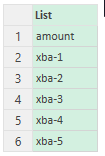
I created a list of column names (myColumn):
I'd like to use someting like that:
Table.Group(Source, {"part"}, myColumn, each List.Sum(myColumn))
Is possible?
Every help is appreciated. Thanks!
Regards,
Renato
Solved! Go to Solution.
Hello - this is how you can group and sum a variable number of columns... Included in the sample script below shows an example of how you can sum the values of all numeric data fields and another example of how you can sum the values of all fields beginning with "xba".
SCRIPT
let
Source = Table.FromRows(Json.Document(Binary.Decompress(Binary.FromText("i45WclTSUTI2AhKGIMLMVClWByJoCsQW5kDCyAQhBhI0NwNpMYYLgvlGxkDCBKHb2ABqhKWFUmwsAA==", BinaryEncoding.Base64), Compression.Deflate)), let _t = ((type nullable text) meta [Serialized.Text = true]) in type table [ColumnName1 = _t, #"xba-1" = _t, #"xba-2" = _t, #"xba-3" = _t]),
ChangedType = Table.TransformColumnTypes(Source,{{"xba-1", Int64.Type}, {"xba-2", Int64.Type}, {"xba-3", Int64.Type}}),
Grouped = Table.Group(ChangedType, {"ColumnName1"}, {{"Data", each _, type table }}),
// Use this line to select all columns that are of type number.
// ListOfColumnNames = Table.ColumnsOfType ( Grouped[Data]{0}, {type nullable number} ),
// Use this line to select all columns beginning with xba.
ListOfColumnNames = List.Select ( Table.ColumnNames ( Grouped[Data]{0} ), each Text.StartsWith ( _, "xba" ) ),
SumGroupedData = Table.AddColumn (
Grouped,
"SummedData", each
Table.FromRows (
{
List.Transform (
Table.ToColumns (
Table.SelectColumns ( [Data], ListOfColumnNames )
), each try List.Sum ( _ ) otherwise _
)
}, ListOfColumnNames
)
),
Expand = Table.ExpandTableColumn(SumGroupedData, "SummedData", ListOfColumnNames)
in
Expand
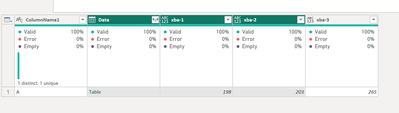
RESULT
Hello - this is how you can group and sum a variable number of columns... Included in the sample script below shows an example of how you can sum the values of all numeric data fields and another example of how you can sum the values of all fields beginning with "xba".
SCRIPT
let
Source = Table.FromRows(Json.Document(Binary.Decompress(Binary.FromText("i45WclTSUTI2AhKGIMLMVClWByJoCsQW5kDCyAQhBhI0NwNpMYYLgvlGxkDCBKHb2ABqhKWFUmwsAA==", BinaryEncoding.Base64), Compression.Deflate)), let _t = ((type nullable text) meta [Serialized.Text = true]) in type table [ColumnName1 = _t, #"xba-1" = _t, #"xba-2" = _t, #"xba-3" = _t]),
ChangedType = Table.TransformColumnTypes(Source,{{"xba-1", Int64.Type}, {"xba-2", Int64.Type}, {"xba-3", Int64.Type}}),
Grouped = Table.Group(ChangedType, {"ColumnName1"}, {{"Data", each _, type table }}),
// Use this line to select all columns that are of type number.
// ListOfColumnNames = Table.ColumnsOfType ( Grouped[Data]{0}, {type nullable number} ),
// Use this line to select all columns beginning with xba.
ListOfColumnNames = List.Select ( Table.ColumnNames ( Grouped[Data]{0} ), each Text.StartsWith ( _, "xba" ) ),
SumGroupedData = Table.AddColumn (
Grouped,
"SummedData", each
Table.FromRows (
{
List.Transform (
Table.ToColumns (
Table.SelectColumns ( [Data], ListOfColumnNames )
), each try List.Sum ( _ ) otherwise _
)
}, ListOfColumnNames
)
),
Expand = Table.ExpandTableColumn(SumGroupedData, "SummedData", ListOfColumnNames)
in
Expand
RESULT
Join us in Barcelona for FabCon and SQLCon, the Fabric, Power BI, SQL, and AI community event. Save €200 with code FABCMTY200.
If you love stickers, then you will definitely want to check out our community sticker challenge, Barcelona edition!
Check out the July 2026 Power BI update to learn about new features.