Join us at FabCon Atlanta from March 16 - 20, 2026, for the ultimate Fabric, Power BI, AI and SQL community-led event. Save $200 with code FABCOMM.
Register now!The Power BI Data Visualization World Championships is back! Get ahead of the game and start preparing now! Learn more
Hi all,
I'd like to use group by to sum the values for several columns, but my database always changing the number of columns that was summarized.
Amount is fixed, but the columns "xba-" is variable. Sometimes has xba-1 and xba-2 and sometimes has xba-1 to xba-40
I have the following code:
= Table.Group(Source, {"part"}, {{"Amount", each List.Sum([amount]), type number}, {"xba-1", each List.Sum([#"xba-1"]), type nullable number}, {"xba-2", each List.Sum([#"xba-2"]), type nullable number}, {"xba-3", each List.Sum([#"xba-3"]), type nullable number}, {"xba-4", each List.Sum([#"xba-4"]), type nullable number}, {"xba-5", each List.Sum([#"xba-5"]), type nullable number}})
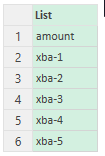
I created a list of column names (myColumn):
I'd like to use someting like that:
Table.Group(Source, {"part"}, myColumn, each List.Sum(myColumn))
Is possible?
Every help is appreciated. Thanks!
Regards,
Renato
Solved! Go to Solution.
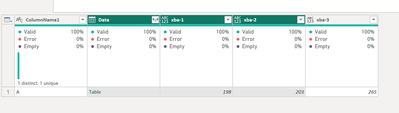
Hello - this is how you can group and sum a variable number of columns... Included in the sample script below shows an example of how you can sum the values of all numeric data fields and another example of how you can sum the values of all fields beginning with "xba".
SCRIPT
let
Source = Table.FromRows(Json.Document(Binary.Decompress(Binary.FromText("i45WclTSUTI2AhKGIMLMVClWByJoCsQW5kDCyAQhBhI0NwNpMYYLgvlGxkDCBKHb2ABqhKWFUmwsAA==", BinaryEncoding.Base64), Compression.Deflate)), let _t = ((type nullable text) meta [Serialized.Text = true]) in type table [ColumnName1 = _t, #"xba-1" = _t, #"xba-2" = _t, #"xba-3" = _t]),
ChangedType = Table.TransformColumnTypes(Source,{{"xba-1", Int64.Type}, {"xba-2", Int64.Type}, {"xba-3", Int64.Type}}),
Grouped = Table.Group(ChangedType, {"ColumnName1"}, {{"Data", each _, type table }}),
// Use this line to select all columns that are of type number.
// ListOfColumnNames = Table.ColumnsOfType ( Grouped[Data]{0}, {type nullable number} ),
// Use this line to select all columns beginning with xba.
ListOfColumnNames = List.Select ( Table.ColumnNames ( Grouped[Data]{0} ), each Text.StartsWith ( _, "xba" ) ),
SumGroupedData = Table.AddColumn (
Grouped,
"SummedData", each
Table.FromRows (
{
List.Transform (
Table.ToColumns (
Table.SelectColumns ( [Data], ListOfColumnNames )
), each try List.Sum ( _ ) otherwise _
)
}, ListOfColumnNames
)
),
Expand = Table.ExpandTableColumn(SumGroupedData, "SummedData", ListOfColumnNames)
in
Expand
RESULT
Hello - this is how you can group and sum a variable number of columns... Included in the sample script below shows an example of how you can sum the values of all numeric data fields and another example of how you can sum the values of all fields beginning with "xba".
SCRIPT
let
Source = Table.FromRows(Json.Document(Binary.Decompress(Binary.FromText("i45WclTSUTI2AhKGIMLMVClWByJoCsQW5kDCyAQhBhI0NwNpMYYLgvlGxkDCBKHb2ABqhKWFUmwsAA==", BinaryEncoding.Base64), Compression.Deflate)), let _t = ((type nullable text) meta [Serialized.Text = true]) in type table [ColumnName1 = _t, #"xba-1" = _t, #"xba-2" = _t, #"xba-3" = _t]),
ChangedType = Table.TransformColumnTypes(Source,{{"xba-1", Int64.Type}, {"xba-2", Int64.Type}, {"xba-3", Int64.Type}}),
Grouped = Table.Group(ChangedType, {"ColumnName1"}, {{"Data", each _, type table }}),
// Use this line to select all columns that are of type number.
// ListOfColumnNames = Table.ColumnsOfType ( Grouped[Data]{0}, {type nullable number} ),
// Use this line to select all columns beginning with xba.
ListOfColumnNames = List.Select ( Table.ColumnNames ( Grouped[Data]{0} ), each Text.StartsWith ( _, "xba" ) ),
SumGroupedData = Table.AddColumn (
Grouped,
"SummedData", each
Table.FromRows (
{
List.Transform (
Table.ToColumns (
Table.SelectColumns ( [Data], ListOfColumnNames )
), each try List.Sum ( _ ) otherwise _
)
}, ListOfColumnNames
)
),
Expand = Table.ExpandTableColumn(SumGroupedData, "SummedData", ListOfColumnNames)
in
Expand
RESULT
The Power BI Data Visualization World Championships is back! Get ahead of the game and start preparing now!