This is best Fabric, Power BI, SQL and AI community event. How do we know? The last event sold out! Save €200 with code FABCMTY200.
Register nowThe Fabric community is upgrading! Read all of the details including the timeline and what you can expect. Learn more
Hi,
I have some missing values in the column "Projektkosten (Geplant) (MFr)". I would like to fill the missing data from the previous "Exportdatum" that has the same "PMS-ID".
Sample data:
ID, PMS-ID, Exportdatum, Projektkosten (Geplant) (MFr)
| 14 | 69 | 22.06.2017 | 132.16892 |
| 14 | 69 | 07.06.2018 | 0 |
| 14 | 69 | 29.06.2018 | 132.16892 |
| 14 | 69 | 04.06.2019 | 132.16892 |
| 14 | 69 | 14.06.2019 | 132.16892 |
| 14 | 69 | 16.06.2019 | 0 |
| 14 | 69 | 25.09.2019 | 134.87092 |
| 14 | 69 | 09.06.2020 | 134.87092 |
| 14 | 69 | 07.06.2021 | 134.87092 |
| 14 | 69 | 03.06.2022 | 134.87092 |
| 14 | 69 | 10.10.2022 | 134.87092 |
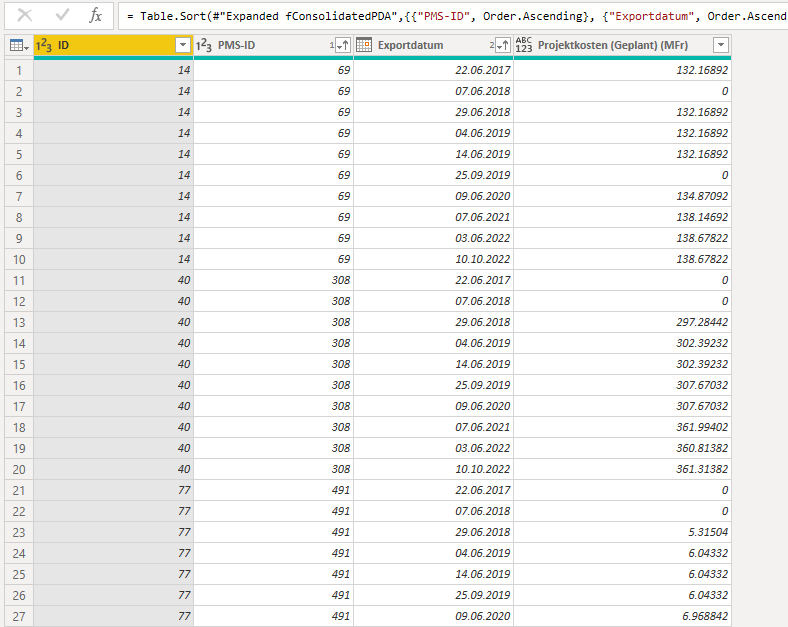
I have used Groupby and fill with the following command
= Table.Group(
#"Sorted Rows1",
{"PMS-ID"},
{{"Rows", each Table.FillDown(_, {"Projektkosten (Geplant) (MFr)"}), type table}}
)
The command works without errors, but does not fill the missing data.
Any idea why the Filldown may not be working?
Solved! Go to Solution.
Hi @Anonymous ,
the fill down works on null values, not 0. So after you replace 0 by null, you should see the expected result.
Make sure to transform the column to number first to make sure only complete fields will be replaced.
Imke Feldmann (The BIccountant)
If you liked my solution, please give it a thumbs up. And if I did answer your question, please mark this post as a solution. Thanks!
How to integrate M-code into your solution -- How to get your questions answered quickly -- How to provide sample data -- Check out more PBI- learning resources here -- Performance Tipps for M-queries
Thanks. it works perfectly.
Hi @Anonymous ,
the fill down works on null values, not 0. So after you replace 0 by null, you should see the expected result.
Make sure to transform the column to number first to make sure only complete fields will be replaced.
Imke Feldmann (The BIccountant)
If you liked my solution, please give it a thumbs up. And if I did answer your question, please mark this post as a solution. Thanks!
How to integrate M-code into your solution -- How to get your questions answered quickly -- How to provide sample data -- Check out more PBI- learning resources here -- Performance Tipps for M-queries
Join us in Barcelona for FabCon and SQLCon, the Fabric, Power BI, SQL, and AI community event. Save €200 with code FABCMTY200.