cancel
Showing results for 
Search instead for 
Did you mean: 

We've captured the moments from FabCon & SQLCon that everyone is talking about, and we are bringing them to the community, live and on-demand. Starts on April 14th. Register now

Reply
andybamber
Helper III
Helper III

Group By - Text.Combine

Hello!


I have attached a PBIX.


I have a small data table which has a Code column and a Mail column


For each of the Codes A0, B1, C2 there are the same 4 mail addresses a.com, b.com, c.com. d.com


If you go into Power Query you can see I have used a Group with a Text.Combine to get a concatenated string of mail addresses for each code. The problem is that I would like to see the mail addresses in the same order for codes, A0, B1 and C2, but if you look at the source data, for code B1 the mail addresses are in a different order, and that reflects in the grouping and combine result


What do i need to do in order to see the mail addresses concatenated in the same order for each Code? I'm guessing some kind of sort?


PBIX 


Thanks!

1 ACCEPTED SOLUTION
Vijay_A_Verma
Most Valuable Professional

Yes, you will need to sort the second column - Then buffer the table and use buffered table in the Group by. If you don't use buffered table, you will have original sort order.

Below is revised query

let
    Source = Table.FromRows(Json.Document(Binary.Decompress(Binary.FromText("i45WcjRQ0lFK1EvOz1WK1YFyk1C5yajcFDjXyRCTm4zKTULlIixyNsLkJqFyk1G5CIucjYHcVAg3FgA=", BinaryEncoding.Base64), Compression.Deflate)), let _t = ((type nullable text) meta [Serialized.Text = true]) in type table [Code = _t, Mail = _t]),
    #"Changed Type" = Table.TransformColumnTypes(Source,{{"Code", type text}, {"Mail", type text}}),
    #"Sorted Rows" = Table.Buffer(Table.Sort(#"Changed Type",{{"Mail", Order.Ascending}})),
    #"Grouped Rows" = Table.Group(#"Sorted Rows",{"Code"},{{"Concat Mail", each Text.Combine([Mail],";"), type text}})
in
    #"Grouped Rows"

View solution in original post

2 REPLIES 2
rohit_singh
Solution Sage
Solution Sage

Hi @andybamber ,

You just need to add an additional line to sort data before you group and concatenate :

let
    Source = Table.FromRows(Json.Document(Binary.Decompress(Binary.FromText("i45WcjRQ0lFK1EvOz1WK1YFyk1C5yajcFDjXyRCTm4zKTULlIixyNsLkJqFyk1G5CIucjYHcVAg3FgA=", BinaryEncoding.Base64), Compression.Deflate)), let _t = ((type nullable text) meta [Serialized.Text = true]) in type table [Code = _t, Mail = _t]),
    #"Sorted Rows" = Table.Sort(Source,{{"Code", Order.Ascending},{"Mail", Order.Ascending}}),
    #"Changed Type" = Table.TransformColumnTypes(#"Sorted Rows",{{"Code", type text}, {"Mail", type text}}),
    #"Grouped Rows" = Table.Group(#"Changed Type",{"Code"},{{"Concat Mail", each Text.Combine([Mail],";"), type text}})
in
    #"Grouped Rows"


#"Sorted Rows" = Table.Sort(Source,{{"Code", Order.Ascending},{"Mail", Order.Ascending}})


This will sort your data in ascending order using the code column first, and then the mail column.

The result is this :
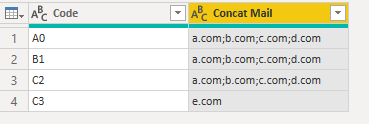
rohit_singh_0-1653403811630.png


Kind regards,

Rohit


Please mark this answer as the solution if it resolves your issue.
Appreciate your kudos! 🙂

Vijay_A_Verma
Most Valuable Professional

Yes, you will need to sort the second column - Then buffer the table and use buffered table in the Group by. If you don't use buffered table, you will have original sort order.

Below is revised query

let
    Source = Table.FromRows(Json.Document(Binary.Decompress(Binary.FromText("i45WcjRQ0lFK1EvOz1WK1YFyk1C5yajcFDjXyRCTm4zKTULlIixyNsLkJqFyk1G5CIucjYHcVAg3FgA=", BinaryEncoding.Base64), Compression.Deflate)), let _t = ((type nullable text) meta [Serialized.Text = true]) in type table [Code = _t, Mail = _t]),
    #"Changed Type" = Table.TransformColumnTypes(Source,{{"Code", type text}, {"Mail", type text}}),
    #"Sorted Rows" = Table.Buffer(Table.Sort(#"Changed Type",{{"Mail", Order.Ascending}})),
    #"Grouped Rows" = Table.Group(#"Sorted Rows",{"Code"},{{"Concat Mail", each Text.Combine([Mail],";"), type text}})
in
    #"Grouped Rows"

Helpful resources

Announcements
New to Fabric survey Carousel

New to Fabric Survey

If you have recently started exploring Fabric, we'd love to hear how it's going. Your feedback can help with product improvements.

Power BI DataViz World Championships carousel

Power BI DataViz World Championships - June 2026

A new Power BI DataViz World Championship is coming this June! Don't miss out on submitting your entry.

Join our Fabric User Panel

Join our Fabric User Panel

Share feedback directly with Fabric product managers, participate in targeted research studies and influence the Fabric roadmap.

March Power BI Update Carousel

Power BI Community Update - March 2026

Check out the March 2026 Power BI update to learn about new features.