Join us at FabCon Atlanta from March 16 - 20, 2026, for the ultimate Fabric, Power BI, AI and SQL community-led event. Save $200 with code FABCOMM.
Register now!The Power BI Data Visualization World Championships is back! Get ahead of the game and start preparing now! Learn more
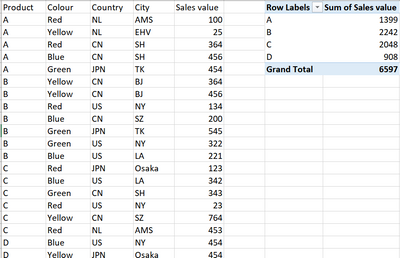
Dear, I have a dataset like below in PBI, how do I create a table in Power query like the pivot table below, in which calculates the sum of sales value for each distinct product type A/B/C/D? (will need to consider adding other dimensions as well when proceeding further)
Thank you!
Solved! Go to Solution.
Select Product column - Home menu - Group by
Under Operation, select Sum and under Column, select Sales value
See the working here - Open a blank query - Home - Advanced Editor - Remove everything from there and paste the below code to test
let
Source = Table.FromRows(Json.Document(Binary.Decompress(Binary.FromText("i45WclTSUQpKTQGSjiCmLxCbKsXqQCQiU3Ny8stBck5Awg+ILcFyIJ57UWpqHpB2cgYS/kBsaASWc4Yb6OIGJAKA2AQu4V+UmJeeCtLtASQCgdhcKTYWAA==", BinaryEncoding.Base64), Compression.Deflate)), let _t = ((type nullable text) meta [Serialized.Text = true]) in type table [Product = _t, Color = _t, Country = _t, City = _t, #"Sales value" = _t]),
#"Changed Type" = Table.TransformColumnTypes(Source,{{"Product", type text}, {"Color", type text}, {"Country", type text}, {"City", type text}, {"Sales value", Int64.Type}}),
#"Grouped Rows" = Table.Group(#"Changed Type", {"Product"}, {{"Sum of Sales value", each List.Sum([Sales value]), type nullable number}})
in
#"Grouped Rows"
Select Product column - Home menu - Group by
Under Operation, select Sum and under Column, select Sales value
See the working here - Open a blank query - Home - Advanced Editor - Remove everything from there and paste the below code to test
let
Source = Table.FromRows(Json.Document(Binary.Decompress(Binary.FromText("i45WclTSUQpKTQGSjiCmLxCbKsXqQCQiU3Ny8stBck5Awg+ILcFyIJ57UWpqHpB2cgYS/kBsaASWc4Yb6OIGJAKA2AQu4V+UmJeeCtLtASQCgdhcKTYWAA==", BinaryEncoding.Base64), Compression.Deflate)), let _t = ((type nullable text) meta [Serialized.Text = true]) in type table [Product = _t, Color = _t, Country = _t, City = _t, #"Sales value" = _t]),
#"Changed Type" = Table.TransformColumnTypes(Source,{{"Product", type text}, {"Color", type text}, {"Country", type text}, {"City", type text}, {"Sales value", Int64.Type}}),
#"Grouped Rows" = Table.Group(#"Changed Type", {"Product"}, {{"Sum of Sales value", each List.Sum([Sales value]), type nullable number}})
in
#"Grouped Rows"
The Power BI Data Visualization World Championships is back! Get ahead of the game and start preparing now!
| User | Count |
|---|---|
| 19 | |
| 9 | |
| 8 | |
| 7 | |
| 6 |