Share feedback directly with Fabric product managers, participate in targeted research studies and influence the Fabric roadmap.
Sign up nowGet Fabric certified for FREE! Don't miss your chance! Learn more
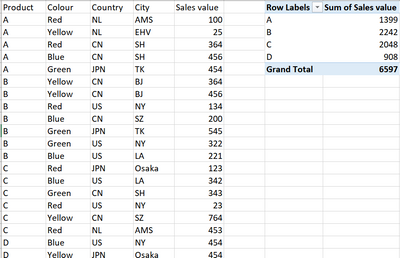
Dear, I have a dataset like below in PBI, how do I create a table in Power query like the pivot table below, in which calculates the sum of sales value for each distinct product type A/B/C/D? (will need to consider adding other dimensions as well when proceeding further)
Thank you!
Solved! Go to Solution.
Select Product column - Home menu - Group by
Under Operation, select Sum and under Column, select Sales value
See the working here - Open a blank query - Home - Advanced Editor - Remove everything from there and paste the below code to test
let
Source = Table.FromRows(Json.Document(Binary.Decompress(Binary.FromText("i45WclTSUQpKTQGSjiCmLxCbKsXqQCQiU3Ny8stBck5Awg+ILcFyIJ57UWpqHpB2cgYS/kBsaASWc4Yb6OIGJAKA2AQu4V+UmJeeCtLtASQCgdhcKTYWAA==", BinaryEncoding.Base64), Compression.Deflate)), let _t = ((type nullable text) meta [Serialized.Text = true]) in type table [Product = _t, Color = _t, Country = _t, City = _t, #"Sales value" = _t]),
#"Changed Type" = Table.TransformColumnTypes(Source,{{"Product", type text}, {"Color", type text}, {"Country", type text}, {"City", type text}, {"Sales value", Int64.Type}}),
#"Grouped Rows" = Table.Group(#"Changed Type", {"Product"}, {{"Sum of Sales value", each List.Sum([Sales value]), type nullable number}})
in
#"Grouped Rows"
Select Product column - Home menu - Group by
Under Operation, select Sum and under Column, select Sales value
See the working here - Open a blank query - Home - Advanced Editor - Remove everything from there and paste the below code to test
let
Source = Table.FromRows(Json.Document(Binary.Decompress(Binary.FromText("i45WclTSUQpKTQGSjiCmLxCbKsXqQCQiU3Ny8stBck5Awg+ILcFyIJ57UWpqHpB2cgYS/kBsaASWc4Yb6OIGJAKA2AQu4V+UmJeeCtLtASQCgdhcKTYWAA==", BinaryEncoding.Base64), Compression.Deflate)), let _t = ((type nullable text) meta [Serialized.Text = true]) in type table [Product = _t, Color = _t, Country = _t, City = _t, #"Sales value" = _t]),
#"Changed Type" = Table.TransformColumnTypes(Source,{{"Product", type text}, {"Color", type text}, {"Country", type text}, {"City", type text}, {"Sales value", Int64.Type}}),
#"Grouped Rows" = Table.Group(#"Changed Type", {"Product"}, {{"Sum of Sales value", each List.Sum([Sales value]), type nullable number}})
in
#"Grouped Rows"
If you love stickers, then you will definitely want to check out our Community Sticker Challenge!
Check out the January 2026 Power BI update to learn about new features.
| User | Count |
|---|---|
| 7 | |
| 5 | |
| 4 | |
| 4 | |
| 3 |
| User | Count |
|---|---|
| 13 | |
| 11 | |
| 11 | |
| 7 | |
| 6 |