cancel
Showing results for 
Search instead for 
Did you mean: 

Try your skills in the Power BI Dataviz World Championship! Round one ends June 26. Join now

Reply
crossover
Advocate I
Advocate I

Good practice for splitting long text strings

I have a column [text1] with strings of various lenghts anywhere between 10 to 300+ characters. I need to break this text down to 4 columns - knowing that a single column fits up to 70 characters and line breaking should be done nicely with a space (e.g. not to break up words - this is where my M gets annoyingly extensive). The fourth column can contain whatever is left from the broken down string.


While I can eventually get it done, the reality is that I have 2 columns that need this and my M syntax got really long and I wanted to check if there's a better alternative to Split column at 70 characters + split again at right-most space and do A LOT of replacing and custom columns.


Is there some good practice or M text manipulation functions that are well suited for this task? A minor example below of the expected outcome by splitting up to 20 characters per column. Any relevant blog posts or M functions that might be useful in this case? No good hits so far when googling around aside of basic split-by-delimiter stuff. Feels like someone must have surely tackled this issue before...


split.png


1 ACCEPTED SOLUTION
Jakinta
Solution Sage
Solution Sage

Hello,


try this.

I have added paramater NumOfChar so you can input desired number of characters to split.


let
Source = Excel.CurrentWorkbook(){[Name="Table2"]}[Content],
#"Added Custom" = Table.AddColumn(Source, "Custom", each Text.PositionOfAny([Column1],{" "},Occurrence.All
)),
Custom = #"Added Custom"{0}[Custom],
#"Converted to Table" = Table.FromList(Custom, Splitter.SplitByNothing(), null, null, ExtraValues.Error),
#"Changed Type" = Table.TransformColumnTypes(#"Converted to Table",{{"Column1", Int64.Type}}),
#"SPLIT (parameter)" = Table.AddColumn(#"Changed Type", "Custom", each if [Column1] < NumOfCh then 0
else if ([Column1] >= NumOfCh and [Column1] < NumOfCh*2) then 1
else if ([Column1] >= NumOfCh*2 and [Column1] < NumOfCh*3) then 2
else if [Column1] >= NumOfCh*3 then 3 else null),
#"Grouped Rows" = Table.Group(#"SPLIT (parameter)", {"Custom"}, {{"Gr", each _, type table [Column1=nullable number, Custom=number]}}),
#"Added Custom2" = Table.AddColumn(#"Grouped Rows", "Custom.1", each Table.AddIndexColumn([Gr], "Index")),
#"Added Custom3" = Table.AddColumn(#"Added Custom2", "Position", each [Gr][Column1]{0}),
#"Removed Columns" = Table.RemoveColumns(#"Added Custom3",{"Custom", "Gr", "Custom.1"}),
Positions = List.Combine ({{0}, List.RemoveFirstN(#"Removed Columns"[Position], 1)}),
FINAL = Table.SplitColumn(Source, "Column1", Splitter.SplitTextByPositions(Positions) )
in
FINAL
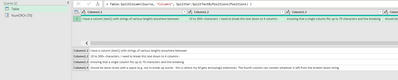


Jakinta_0-1619312155889.png


View solution in original post

4 REPLIES 4
Anonymous
Not applicable

here you can find all the functions available to act on the texts


I propose a draft resolution. See if it comes close to what you are looking for.


Anonymous
Not applicable

a version that takes into account, if I understand what you mean, the limit of 70 characters for the first three columns.

Jakinta
Solution Sage
Solution Sage

Hello,


try this.

I have added paramater NumOfChar so you can input desired number of characters to split.


let
Source = Excel.CurrentWorkbook(){[Name="Table2"]}[Content],
#"Added Custom" = Table.AddColumn(Source, "Custom", each Text.PositionOfAny([Column1],{" "},Occurrence.All
)),
Custom = #"Added Custom"{0}[Custom],
#"Converted to Table" = Table.FromList(Custom, Splitter.SplitByNothing(), null, null, ExtraValues.Error),
#"Changed Type" = Table.TransformColumnTypes(#"Converted to Table",{{"Column1", Int64.Type}}),
#"SPLIT (parameter)" = Table.AddColumn(#"Changed Type", "Custom", each if [Column1] < NumOfCh then 0
else if ([Column1] >= NumOfCh and [Column1] < NumOfCh*2) then 1
else if ([Column1] >= NumOfCh*2 and [Column1] < NumOfCh*3) then 2
else if [Column1] >= NumOfCh*3 then 3 else null),
#"Grouped Rows" = Table.Group(#"SPLIT (parameter)", {"Custom"}, {{"Gr", each _, type table [Column1=nullable number, Custom=number]}}),
#"Added Custom2" = Table.AddColumn(#"Grouped Rows", "Custom.1", each Table.AddIndexColumn([Gr], "Index")),
#"Added Custom3" = Table.AddColumn(#"Added Custom2", "Position", each [Gr][Column1]{0}),
#"Removed Columns" = Table.RemoveColumns(#"Added Custom3",{"Custom", "Gr", "Custom.1"}),
Positions = List.Combine ({{0}, List.RemoveFirstN(#"Removed Columns"[Position], 1)}),
FINAL = Table.SplitColumn(Source, "Column1", Splitter.SplitTextByPositions(Positions) )
in
FINAL


Jakinta_0-1619312155889.png


Thanks, I wasn't able to implement this directly, but was able to pick up some methods.

Helpful resources

Announcements
Fabric Data Days is here Carousel

Fabric Data Days 2026

Don't miss out on Data Days, June 15 through August 7. Learn Fabric, Power BI, SQL, AI and more.

May Power BI Update Carousel

Power BI Monthly Update - May 2026

Check out the May 2026 Power BI update to learn about new features.

Power BI DataViz World Championships carousel

Power BI DataViz World Championships - June 2026

A new Power BI DataViz World Championship is coming this June! Don't miss out on submitting your entry.
