Don't miss your chance to take the Fabric Data Engineer (DP-600) exam for FREE! Find out how by watching the DP-600 session on-demand now through April 28th.
Learn moreJoin the FabCon + SQLCon recap series. Up next: Power BI, Real-Time Intelligence, IQ and AI, and Data Factory take center stage. All sessions are available on-demand after the live show. Register now
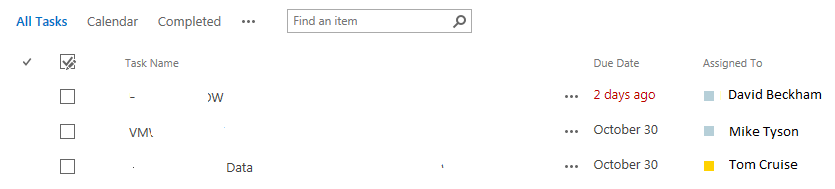
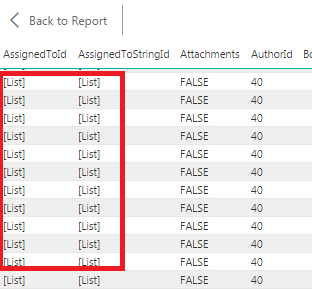
I am trying to get data from Sharepoint list into Power BI Dekstop, but I am getting the wrong information. For example I have sharepoint list "Task" with column "Assigned To" filled with correct value, but all I get in Power BI Dekstop is value '[List]'.
Thanks 😄
Solved! Go to Solution.
I believe that is because SharePoint references the info in the people picker field with the data in the hidden user list. To connect to the list append this /_catalogs/users/simple.aspx to the end of the site and you should see the list. I would assume that in PowerBI you should connect and do a merge of the two related lists to fill in the proper information.
In your query editor, these columns should have a slightly different icon on the right hand side of the field name (normally a drop arrow). This should let you grab the values from the 'list' and convert it into data for the row. Even though there might be only a single value, its really down to how the data is stored.
Fixing in the query editor should give you the value your looking for.
Thanks Morgade1,
you are right. There is hidden 'Users' list that I can bring in.
Thanks Ross73312,
You are right, I can see the value after I expand the icon. All I need to do now is link that ID with 'Users' list.
Thank you all, really appreciate it.
In your query editor, these columns should have a slightly different icon on the right hand side of the field name (normally a drop arrow). This should let you grab the values from the 'list' and convert it into data for the row. Even though there might be only a single value, its really down to how the data is stored.
Fixing in the query editor should give you the value your looking for.
I believe that is because SharePoint references the info in the people picker field with the data in the hidden user list. To connect to the list append this /_catalogs/users/simple.aspx to the end of the site and you should see the list. I would assume that in PowerBI you should connect and do a merge of the two related lists to fill in the proper information.
Check out the April 2026 Power BI update to learn about new features.
If you have recently started exploring Fabric, we'd love to hear how it's going. Your feedback can help with product improvements.
A new Power BI DataViz World Championship is coming this June! Don't miss out on submitting your entry.
| User | Count |
|---|---|
| 8 | |
| 6 | |
| 5 | |
| 5 | |
| 4 |