cancel
Showing results for 
Search instead for 
Did you mean: 

July 7 - July 17 | Round 2 of the Power BI Dataviz World Championships. Don't miss your chance! Learn more

Reply
cittakaro
Frequent Visitor

Getting wrong data from Sharepoint List

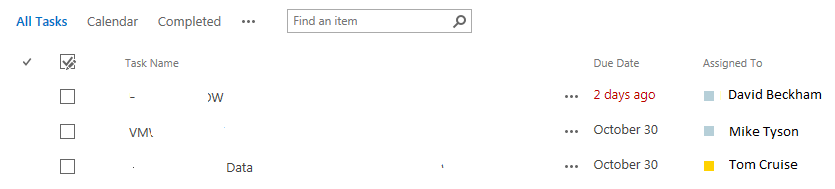
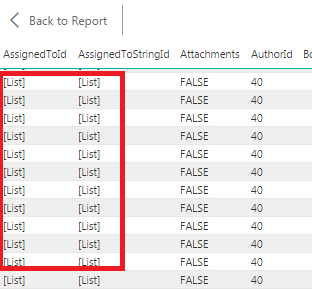
I am trying to get data from Sharepoint list into Power BI Dekstop, but I am getting the wrong information. For example I have sharepoint list "Task" with column "Assigned To" filled with correct value, but all I get in Power BI Dekstop is value '[List]'. 

image.pngimage.png

Thanks 😄

2 ACCEPTED SOLUTIONS
morgade1
New Member

I believe that is because SharePoint references the info in the people picker field with the data in the hidden user list. To connect to the list append this /_catalogs/users/simple.aspx to the end of the site and you should see the list. I would assume that in PowerBI you should connect and do a merge of the two related lists to fill in the proper information. 

View solution in original post

Anonymous
Not applicable

In your query editor, these columns should have a slightly different icon on the right hand side of the field name (normally a drop arrow).  This should let you grab the values from the 'list' and convert it into data for the row.  Even though there might be only a single value, its really down to how the data is stored.


Fixing in the query editor should give you the value your looking for.

View solution in original post

4 REPLIES 4
cittakaro
Frequent Visitor

Thanks Morgade1,

you are right. There is hidden 'Users' list that I can bring in.


Thanks Ross73312,

You are right, I can see the value after I expand the icon. All I need to do now is link that ID with 'Users' list.


Thank you all, really appreciate it.


Anonymous
Not applicable

In your query editor, these columns should have a slightly different icon on the right hand side of the field name (normally a drop arrow).  This should let you grab the values from the 'list' and convert it into data for the row.  Even though there might be only a single value, its really down to how the data is stored.


Fixing in the query editor should give you the value your looking for.

morgade1
New Member

I believe that is because SharePoint references the info in the people picker field with the data in the hidden user list. To connect to the list append this /_catalogs/users/simple.aspx to the end of the site and you should see the list. I would assume that in PowerBI you should connect and do a merge of the two related lists to fill in the proper information. 

morgade1
New Member

I believe that is because SharePoint references the info in the people picker field with the data in the hidden user list. To connect to the list append this /_catalogs/users/simple.aspx to the end of the site and you should see the list. I would assume that in PowerBI you should connect and do a merge of the two related lists to fill in the proper information. 

Helpful resources

Announcements
FabCon and SQLCon Barcelona 2026

FabCon & SQLCon – Barcelona 2026

Join us in Barcelona for FabCon and SQLCon, the Fabric, Power BI, SQL, and AI community event. Save €200 with code FABCMTY200.

60 days of Data Days Carousel

Data Days 2026

Join Fabric Data Days 2026: 60 days of free live/on-demand sessions, challenges, study groups, and certification opportunities.

Power BI DataViz World Championships carousel

Power BI DataViz World Championships - June 2026

A new Power BI DataViz World Championship is coming this June! Don't miss out on submitting your entry.