cancel
Showing results for 
Search instead for 
Did you mean: 

The Power BI Data Visualization World Championships is back! Get ahead of the game and start preparing now! Learn more

Reply
oceany
Frequent Visitor

Getting a minimum number from a list with a condition

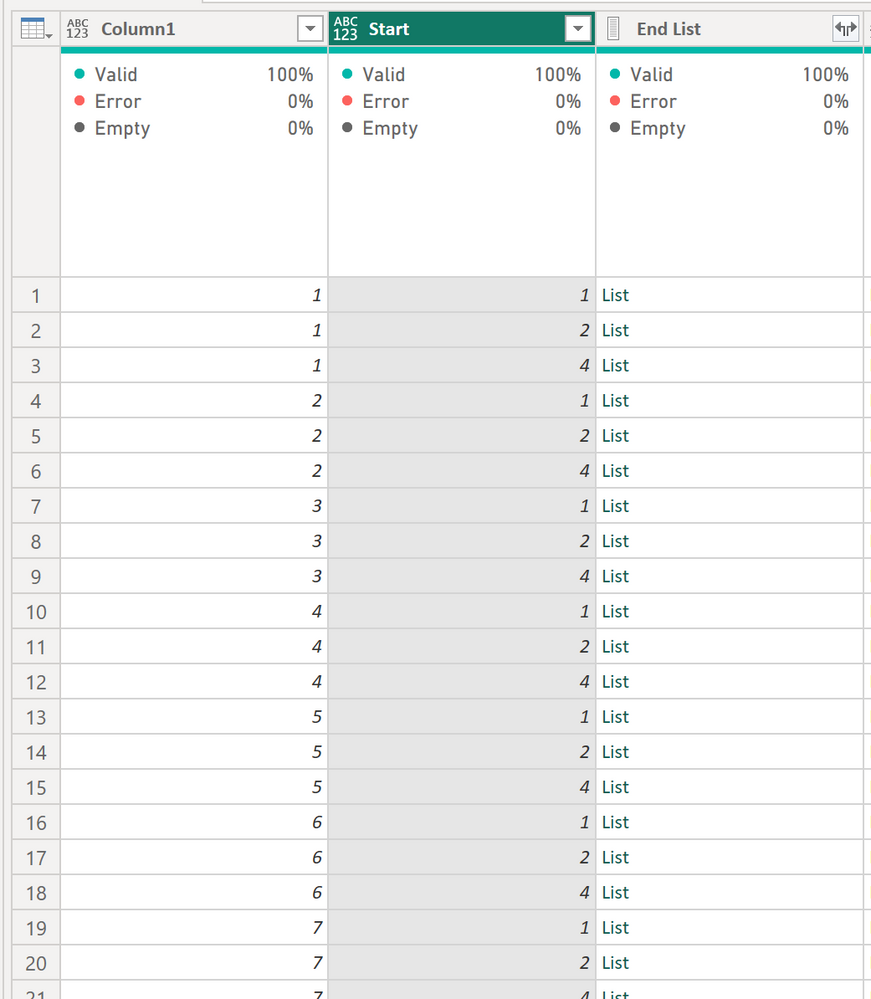
Let us say my table has two columns: Start & End List. 
1. Start (Integer)

2. End List (List)

The length of End list is not fixed and may vary depending on each row. 

2023-07-18 14_43_44-Project Tracking Report_2023.07.12 - Power Query Editor.png


Let us say, Row #1's Start=1 and End List = {3, 4, 9, 11, 35}
I would like to get 3 in a new column since 3 is the minimum number while being greater than 1.

Row #3's start=4. If its End List ={2, 3, 6, 10}, I would like to get 6. 


I am trying List.Select, but this function gives an error. 


= Table.AddColumn(#"Expanded Start List", "Custom", each List.Select([End List], each _ > [Start]))


1 REPLY 1
Vijay_A_Verma
Super User
Super User

Right function in this scenario is List.Skip


List.Skip([End List], (x)=> x < [Start]){0}

To use your formula

List.Select([End List], (x)=> x > [Start]){0}


To handle errors


try List.Skip([End List], (x)=> x < [Start]){0} otherwise null


Helpful resources

Announcements
Power BI DataViz World Championships

Power BI Dataviz World Championships

The Power BI Data Visualization World Championships is back! Get ahead of the game and start preparing now!

December 2025 Power BI Update Carousel

Power BI Monthly Update - December 2025

Check out the December 2025 Power BI Holiday Recap!

FabCon Atlanta 2026 carousel

FabCon Atlanta 2026

Join us at FabCon Atlanta, March 16-20, for the ultimate Fabric, Power BI, AI and SQL community-led event. Save $200 with code FABCOMM.