cancel
Showing results for 
Search instead for 
Did you mean: 

The Power BI Data Visualization World Championships is back! Get ahead of the game and start preparing now! Learn more

Reply
Deva002
Frequent Visitor

Getting Data from SAP R/3

For one of our clients', we need to build a set of management dashboards from SAP R/3 data.

How can we import data from SAP R/3?

We have suggested them to use 1. SAP -> Flat File -> SSIS -> SQL -> PBI and 2. OData services -> PBI built above their RFCs.

But while retriving more than 50K rows from SAP, PBI desktop shows Ran Out of memory error. What can we do now?

Is Option 1 is reliable and scalable?


-Deva

3 REPLIES 3
v-qiuyu-msft
Community Support
Community Support

Hi @Deva002,


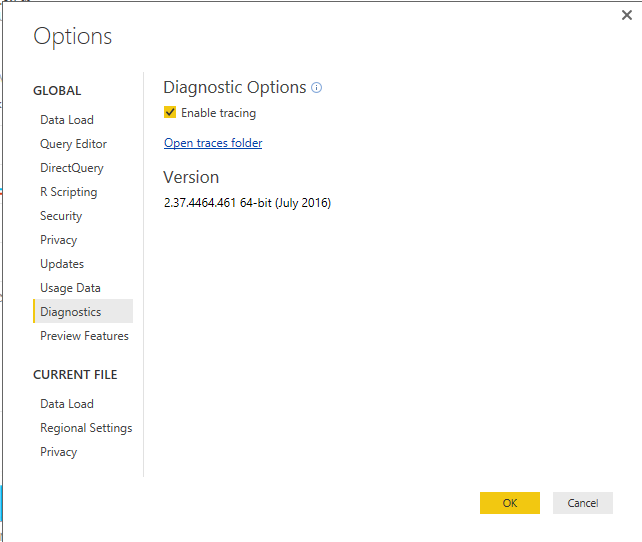
In your scenario, when you use option 1 to get data from SAP R/3, please use DirectQuery mode instead of Import mode to connect to SQL Server database. Also please update the Power BI Desktop to the latest version 2.37.4464.461.


To check whether the issue is caused by the large amount of data, you can get data less than 50k rows (eg: about 5k rows) to see if the same error occurs. When you get data in desktop, please use Process Monitor to trace which process is failed. Also you can check Power BI Desktop trace log files to analyze the issue.
 

q2.PNG


If you have any question, please feel free to ask.


Best Regards,
Qiuyun Yu

Community Support Team _ Qiuyun Yu
If this post helps, then please consider Accept it as the solution to help the other members find it more quickly.

@v-qiuyu-msft Thanks for your inputs.


Yes i'm always using the latest version.

Option 1 : We planned to use directquery only. On OData Services, fetchiching 30K rows takes 10 mins and it suceeds. But in this requirement we need to fetch 1L records. Now we are cosidering a 3rd party addon called Theobald Xtract IS to fetch SAP data through SSIS. Let me know if this is a good option to go.


Thank you very Much!

-Deva

Hi @Deva002,


As the Theobald Xtract IS is a third-party tool and I havn't used it with SSIS, I'm not able to give any comment about it. But each time you use power BI desktop to get data, I would suggest you only filter and keep useful data so that the performance should be improved. Smiley Happy


Best Regards,
Qiuyun Yu

Community Support Team _ Qiuyun Yu
If this post helps, then please consider Accept it as the solution to help the other members find it more quickly.

Helpful resources

Announcements
Power BI DataViz World Championships

Power BI Dataviz World Championships

The Power BI Data Visualization World Championships is back! Get ahead of the game and start preparing now!

November Power BI Update Carousel

Power BI Monthly Update - November 2025

Check out the November 2025 Power BI update to learn about new features.

FabCon Atlanta 2026 carousel

FabCon Atlanta 2026

Join us at FabCon Atlanta, March 16-20, for the ultimate Fabric, Power BI, AI and SQL community-led event. Save $200 with code FABCOMM.