
cancel
Showing results for 
Search instead for 
Did you mean: 

July 7 - July 17 | Round 2 of the Power BI Dataviz World Championships. Don't miss your chance! Learn more

Reply
TonyGu
Helper I
Helper I

Getting Collections AR Column

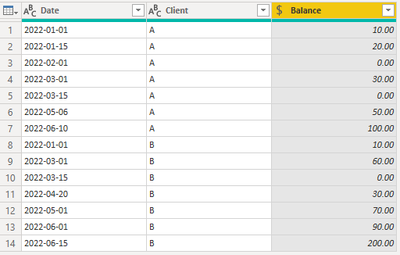
Here is a table that shows the client's cumulative balance through dates. I would like to add 4 more columns to show clients' 30 Days, 60 Days, 90 Days or Above 90 Days AR.


TonyGu_1-1656442193502.png


For example, client A's current balance is $100 and counting from 2022-05-06 (before that date the balance is $0), he should have a 60 Days AR and the amount is $100.

While client B should have a 90 Days AR and the amount should be $200


The result table should be like the screen shot below. 


TonyGu_2-1656442470440.png


I wounder if I will be able to reach this result from power query. Please help 🙂


3 REPLIES 3
v-kkf-msft
Community Support
Community Support

Hi @TonyGu ,


Not sure how you divide it into 30 days, 60 days and 90 days, could you please explain the logic of your calculation? Based on my understanding, I have created the following custom column, please point out the errors.


= let CurClient = [Client], CurDate = [Date], maxdate = List.Max(Table.SelectRows(#"Changed Type", each [Client] = CurClient and [Balance] = 0)[Date]), mylist = Table.SelectRows(#"Changed Type", each [Client] = CurClient and [Date]>= maxdate and [Date]<=CurDate)[Date]
in
Duration.Days(List.Max(mylist) - List.Min(mylist))

 Screenshot 2022-07-01 154951.png


If the problem is still not resolved, please provide detailed error information or the expected result you expect. Let me know immediately, looking forward to your reply.
Best Regards,
Winniz
If this post helps, then please consider Accept it as the solution to help the other members find it more quickly.

wdx223_Daniel
Community Champion
Community Champion

NewStep=Table.Combine(Table.Group(PreviousStepName,"Client",{"n",each let a=Table.Sort(_,"Date"),b=List.Last(a[Date]),c=List.Last(Table.RemoveLastN(a,each [Balance]<>0)?[Date]? ??{a[Date]{0}}),d={"30days","60days","90days","above 90 days"}{List.PositionOf({0,30,60,90},Duration.Days(b-c),1,(x,y)=>x<y)} in #table({"Client","Balance",d"},{{a[Client]{0},List.Last(a[Balance]),List.Last(a[Balance])}}))[n])

Vijay_A_Verma
Most Valuable Professional

Need the logic for following - Why A's bucket should be 60 days and why B's should be in 90 days?

Helpful resources

Announcements
FabCon and SQLCon Barcelona 2026

FabCon & SQLCon – Barcelona 2026

Join us in Barcelona for FabCon and SQLCon, the Fabric, Power BI, SQL, and AI community event. Save €200 with code FABCMTY200.

60 days of Data Days Carousel

Data Days 2026

Join Fabric Data Days 2026: 60 days of free live/on-demand sessions, challenges, study groups, and certification opportunities.

Power BI DataViz World Championships carousel

Power BI DataViz World Championships - June 2026

A new Power BI DataViz World Championship is coming this June! Don't miss out on submitting your entry.