cancel
Showing results for 
Search instead for 
Did you mean: 

The Power BI Data Visualization World Championships is back! Get ahead of the game and start preparing now! Learn more

Reply
chuongtt
Regular Visitor

Get data from folder (PDF.File) from time to time

Hi everyone, 

I am starting new with PowerBI and I need help with this one. 

In the folder and it has a lot of files (PDF file) and it names by date such as for example TONN 04 01 2021 (04(DD),01(MM),2021(YYYY), so the folder will have a lot of files from the month to month, Does any change that I only get the data in January 2021


Thanks in advance

1 ACCEPTED SOLUTION
PC2790
Community Champion
Community Champion

Hi,

I am not able to understand your requirement precisely.

If you are looking to get only the January files form the fiolder containing numerous files, you can use the below code in Power Query:

Follow the below steps:

1) Go to "Transform Date" and open the Power Query editor

2) Go the "Advanced editor" section of the query that you want to change.

3) Add the below M query code in the existing code:


let
Source = Folder.Files("C:\Work\NewFolder"),
#"Filtered Rows" = Table.SelectRows(Source, each Text.StartsWith([Name], "TONN")),
#"Filtered Rows2" = Table.SelectRows(#"Filtered Rows", each Date.Month([Date created]) = 1)
in
#"Filtered Rows2"

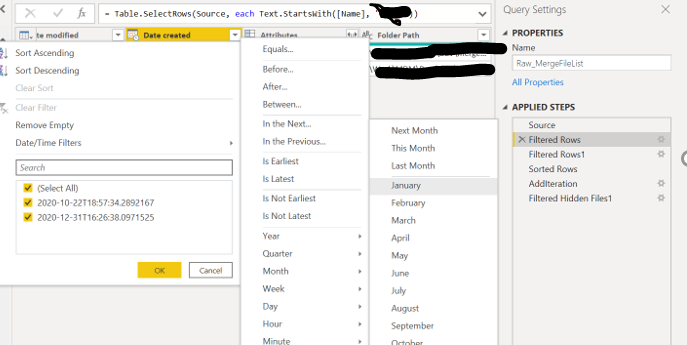
If you want to do it using the UI, please do as shown in the picture below:
Capture.PNG

If I failed to understand your exact requirement, please reply back.


View solution in original post

3 REPLIES 3
PC2790
Community Champion
Community Champion

Hi,

I am not able to understand your requirement precisely.

If you are looking to get only the January files form the fiolder containing numerous files, you can use the below code in Power Query:

Follow the below steps:

1) Go to "Transform Date" and open the Power Query editor

2) Go the "Advanced editor" section of the query that you want to change.

3) Add the below M query code in the existing code:


let
Source = Folder.Files("C:\Work\NewFolder"),
#"Filtered Rows" = Table.SelectRows(Source, each Text.StartsWith([Name], "TONN")),
#"Filtered Rows2" = Table.SelectRows(#"Filtered Rows", each Date.Month([Date created]) = 1)
in
#"Filtered Rows2"

If you want to do it using the UI, please do as shown in the picture below:

Capture.PNG

If I failed to understand your exact requirement, please reply back.


Hello, 

I have the system which will automate generate the raw data file as pdf files and send it to the folder and it also names as an example: DONN 01 01 2021 and the next day we have the second file with a different date.  And what I am doing that I create a report from this pdf file. 


But in the future, this folder will have a lot of files in the folders, for example, 365 files for a year. So If I only want to get data for January and the result only shows the data from 31 files in January.


How PowerBI can help me to make that report?

Thanks in advance.

P/s: Data in one day now includes nearly 230 rows per file and it could be increased in the future. 


PC2790
Community Champion
Community Champion

Yes got your requirement.

The steps above will do teh trick for you.

If you can share your M query from Advanced editor,I can write a full fledged code for you accomodating the logic of filtering out files only for January

Helpful resources

Announcements
Power BI DataViz World Championships

Power BI Dataviz World Championships

The Power BI Data Visualization World Championships is back! Get ahead of the game and start preparing now!

December 2025 Power BI Update Carousel

Power BI Monthly Update - December 2025

Check out the December 2025 Power BI Holiday Recap!

FabCon Atlanta 2026 carousel

FabCon Atlanta 2026

Join us at FabCon Atlanta, March 16-20, for the ultimate Fabric, Power BI, AI and SQL community-led event. Save $200 with code FABCOMM.

Top Solution Authors