Join us in Barcelona for FabCon and SQLCon, September 28 - October 1, 2026.
This is best Fabric, Power BI, SQL and AI community event. How do we know? The last event sold out! Save €200 with code FABCMTY200.
Register now- Power BI forums
- Get Help with Power BI
- Desktop
- Service
- Report Server
- Power Query
- Mobile Apps
- Developer
- DAX Commands and Tips
- Custom Visuals Development Discussion
- Health and Life Sciences
- Power BI Spanish forums
- Translated Spanish Desktop
- Training and Consulting
- Instructor Led Training
- Dashboard in a Day for Women, by Women
- Galleries
- Data Stories Gallery
- Themes Gallery
- Contests Gallery
- QuickViz Gallery
- Quick Measures Gallery
- Visual Calculations Gallery
- Fabric Apps Gallery
- Notebook Gallery
- Translytical Task Flow Gallery
- TMDL Gallery
- R Script Showcase
- Webinars and Video Gallery
- Ideas
- Custom Visuals Ideas (read-only)
- Issues
- Issues
- Events
- Upcoming Events
The Fabric community is now in read-only for platform upgrade. Learn more
- Power BI forums
- Forums
- Get Help with Power BI
- Power Query
- Slicing data
- Subscribe to RSS Feed
- Mark Topic as New
- Mark Topic as Read
- Float this Topic for Current User
- Bookmark
- Subscribe
- Printer Friendly Page

- Mark as New
- Bookmark
- Subscribe
- Mute
- Subscribe to RSS Feed
- Permalink
Slicing data
Hi All, new to Power BI but very excited by it.
Curently I am trying to slice my data. I have an "economic statistic" per county (about 15) starting from 1985 to the end of Dec 2020. Ultimately I just want show a line graph where I can click off and on countries and select any time period I want. I have had no problem slicing by time.
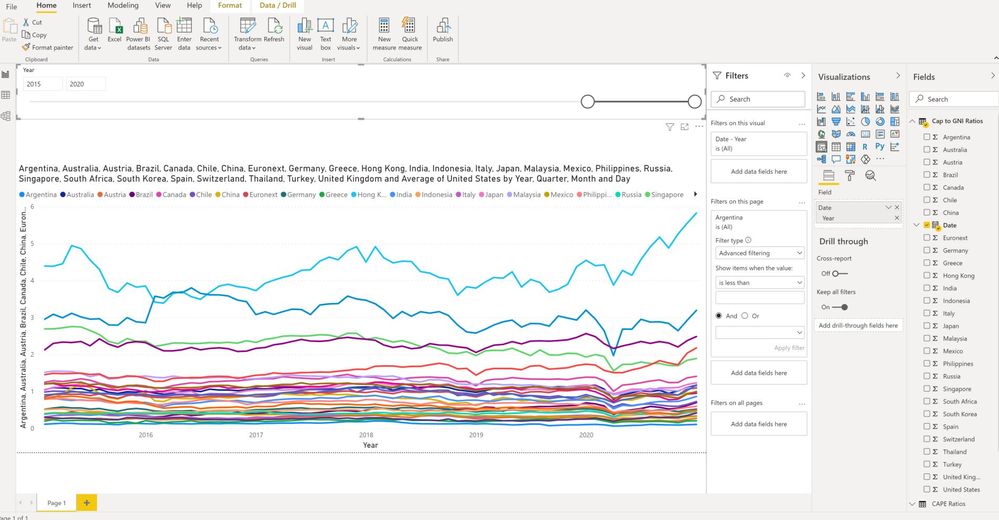
When I go to slice by country it doesnt work. I think my hirachy is out of order but not sure how to change. When I drop a country into the slice, it slices it by each individual "economic statistic" within the country, rather than by country (so then I can click countries on and off at will). Below is the import. Would really appreciate if someone could try and slice this by country @wdx223_Daniel .
Would really appreciate any assitance. Thanks!
| Date | United States (Large Cap) | United States (Small Cap) | United States (Nasdaq) | Canada | United Kingdom (Large Cap) | United Kingdom (Mid Cap) | France | Germany | Spain | Italy | Russia | India |
| 31/12/2020 | 33.44 | 112.98 | 55.33 | 22.82 | 13.66 | 21.58 | 23.87 | 19.64 | 15.11 | 22.12 | 9.73 | 29.91 |
| 30/11/2020 | 32.41 | 104.12 | 53.04 | 22.29 | 13.20 | 20.33 | 23.65 | 18.95 | 14.89 | 21.85 | 8.99 | 27.69 |
| 31/10/2020 | 31.27 | 88.04 | 48.11 | 21.07 | 11.70 | 18.09 | 19.89 | 17.82 | 11.72 | 17.06 | 7.92 | 24.91 |
| 30/09/2020 | 30.84 | 86.49 | 50.15 | 21.04 | 12.33 | 18.29 | 19.25 | 19.07 | 12.09 | 17.73 | 8.32 | 24.60 |
| 31/08/2020 | 30.81 | 89.82 | 53.70 | 21.42 | 12.50 | 18.84 | 19.57 | 19.23 | 12.37 | 18.06 | 9.08 | 24.86 |
| 31/07/2020 | 31.11 | 85.57 | 48.95 | 21.12 | 12.34 | 18.00 | 18.44 | 18.03 | 12.03 | 17.86 | 8.82 | 24.27 |
| 30/06/2020 | 29.35 | 84.51 | 46.17 | 21.67 | 13.22 | 18.31 | 19.76 | 18.44 | 12.36 | 18.71 | 8.21 | 23.29 |
| 31/05/2020 | 27.64 | 82.86 | 43.78 | 21.34 | 12.91 | 18.34 | 18.75 | 17.49 | 12.07 | 17.62 | 8.31 | 21.61 |
| 30/04/2020 | 26.03 | 78.92 | 41.57 | 20.41 | 12.43 | 17.81 | 18.44 | 16.35 | 11.66 | 16.88 | 7.89 | 22.27 |
| 31/03/2020 | 23.42 | 69.58 | 35.98 | 17.85 | 11.85 | 16.47 | 18.12 | 14.75 | 11.35 | 15.76 | 5.78 | 19.29 |
| 29/02/2020 | 31.03 | 90.31 | 39.34 | 21.91 | 13.75 | 21.19 | 21.92 | 18.03 | 14.49 | 20.60 | 7.44 | 25.14 |
| 31/01/2020 | 31.23 | 100.17 | 42.24 | 23.05 | 15.29 | 23.35 | 24.18 | 19.88 | 15.44 | 22.25 | 8.21 | 26.84 |
| 31/12/2019 | 30.91 | 106.29 | 41.65 | 22.33 | 15.81 | 24.18 | 24.60 | 20.19 | 15.49 | 22.76 | 10.05 | 27.49 |
| 30/11/2019 | 29.91 | 105.70 | 40.47 | 23.06 | 15.42 | 23.08 | 24.86 | 21.35 | 15.09 | 22.60 | 9.36 | 27.34 |
| 31/10/2019 | 28.84 | 103.56 | 39.31 | 22.40 | 15.27 | 22.32 | 24.20 | 20.83 | 14.89 | 22.19 | 9.27 | 27.19 |
| 30/09/2019 | 29.45 | 103.35 | 38.25 | 22.87 | 15.62 | 22.25 | 24.07 | 20.30 | 14.94 | 22.38 | 9.13 | 26.55 |
| 31/08/2019 | 28.95 | 103.41 | 38.36 | 22.61 | 15.22 | 21.62 | 23.27 | 19.84 | 14.18 | 21.75 | 8.86 | 25.66 |
| 31/07/2019 | 30.31 | 111.08 | 39.56 | 22.69 | 16.11 | 21.96 | 23.00 | 20.92 | 14.36 | 21.81 | 8.97 | 25.99 |
| 30/06/2019 | 31.00 | 113.28 | 39.20 | 23.69 | 15.77 | 21.73 | 23.71 | 20.64 | 14.54 | 21.20 | 9.65 | 27.91 |
| 31/05/2019 | 27.99 | 107.69 | 36.81 | 23.19 | 15.20 | 21.20 | 22.31 | 19.71 | 14.13 | 19.80 | 9.00 | 28.29 |
| 30/04/2019 | 30.14 | 118.91 | 40.67 | 24.12 | 15.76 | 22.24 | 24.01 | 20.90 | 14.96 | 21.94 | 8.73 | 28.00 |
| 31/03/2019 | 31.08 | 116.56 | 39.19 | 24.14 | 15.53 | 21.63 | 23.40 | 19.78 | 14.50 | 20.45 | 8.56 | 28.00 |
| 28/02/2019 | 30.52 | 120.62 | 38.14 | 23.19 | 15.09 | 21.80 | 23.06 | 19.28 | 14.52 | 20.58 | 8.73 | 25.97 |
| 31/01/2019 | 30.30 | 115.63 | 37.60 | 22.47 | 14.90 | 21.47 | 22.43 | 18.94 | 14.03 | 19.85 | 8.70 | 26.01 |
| 31/12/2018 | 28.02 | 105.69 | 35.19 | 21.37 | 14.29 | 20.07 | 21.81 | 18.23 | 13.04 | 17.69 | 7.86 | 25.86 |
| 30/11/2018 | 29.02 | 120.92 | 39.03 | 22.87 | 14.82 | 21.32 | 23.23 | 19.73 | 13.73 | 18.66 | 8.30 | 25.90 |
| 31/10/2018 | 30.18 | 119.98 | 39.52 | 22.05 | 15.17 | 22.03 | 23.32 | 20.73 | 13.33 | 19.00 | 8.09 | 24.73 |
| 30/09/2018 | 31.04 | 136.21 | 44.06 | 23.21 | 16.01 | 23.84 | 24.75 | 22.17 | 14.01 | 20.14 | 8.50 | 26.12 |
| 31/08/2018 | 32.62 | 139.49 | 44.47 | 23.56 | 15.85 | 24.42 | 23.93 | 22.61 | 13.91 | 19.89 | 8.10 | 27.85 |
| 31/07/2018 | 32.84 | 133.73 | 42.26 | 24.31 | 16.60 | 24.88 | 24.89 | 23.68 | 14.50 | 21.28 | 8.12 | 27.16 |
| 30/06/2018 | 32.20 | 130.87 | 41.38 | 24.28 | 16.36 | 24.98 | 24.22 | 22.95 | 13.90 | 21.45 | 7.87 | 25.81 |
| 31/05/2018 | 31.83 | 129.91 | 41.38 | 23.94 | 16.46 | 25.20 | 23.90 | 22.98 | 13.62 | 20.66 | 8.79 | 25.99 |
| 30/04/2018 | 31.34 | 122.49 | 39.68 | 22.80 | 16.14 | 24.77 | 24.40 | 22.77 | 14.39 | 21.40 | 7.86 | 26.09 |
| 31/03/2018 | 30.97 | 121.39 | 40.07 | 22.57 | 15.22 | 24.03 | 22.50 | 21.58 | 13.86 | 20.12 | 7.79 | 24.62 |
Solved! Go to Solution.
- Mark as New
- Bookmark
- Subscribe
- Mute
- Subscribe to RSS Feed
- Permalink
Your current model is not possible to achieve the slicing. please transform your table into something like the following format, then create 2 separate slicers using Date and Country columns.
| Date | Country | Value1 | Value2 |
| 31/12/2020 | US | xx | xx |
| 30/11/2020 | UK | xx | xx |
| 31/10/2020 | Canada | xx | xx |
| .. | ... | .. | .. |
Paul Zheng _ Community Support Team
If this post helps, please Accept it as the solution to help the other members find it more quickly.


- Mark as New
- Bookmark
- Subscribe
- Mute
- Subscribe to RSS Feed
- Permalink
your image did not show the slicer of countries, it seems you put it into the legend or aixs
- Mark as New
- Bookmark
- Subscribe
- Mute
- Subscribe to RSS Feed
- Permalink
Hi there, I didnt put any slicer on there at all. I'll do it and post it on.
- Mark as New
- Bookmark
- Subscribe
- Mute
- Subscribe to RSS Feed
- Permalink
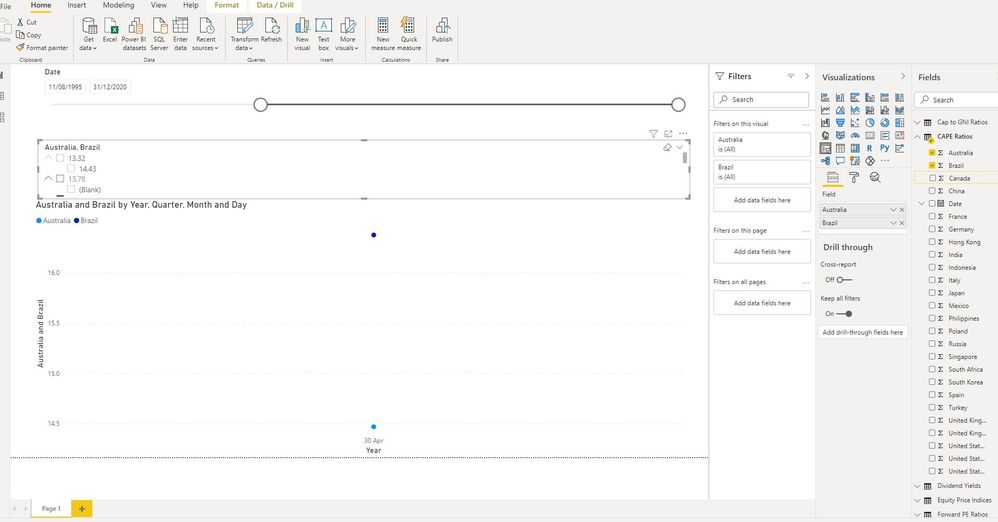
This time I just tried to do Australia and Brazil. The attempted county slice is below the date slice.
Thanks Daniel.
- Mark as New
- Bookmark
- Subscribe
- Mute
- Subscribe to RSS Feed
- Permalink
Your current model is not possible to achieve the slicing. please transform your table into something like the following format, then create 2 separate slicers using Date and Country columns.
| Date | Country | Value1 | Value2 |
| 31/12/2020 | US | xx | xx |
| 30/11/2020 | UK | xx | xx |
| 31/10/2020 | Canada | xx | xx |
| .. | ... | .. | .. |
Paul Zheng _ Community Support Team
If this post helps, please Accept it as the solution to help the other members find it more quickly.
- Mark as New
- Bookmark
- Subscribe
- Mute
- Subscribe to RSS Feed
- Permalink
That did the trick. Thank you for taking the time to reply.

Helpful resources

FabCon & SQLCon – Barcelona 2026
Join us in Barcelona for FabCon and SQLCon, the Fabric, Power BI, SQL, and AI community event. Save €200 with code FABCMTY200.

Power BI DataViz World Championships - June 2026
A new Power BI DataViz World Championship is coming this June! Don't miss out on submitting your entry.


