Join us at FabCon Atlanta from March 16 - 20, 2026, for the ultimate Fabric, Power BI, AI and SQL community-led event. Save $200 with code FABCOMM.
Register now!The Power BI Data Visualization World Championships is back! It's time to submit your entry. Live now!
Hello,
I'm loading XML data from a legacy SOAP WS (great post here on how to get it).
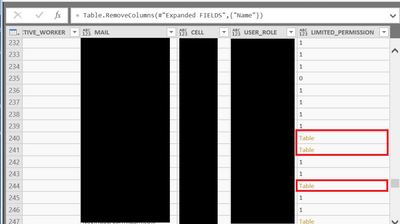
Some of the tags are empty and the Get Data interprets it as [Table] array.
I need to get rid of the [Table] values, turn to 0 or blank.
I've tried all kind of Table.ReplaceValue and can't get it to work.
Below an output example of the XML
<?xml version="1.0" encoding="utf-8"?>
<ROOT>
<result>
<CARDS>
<CARD>
<FIELDS>
<F_N>Mike</F_N>
<P_N>Last</P_N>
<TID>1111111111</TID>
<ACTIVE_WORKER>1</ACTIVE_WORKER>
<MAIL>something@something.com</MAIL>
<CELL>222222222</CELL>
<USER_ROLE>master</USER_ROLE>
<LIMITED_PERMISSION></LIMITED_PERMISSION>
</FIELDS>
</CARD>
</CARDS>
</result>
</ROOT>
[First question in this amazing forum I've been following and learning from for years ....
]
Solved! Go to Solution.
@danielsaf,
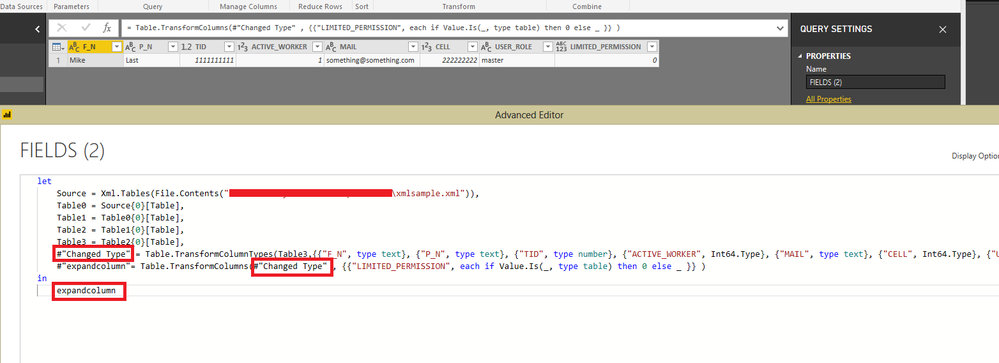
Please add an step into Advanced Editor of your query.
#"expandcolumn"= Table.TransformColumns(yourpreviousstep , {{"LIMITED_PERMISSION", each if Value.Is(_, type table) then 0 else _ }} )
Regards,
Lydia
@danielsaf,
Please add an step into Advanced Editor of your query.
#"expandcolumn"= Table.TransformColumns(yourpreviousstep , {{"LIMITED_PERMISSION", each if Value.Is(_, type table) then 0 else _ }} )
Regards,
Lydia
Excellent, exactely what I was looking for.
Is there a way to do it once for all columns or simply repeat the columns like this
#"Expandcolumn"= Table.TransformColumns(#"Removed Columns", {{"LIMITED_PERMISSION", each if Value.Is(_, type table) then 0 else _ },{"USER_ROLE", each if Value.Is(_, type table) then "" else _ }} ),
@danielsaf,
Please repeat this step for all the columns that you need to expand.
Regards,
Lydia
| User | Count |
|---|---|
| 20 | |
| 10 | |
| 8 | |
| 8 | |
| 7 |