cancel
Showing results for 
Search instead for 
Did you mean: 

Learn from the best! Meet the four finalists headed to the FINALS of the Power BI Dataviz World Championships! Register now

Reply
Anonymous
Not applicable

Formatting data - Transposing

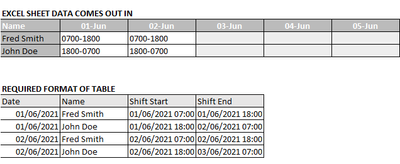
Hi all. We have some rostering software that churns out rosters in a particular format, but we need it to be reformatted and changed around to get it into a different layout completely to be of any use:

MaxTheMarshall_0-1623337625751.png

I imagine using Transpose and DAX will come into it, or maybe even dynamic tables. But does anyone have any pointers on how we'd start approaching reformatting this data?


Thanks!

1 ACCEPTED SOLUTION
Anonymous
Not applicable

Hi @Anonymous 


If you use Power Query to transform before loaded to model, here is one way, paste in Advanced Editor

let
    Source = Table.FromRows(Json.Document(Binary.Decompress(Binary.FromText("i45WcitKTVHSUTIwNzDQNbQwMEBjK8XqRCt55WfkAdkgIV2QJBpbKTYWAA==", BinaryEncoding.Base64), Compression.Deflate)), let _t = ((type nullable text) meta [Serialized.Text = true]) in type table [Name = _t, #"01/06/2021" = _t, #"02/06/2021" = _t, #"03/06/2021" = _t]),
    #"Unpivoted Other Columns" = Table.UnpivotOtherColumns(Source, {"Name"}, "Date", "Value"),
    #"Filtered Rows" = Table.SelectRows(#"Unpivoted Other Columns", each ([Value] <> "")),
    #"Split Column by Delimiter" = Table.SplitColumn(#"Filtered Rows", "Value", Splitter.SplitTextByDelimiter("-", QuoteStyle.Csv), {"Start", "End"}),
    #"Changed Type" = Table.TransformColumnTypes(#"Split Column by Delimiter",{{"Start", type time}, {"End", type time}, {"Date", type date}}),
    #"Added Custom" = Table.AddColumn(#"Changed Type", "ShiftEnd", each if [End]<[Start] then Date.AddDays([Date],1) & [End] else [Date] & [End]),
    #"Added Custom1" = Table.AddColumn(#"Added Custom", "ShiftStart", each [Date]&[Start]),
    #"Reordered Columns" = Table.ReorderColumns(#"Added Custom1",{"Name", "Date", "ShiftStart", "ShiftEnd", "Start", "End"}),
    #"Removed Columns" = Table.RemoveColumns(#"Reordered Columns",{"Start", "End"}),
    #"Reordered Columns1" = Table.ReorderColumns(#"Removed Columns",{"Date", "Name", "ShiftStart", "ShiftEnd"}),
    #"Changed Type1" = Table.TransformColumnTypes(#"Reordered Columns1",{{"ShiftStart", type datetime}, {"ShiftEnd", type datetime}})
in
    #"Changed Type1"
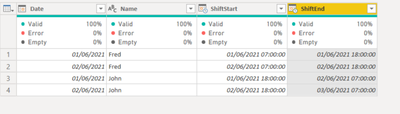
 

Vera_33_0-1623375571153.png


View solution in original post

2 REPLIES 2
Anonymous
Not applicable

That's brilliant, thank you VERY VERY much! 😊

Anonymous
Not applicable

Hi @Anonymous 


If you use Power Query to transform before loaded to model, here is one way, paste in Advanced Editor

let
    Source = Table.FromRows(Json.Document(Binary.Decompress(Binary.FromText("i45WcitKTVHSUTIwNzDQNbQwMEBjK8XqRCt55WfkAdkgIV2QJBpbKTYWAA==", BinaryEncoding.Base64), Compression.Deflate)), let _t = ((type nullable text) meta [Serialized.Text = true]) in type table [Name = _t, #"01/06/2021" = _t, #"02/06/2021" = _t, #"03/06/2021" = _t]),
    #"Unpivoted Other Columns" = Table.UnpivotOtherColumns(Source, {"Name"}, "Date", "Value"),
    #"Filtered Rows" = Table.SelectRows(#"Unpivoted Other Columns", each ([Value] <> "")),
    #"Split Column by Delimiter" = Table.SplitColumn(#"Filtered Rows", "Value", Splitter.SplitTextByDelimiter("-", QuoteStyle.Csv), {"Start", "End"}),
    #"Changed Type" = Table.TransformColumnTypes(#"Split Column by Delimiter",{{"Start", type time}, {"End", type time}, {"Date", type date}}),
    #"Added Custom" = Table.AddColumn(#"Changed Type", "ShiftEnd", each if [End]<[Start] then Date.AddDays([Date],1) & [End] else [Date] & [End]),
    #"Added Custom1" = Table.AddColumn(#"Added Custom", "ShiftStart", each [Date]&[Start]),
    #"Reordered Columns" = Table.ReorderColumns(#"Added Custom1",{"Name", "Date", "ShiftStart", "ShiftEnd", "Start", "End"}),
    #"Removed Columns" = Table.RemoveColumns(#"Reordered Columns",{"Start", "End"}),
    #"Reordered Columns1" = Table.ReorderColumns(#"Removed Columns",{"Date", "Name", "ShiftStart", "ShiftEnd"}),
    #"Changed Type1" = Table.TransformColumnTypes(#"Reordered Columns1",{{"ShiftStart", type datetime}, {"ShiftEnd", type datetime}})
in
    #"Changed Type1"
 

Vera_33_0-1623375571153.png


Helpful resources

Announcements
Join our Fabric User Panel

Join our Fabric User Panel

Share feedback directly with Fabric product managers, participate in targeted research studies and influence the Fabric roadmap.

February Power BI Update Carousel

Power BI Monthly Update - February 2026

Check out the February 2026 Power BI update to learn about new features.

FabCon Atlanta 2026 carousel

FabCon Atlanta 2026

Join us at FabCon Atlanta, March 16-20, for the ultimate Fabric, Power BI, AI and SQL community-led event. Save $200 with code FABCOMM.

Top Solution Authors