Get Fabric or SQL Certified for Free.
Get certified for free when you join Fabric Data Days 2026 and dive into Fabric, Power BI, SQL, AI, and other essential data skills.
Join now- Power BI forums
- Get Help with Power BI
- Desktop
- Service
- Report Server
- Power Query
- Mobile Apps
- Developer
- DAX Commands and Tips
- Custom Visuals Development Discussion
- Health and Life Sciences
- Power BI Spanish forums
- Translated Spanish Desktop
- Training and Consulting
- Instructor Led Training
- Dashboard in a Day for Women, by Women
- Galleries
- Data Stories Gallery
- Themes Gallery
- Contests Gallery
- QuickViz Gallery
- Quick Measures Gallery
- Visual Calculations Gallery
- Notebook Gallery
- Translytical Task Flow Gallery
- TMDL Gallery
- R Script Showcase
- Webinars and Video Gallery
- Ideas
- Custom Visuals Ideas (read-only)
- Issues
- Issues
- Events
- Upcoming Events
Try your skills in the Power BI Dataviz World Championship! Round one ends June 26. Join now
- Power BI forums
- Forums
- Get Help with Power BI
- Power Query
- Re: Find dates in text
- Subscribe to RSS Feed
- Mark Topic as New
- Mark Topic as Read
- Float this Topic for Current User
- Bookmark
- Subscribe
- Printer Friendly Page

- Mark as New
- Bookmark
- Subscribe
- Mute
- Subscribe to RSS Feed
- Permalink
- Report Inappropriate Content
Find dates in text
Dear all,
I kindly request the help of this community. I am a beginner and I am still getting acustom with Language M and DAX.
In the file I have I need to extract the maximum dates from a text column.
The dates can be anywhere within the text and they have different ways they were written:
| qbcsde45cd 01.06.2022 - 31.05.2023 csfmeoj3dde |
| ljfofbl;s 5 dada 01.06.2022 -31.05.2023lepojn dbfuif7 9089n fe |
| lopjfeif4f 03-04.05.2022 pinsdiubf4frf |
| pjnwd lasa3asde 17/18/19 kmfiofjnrigb56 |
| casfsfe34fgthtr 28*02*2023 sdgdht676s |
| plnu67jniu 31.12.24 xniubuy67bkl; |
| mnjhvt567ybnl 31/12/2022 amsuaisb67890 |
| (ant txt) 30/6/22 (any text) |
I was thinking to an algorithm like following, but I do not manage it to writte it:
- Replace all punctation with "/" and make a list from text
- Loop through the list or generate a secondary list with the dates
- In set of 8 characters
- In set of 10 characters
check for each step if the step is a date with date from text
- Get the max date
Thank you in advance!
Solved! Go to Solution.


- Mark as New
- Bookmark
- Subscribe
- Mute
- Subscribe to RSS Feed
- Permalink
- Report Inappropriate Content
Use this in a custom column
= List.Max(List.Transform(List.Transform(Text.Split(Text.Replace(Text.Replace(Text.Replace(Text.Replace([Data],".","/"),".","/"),"*","/"),"-"," ")," "),(x)=>Text.Select(x,{"0".."9","/"})),(y)=>if Text.Contains(y,"/") then try Date.From(y) otherwise null else null))Full code for testing
let
    Source = Table.FromRows(Json.Document(Binary.Decompress(Binary.FromText("hY/BbsMgEER/ZZVTGzUxBhts5VOsHMCwCQRjN+A2/vsSN1XV9tDjzL4Z7XTd5lX1UZuq7jWQck/4nhJKYQcsi/ouGPQRBzM6prXZHF+6jXc4ovKHCDVoqeWPIG2/ct5MowugFc4WBbSkaQPgo2KcHBqLFQJhO1I9MhQmG6K2s8qXK67o5MK7Bi+jZDJ/CqUoyqYoW7gMaEd04WpPquYr28uIEQ2r8JTO6Qq02RK6XUdEfdLnxAWPn60+zFy4YOf70pLuaQW3rNS8cKEu/rBSQ3Dnt1RzsajgM1iUtFjflEOcpY2Ki6YlK/okQ4J0S8/ASMGLzGRngWSy9Wvyf4u/q9q/TccP", BinaryEncoding.Base64), Compression.Deflate)), let _t = ((type nullable text) meta [Serialized.Text = true]) in type table [Data = _t]),
    #"Added Custom" = Table.AddColumn(Source, "Custom", each List.Max(List.Transform(List.Transform(Text.Split(Text.Replace(Text.Replace(Text.Replace(Text.Replace([Data],".","/"),".","/"),"*","/"),"-"," ")," "),(x)=>Text.Select(x,{"0".."9","/"})),(y)=>if Text.Contains(y,"/") then try Date.From(y) otherwise null else null)))
in
    #"Added Custom"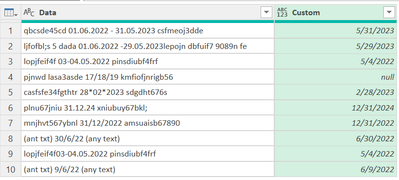

- Mark as New
- Bookmark
- Subscribe
- Mute
- Subscribe to RSS Feed
- Permalink
- Report Inappropriate Content
Hi @severm ,
Here a potential solution. You can merge some of the steps. But it might help you anyway or at least gets you closer to a soluition:
Before:
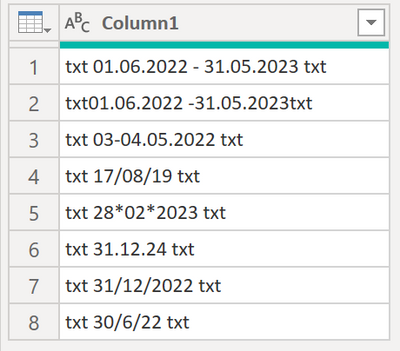
After:
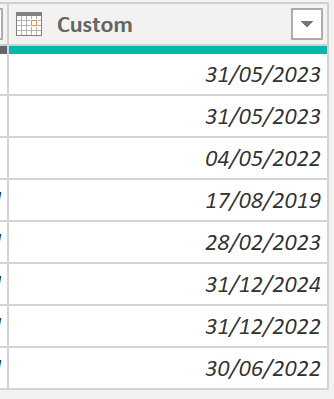
Here the code in Power Query M that you can paste into the advanced editor (if you do not know, how to exactly do this, please check out this quick walkthrough)
let
    Source = Table.FromRows(Json.Document(Binary.Decompress(Binary.FromText("ZY3BDYAwDANXiXhWtHFcKGUWxBY8GJ+CQJTy9PkSL0u37ZvAAlIgSPESSxjPEKV03dpfTq28RiUIosdwF6xPxSZFVps/kNmBrp05142BQwPVqL+/EZr0YesB", BinaryEncoding.Base64), Compression.Deflate)), let _t = ((type nullable text) meta [Serialized.Text = true]) in type table [Column1 = _t]),
    #"Changed Type" = Table.TransformColumnTypes(Source,{{"Column1", type text}}),
    #"Replaced Value" = Table.ReplaceValue(#"Changed Type",".","/",Replacer.ReplaceText,{"Column1"}),
    #"Replaced Value1" = Table.ReplaceValue(#"Replaced Value","txt","",Replacer.ReplaceText,{"Column1"}),
    #"Replaced Value2" = Table.ReplaceValue(#"Replaced Value1","*","/",Replacer.ReplaceText,{"Column1"}),
    #"Replaced Value3" = Table.ReplaceValue(#"Replaced Value2"," ","",Replacer.ReplaceText,{"Column1"}),
    #"Split Column by Delimiter" = Table.SplitColumn(#"Replaced Value3", "Column1", Splitter.SplitTextByDelimiter("-", QuoteStyle.Csv), {"Column1.1", "Column1.2"}),
    #"Added Custom" = Table.AddColumn(#"Split Column by Delimiter", "Custom", each if [Column1.2] <> null then [Column1.2] else [Column1.1]),
    #"Changed Type1" = Table.TransformColumnTypes(#"Added Custom",{{"Custom", type date}})
in
    #"Changed Type1"
Let me know if this helps or if you get stuck somewhere 🙂
/Tom
https://www.tackytech.blog/
https://www.instagram.com/tackytechtom/
| Did I answer your question❓➡️ Please, mark my post as a solution ✔️ |
| Also happily accepting Kudos 🙂 |
| Feel free to connect with me on LinkedIn! | |
| #proudtobeasuperuser |  |
- Mark as New
- Bookmark
- Subscribe
- Mute
- Subscribe to RSS Feed
- Permalink
- Report Inappropriate Content
Hey Tom,
I very much appreciate your answer. As always, the real life is more complex :). txt in my description are full senteces or abreviation, shorter or longer, sometimes txt includes also numbers.
| qbcsde45cd 01.06.2022 - 31.05.2023 csfmeoj3dde |
| ljfofbl;s 5 dada 01.06.2022 -31.05.2023lepojn dbfuif7 9089n fe |
| lopjfeif4f 03-04.05.2022 pinsdiubf4frf |
| pjnwd lasa3asde 17/18/19 kmfiofjnrigb56 |
| casfsfe34fgthtr 28*02*2023 sdgdht676s |
| plnu67jniu 31.12.24 xniubuy67bkl; |
| mnjhvt567ybnl 31/12/2022 amsuaisb67890 |
| (ant txt) 30/6/22 (any text) |
This why I proposed some steps in my post. If you could help put me on a new direction I would be grateful.
Thank you!
- Mark as New
- Bookmark
- Subscribe
- Mute
- Subscribe to RSS Feed
- Permalink
- Report Inappropriate Content
In a custom column, pur following formula (here [Data] is column name) and select the column and Transform menu - Data type - Date
= List.Last(Text.Split(Text.Select(Text.Replace(Text.Replace([Data],".","/"),"*","/"),{"0".."9","-","/"}),"-"))For in place replacement of the column, insert following step where Source should be replaced with your previous step and don't forget to change column type to date
= Table.ReplaceValue(Source,each [Data], each List.Last(Text.Split(Text.Select(Text.Replace(Text.Replace([Data],".","/"),"*","/"),{"0".."9","-","/"}),"-")),Replacer.ReplaceValue,{"Data"})- Mark as New
- Bookmark
- Subscribe
- Mute
- Subscribe to RSS Feed
- Permalink
- Report Inappropriate Content
Thank you @Vijay_A_Verma
You did get me a step closer to the objectif. But still I need some steps. And I really appreciate your solution.
If in the txt I would not have also numbers your I would have been much closer. But as people inputing data are not the same, their inputs are really different.
In case you could have another tip, I would be grateful.
Thank you!
- Mark as New
- Bookmark
- Subscribe
- Mute
- Subscribe to RSS Feed
- Permalink
- Report Inappropriate Content
Use this in a custom column
= List.Max(List.Transform(List.Transform(Text.Split(Text.Replace(Text.Replace(Text.Replace(Text.Replace([Data],".","/"),".","/"),"*","/"),"-"," ")," "),(x)=>Text.Select(x,{"0".."9","/"})),(y)=>if Text.Contains(y,"/") then try Date.From(y) otherwise null else null))Full code for testing
let
    Source = Table.FromRows(Json.Document(Binary.Decompress(Binary.FromText("hY/BbsMgEER/ZZVTGzUxBhts5VOsHMCwCQRjN+A2/vsSN1XV9tDjzL4Z7XTd5lX1UZuq7jWQck/4nhJKYQcsi/ouGPQRBzM6prXZHF+6jXc4ovKHCDVoqeWPIG2/ct5MowugFc4WBbSkaQPgo2KcHBqLFQJhO1I9MhQmG6K2s8qXK67o5MK7Bi+jZDJ/CqUoyqYoW7gMaEd04WpPquYr28uIEQ2r8JTO6Qq02RK6XUdEfdLnxAWPn60+zFy4YOf70pLuaQW3rNS8cKEu/rBSQ3Dnt1RzsajgM1iUtFjflEOcpY2Ki6YlK/okQ4J0S8/ASMGLzGRngWSy9Wvyf4u/q9q/TccP", BinaryEncoding.Base64), Compression.Deflate)), let _t = ((type nullable text) meta [Serialized.Text = true]) in type table [Data = _t]),
    #"Added Custom" = Table.AddColumn(Source, "Custom", each List.Max(List.Transform(List.Transform(Text.Split(Text.Replace(Text.Replace(Text.Replace(Text.Replace([Data],".","/"),".","/"),"*","/"),"-"," ")," "),(x)=>Text.Select(x,{"0".."9","/"})),(y)=>if Text.Contains(y,"/") then try Date.From(y) otherwise null else null)))
in
#"Added Custom"- Mark as New
- Bookmark
- Subscribe
- Mute
- Subscribe to RSS Feed
- Permalink
- Report Inappropriate Content

Helpful resources

Data Days 2026
Don't miss out on Data Days, June 15 through August 7. Learn Fabric, Power BI, SQL, AI and more.

Power BI Monthly Update - May 2026
Check out the May 2026 Power BI update to learn about new features.

Power BI DataViz World Championships - June 2026
A new Power BI DataViz World Championship is coming this June! Don't miss out on submitting your entry.


| User | Count |
|---|---|
| 11 | |
| 9 | |
| 5 | |
| 5 | |
| 4 |


