Learn from the best! Meet the four finalists headed to the FINALS of the Power BI Dataviz World Championships! Register now
Hi,
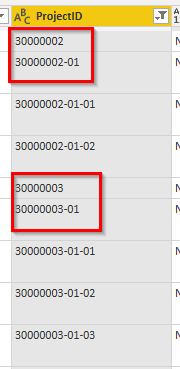
I hope this is a simple question to answer. I am new to the power query so I need all help I can get. I need to filter out all project id:s ending on -**-**. In the example below I only want to keep e.g. 30000002 and 30000002-01, but I don't want to keep 30000002-01-01. I have tried to use the option "not ends with" but I don't get it to work.
Appreciate all your help
Anna
Solved! Go to Solution.
if the project_id is always in the same pattern as the sample data ie, 8 chars or 8-2 chars or 8-2-2 chars then
Add a column like this
= Table.AddColumn(#"Added Custom", "LastPos", each if Text.PositionOf([ProjectID], "-", Occurrence.Last) = 12 then 1 else 0)
That'll give a 1 in a new column for the 8-2-2 pattern.
Then you filter the rows (from the dropdown in column LastPos) to keep the 0 rows
Hi @annade22
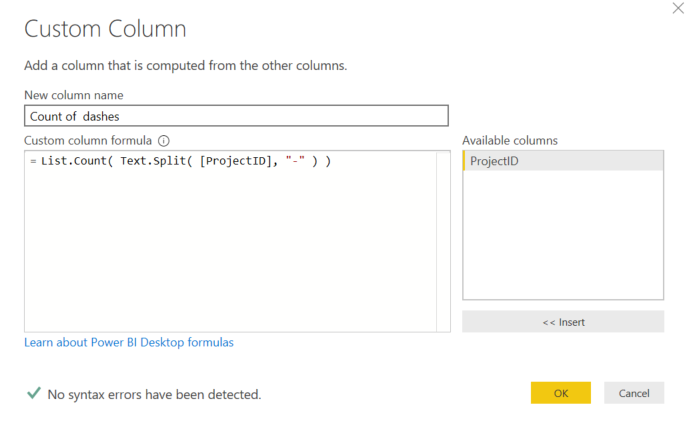
You can add Custom column like below and later liter it > 3
Hi @annade22
You can add Custom column like below and later liter it > 3
if the project_id is always in the same pattern as the sample data ie, 8 chars or 8-2 chars or 8-2-2 chars then
Add a column like this
= Table.AddColumn(#"Added Custom", "LastPos", each if Text.PositionOf([ProjectID], "-", Occurrence.Last) = 12 then 1 else 0)
That'll give a 1 in a new column for the 8-2-2 pattern.
Then you filter the rows (from the dropdown in column LastPos) to keep the 0 rows
A new Power BI DataViz World Championship is coming this June! Don't miss out on submitting your entry.
Share feedback directly with Fabric product managers, participate in targeted research studies and influence the Fabric roadmap.
| User | Count |
|---|---|
| 5 | |
| 4 | |
| 4 | |
| 3 | |
| 2 |
| User | Count |
|---|---|
| 11 | |
| 10 | |
| 7 | |
| 7 | |
| 6 |