Join us at FabCon Atlanta from March 16 - 20, 2026, for the ultimate Fabric, Power BI, AI and SQL community-led event. Save $200 with code FABCOMM.
Register now!The Power BI Data Visualization World Championships is back! Get ahead of the game and start preparing now! Learn more
Hi,
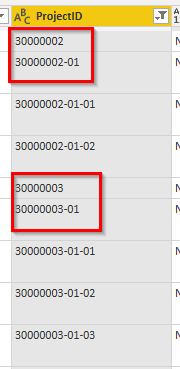
I hope this is a simple question to answer. I am new to the power query so I need all help I can get. I need to filter out all project id:s ending on -**-**. In the example below I only want to keep e.g. 30000002 and 30000002-01, but I don't want to keep 30000002-01-01. I have tried to use the option "not ends with" but I don't get it to work.
Appreciate all your help
Anna
Solved! Go to Solution.
if the project_id is always in the same pattern as the sample data ie, 8 chars or 8-2 chars or 8-2-2 chars then
Add a column like this
= Table.AddColumn(#"Added Custom", "LastPos", each if Text.PositionOf([ProjectID], "-", Occurrence.Last) = 12 then 1 else 0)
That'll give a 1 in a new column for the 8-2-2 pattern.
Then you filter the rows (from the dropdown in column LastPos) to keep the 0 rows
Hi @annade22
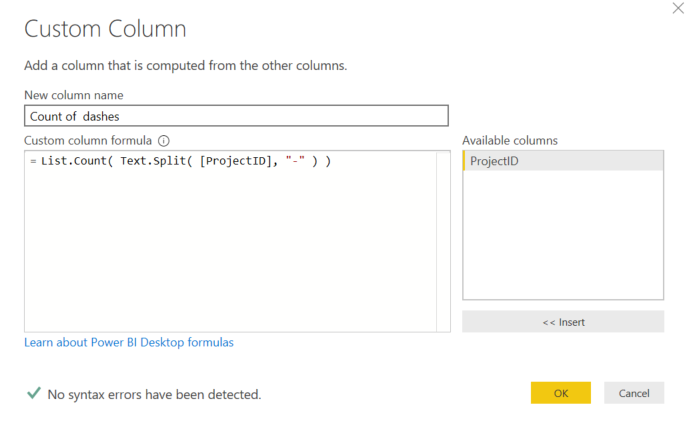
You can add Custom column like below and later liter it > 3
Hi @annade22
You can add Custom column like below and later liter it > 3
if the project_id is always in the same pattern as the sample data ie, 8 chars or 8-2 chars or 8-2-2 chars then
Add a column like this
= Table.AddColumn(#"Added Custom", "LastPos", each if Text.PositionOf([ProjectID], "-", Occurrence.Last) = 12 then 1 else 0)
That'll give a 1 in a new column for the 8-2-2 pattern.
Then you filter the rows (from the dropdown in column LastPos) to keep the 0 rows
The Power BI Data Visualization World Championships is back! Get ahead of the game and start preparing now!