Join us at FabCon Atlanta from March 16 - 20, 2026, for the ultimate Fabric, Power BI, AI and SQL community-led event. Save $200 with code FABCOMM.
Register now!The Power BI Data Visualization World Championships is back! It's time to submit your entry. Live now!
Hello everyone!
I have a Sharepoint-Folder that contains for every week an Excel File.
This files have specific name like "SalesEDT202001012200"
Now I would like to extract/ source data just from the newest file.
How is this possible if there is always a new file with a new name?
Best Regards
Solved! Go to Solution.
Hi, @joshua1990
You can import from a folder, and then query the code like this:
let
Source = Folder.Files("D:\temp"),
splCol = Table.SplitColumn(
Source,
"Name",
each {_, DateTime.From(
Number.ToText(
Number.From(Text.BetweenDelimiters(_,"SalesEDT",".xlsx")),
"0000-00-00 00:00"
)
)
},
{"Name", "DateTime"}
),
filter = Table.SelectRows(splCol, let latest = List.Max(splCol[DateTime]) in each [DateTime] = latest)
in
filterI am following the example file name you provided to split the time text into real time values to form a new column, and finally by filtering the latest time to get the final file to be processed
If my code solves your problem, please mark it as a solution!
Hi, @joshua1990
You can import from a folder, and then query the code like this:
let
Source = Folder.Files("D:\temp"),
splCol = Table.SplitColumn(
Source,
"Name",
each {_, DateTime.From(
Number.ToText(
Number.From(Text.BetweenDelimiters(_,"SalesEDT",".xlsx")),
"0000-00-00 00:00"
)
)
},
{"Name", "DateTime"}
),
filter = Table.SelectRows(splCol, let latest = List.Max(splCol[DateTime]) in each [DateTime] = latest)
in
filterI am following the example file name you provided to split the time text into real time values to form a new column, and finally by filtering the latest time to get the final file to be processed
If my code solves your problem, please mark it as a solution!
@joshua1990
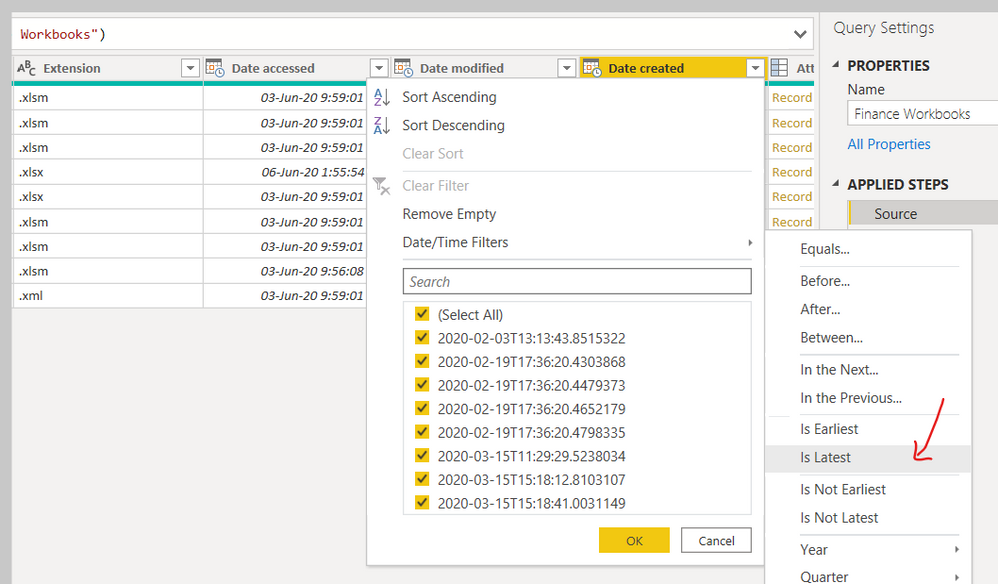
When you use GET DATA from Power Query, use Files From Folder.
Apply the following filter to get the latest file like below.
________________________
Did I answer your question? Mark this post as a solution, this will help others!.
Click on the Thumbs-Up icon on the right if you like this reply 🙂
⭕ Subscribe and learn Power BI from these videos
⚪ Website ⚪ LinkedIn ⚪ PBI User Group
The Power BI Data Visualization World Championships is back! It's time to submit your entry.
Check out the January 2026 Power BI update to learn about new features.
| User | Count |
|---|---|
| 18 | |
| 13 | |
| 9 | |
| 8 | |
| 8 |