Don't miss your chance to take the Fabric Data Engineer (DP-600) exam for FREE! Find out how by attending the DP-600 session on April 23rd (pacific time), live or on-demand.
Learn moreNext up in the FabCon + SQLCon recap series: The roadmap for Microsoft SQL and Maximizing Developer experiences in Fabric. All sessions are available on-demand after the live show. Register now
Hello everyone!
I have a Sharepoint-Folder that contains for every week an Excel File.
This files have specific name like "SalesEDT202001012200"
Now I would like to extract/ source data just from the newest file.
How is this possible if there is always a new file with a new name?
Best Regards
Solved! Go to Solution.
Hi, @joshua1990
You can import from a folder, and then query the code like this:
let
Source = Folder.Files("D:\temp"),
splCol = Table.SplitColumn(
Source,
"Name",
each {_, DateTime.From(
Number.ToText(
Number.From(Text.BetweenDelimiters(_,"SalesEDT",".xlsx")),
"0000-00-00 00:00"
)
)
},
{"Name", "DateTime"}
),
filter = Table.SelectRows(splCol, let latest = List.Max(splCol[DateTime]) in each [DateTime] = latest)
in
filterI am following the example file name you provided to split the time text into real time values to form a new column, and finally by filtering the latest time to get the final file to be processed
If my code solves your problem, please mark it as a solution!
Hi, @joshua1990
You can import from a folder, and then query the code like this:
let
Source = Folder.Files("D:\temp"),
splCol = Table.SplitColumn(
Source,
"Name",
each {_, DateTime.From(
Number.ToText(
Number.From(Text.BetweenDelimiters(_,"SalesEDT",".xlsx")),
"0000-00-00 00:00"
)
)
},
{"Name", "DateTime"}
),
filter = Table.SelectRows(splCol, let latest = List.Max(splCol[DateTime]) in each [DateTime] = latest)
in
filterI am following the example file name you provided to split the time text into real time values to form a new column, and finally by filtering the latest time to get the final file to be processed
If my code solves your problem, please mark it as a solution!
@joshua1990
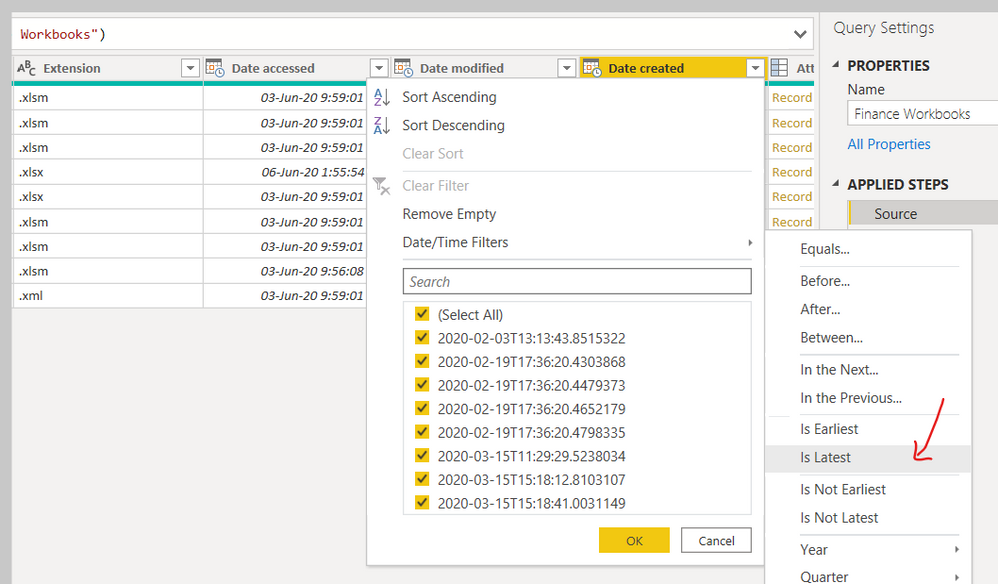
When you use GET DATA from Power Query, use Files From Folder.
Apply the following filter to get the latest file like below.
________________________
Did I answer your question? Mark this post as a solution, this will help others!.
Click on the Thumbs-Up icon on the right if you like this reply 🙂
⭕ Subscribe and learn Power BI from these videos
⚪ Website ⚪ LinkedIn ⚪ PBI User Group
If you have recently started exploring Fabric, we'd love to hear how it's going. Your feedback can help with product improvements.
A new Power BI DataViz World Championship is coming this June! Don't miss out on submitting your entry.
Experience the highlights from FabCon & SQLCon, available live and on-demand starting April 14th.
| User | Count |
|---|---|
| 5 | |
| 3 | |
| 3 | |
| 3 | |
| 2 |
| User | Count |
|---|---|
| 7 | |
| 5 | |
| 5 | |
| 5 | |
| 4 |