cancel
Showing results for 
Search instead for 
Did you mean: 

Did you hear? There's a new SQL AI Developer certification (DP-800). Start preparing now and be one of the first to get certified. Register now

Reply
Anonymous
Not applicable

Facing issues with the IF statement

Hi All,


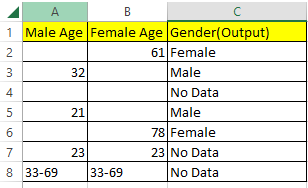
Below is the table and the following formula is used in excel. The logic is straightforward in excel. I am trying to find the Gender based on values present in column A and B. 

Formula - =IF(A2=B2,"No Data",IF(A2="","Female","Male"))
Sri1990_1-1675045055878.png

Now, I try to do the same in power BI with similar data, the query doesnt work. I read IF statements work in Power BI.

Following queries have been tried by creating a custom column:

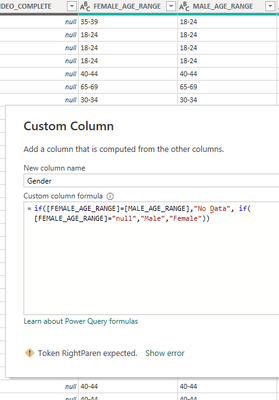
Query 1:

Gender = if([FEMALE_AGE_RANGE]=[MALE_AGE_RANGE],"No Data", if([FEMALE_AGE_RANGE]="null","Male","Female")
Sri1990_2-1675045576335.png


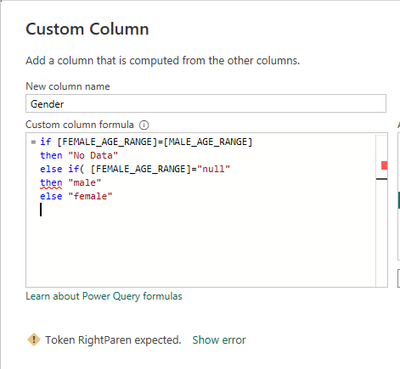
Query 2:

Gender = if [FEMALE_AGE_RANGE]=[MALE_AGE_RANGE]
then "No Data"
else if( [FEMALE_AGE_RANGE]="null"
then "male"
else "female"
Sri1990_3-1675045657847.png

Can someone please guide me what I am doing wrong and appreciate if someone can provide me a right query using IF statement.


Thank you


1 ACCEPTED SOLUTION
mussaenda
Super User
Super User

Hi @Anonymous ,


try 

if [FEMALE_AGE_RANGE] = [MALE_AGE_RANGE]
then "No Data"
else 

if [FEMALE_AGE_RANGE] = null
then "Male"
else
"Female"

View solution in original post

4 REPLIES 4
mussaenda
Super User
Super User

Hi @Anonymous ,


try 

if [FEMALE_AGE_RANGE] = [MALE_AGE_RANGE]
then "No Data"
else 

if [FEMALE_AGE_RANGE] = null
then "Male"
else
"Female"
Anonymous
Not applicable

Hi @mussaenda


Thanks for this. It worked so the only difference between your query and my query is that extra space between "else" and "if" 😐 ? and how did you find out about this issue? I did not even think in your direction at all. Thanks again

Hi @Anonymous ,


Glad it worked. It is still your query. 

The difference is the null that you treated as a string because of ""


It should be null and not "null"


Anonymous
Not applicable

Thanks mate. Clear 🙂 

Helpful resources

Announcements
April Power BI Update Carousel

Power BI Monthly Update - April 2026

Check out the April 2026 Power BI update to learn about new features.

New to Fabric survey Carousel

New to Fabric Survey

If you have recently started exploring Fabric, we'd love to hear how it's going. Your feedback can help with product improvements.

Power BI DataViz World Championships carousel

Power BI DataViz World Championships - June 2026

A new Power BI DataViz World Championship is coming this June! Don't miss out on submitting your entry.

FabCon and SQLCon Highlights Carousel

FabCon & SQLCon Highlights

Experience the highlights from FabCon & SQLCon, available live and on-demand starting April 14th.