Don't miss your chance to take the Fabric Data Engineer (DP-600) exam for FREE! Find out how by attending the DP-600 session on April 23rd (pacific time), live or on-demand.
Learn moreJoin the FabCon + SQLCon recap series. Up next: Power BI, Real-Time Intelligence, IQ and AI, and Data Factory take center stage. All sessions are available on-demand after the live show. Register now
I need to extract data from an API paginated.
The item limit per page is 50.
There are 15,000 items to be extracted.
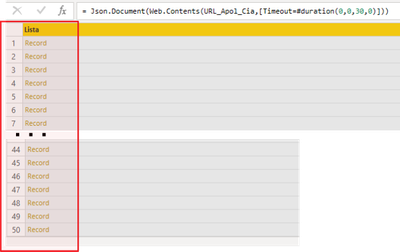
I can connect with the API and retrieve the first 50 items.
How can I recursively extract all the data? Create a single table with all 15,000 items ...
---
Code:
let
token = Number.ToText(123456),
take = Number.ToText(50),
skip = Number.ToText(0),
url = "https://conectapi.com/v1/authenticate",
body = "{""username"":""myusername@conectapi.com"",""password"":""123456"",""myid"":""123"",""Expires"":""30""}",
Parsed_JSON = Json.Document(body,65001),
BuildQueryString = Uri.BuildQueryString(Parsed_JSON),
Source = Json.Document(Web.Contents(url,[Headers = [#"Content-Type"="application/json"], Content = Text.ToBinary(body) ] )),
#"Convertido em Tabela" = Record.ToTable(Source),
#"Linhas FiltrImageadas" = Table.SelectRows(#"Convertido em Tabela", each ([Name] = "Token")),
#"Personalizado Adicionado" = Table.AddColumn(#"Linhas Filtradas", "URL_Apol_Cia", each "https://conectapi.com/v1/"&[Value]&"/Documents?take="&take&"&skip="&skip),
URL_Docs_Cia = #"Personalizado Adicionado"{0}[URL_Apol_Cia],
OrigemDocsCia = Json.Document(Web.Contents(URL_Apol_Cia,[Timeout=#duration(0,0,30,0)]))
in
OrigemDocsCia
---
Image query result:
Solved! Go to Solution.
Hi;
Grateful for the help.
I solved the situation using:
- Authentication in API Auth, and;
- Function List.Generate;
The videos and content from the links below helped a lot:
- https://www.youtube.com/watch?v=Xhr864DlfNE;
- https://www.youtube.com/watch?v=yc78DZnGhbQ;
- https://www.youtube.com/watch?v=mXbjoSg9ldo;
- https://www.youtube.com/watch?v=hHkU8tPhVXs&t=492s;
-http://angryanalyticsblog.azurewebsites.net/index.php/2016/05/16/api-strategies-with-power-bi/;
Hi;
Grateful for the help.
I solved the situation using:
- Authentication in API Auth, and;
- Function List.Generate;
The videos and content from the links below helped a lot:
- https://www.youtube.com/watch?v=Xhr864DlfNE;
- https://www.youtube.com/watch?v=yc78DZnGhbQ;
- https://www.youtube.com/watch?v=mXbjoSg9ldo;
- https://www.youtube.com/watch?v=hHkU8tPhVXs&t=492s;
-http://angryanalyticsblog.azurewebsites.net/index.php/2016/05/16/api-strategies-with-power-bi/;
Please see this video for how to do this.
Power BI - Tales From The Front - REST APIs - YouTube
Pat
To learn more about Power BI, follow me on Twitter or subscribe on YouTube.
Thank`s man.
Check out the April 2026 Power BI update to learn about new features.
If you have recently started exploring Fabric, we'd love to hear how it's going. Your feedback can help with product improvements.
A new Power BI DataViz World Championship is coming this June! Don't miss out on submitting your entry.
| User | Count |
|---|---|
| 5 | |
| 3 | |
| 3 | |
| 3 | |
| 3 |
| User | Count |
|---|---|
| 7 | |
| 6 | |
| 5 | |
| 5 | |
| 4 |