Learn from the best! Meet the four finalists headed to the FINALS of the Power BI Dataviz World Championships! Register now
I need to extract data from an API paginated.
The item limit per page is 50.
There are 15,000 items to be extracted.
I can connect with the API and retrieve the first 50 items.
How can I recursively extract all the data? Create a single table with all 15,000 items ...
---
Code:
let
token = Number.ToText(123456),
take = Number.ToText(50),
skip = Number.ToText(0),
url = "https://conectapi.com/v1/authenticate",
body = "{""username"":""myusername@conectapi.com"",""password"":""123456"",""myid"":""123"",""Expires"":""30""}",
Parsed_JSON = Json.Document(body,65001),
BuildQueryString = Uri.BuildQueryString(Parsed_JSON),
Source = Json.Document(Web.Contents(url,[Headers = [#"Content-Type"="application/json"], Content = Text.ToBinary(body) ] )),
#"Convertido em Tabela" = Record.ToTable(Source),
#"Linhas FiltrImageadas" = Table.SelectRows(#"Convertido em Tabela", each ([Name] = "Token")),
#"Personalizado Adicionado" = Table.AddColumn(#"Linhas Filtradas", "URL_Apol_Cia", each "https://conectapi.com/v1/"&[Value]&"/Documents?take="&take&"&skip="&skip),
URL_Docs_Cia = #"Personalizado Adicionado"{0}[URL_Apol_Cia],
OrigemDocsCia = Json.Document(Web.Contents(URL_Apol_Cia,[Timeout=#duration(0,0,30,0)]))
in
OrigemDocsCia
---
Image query result:
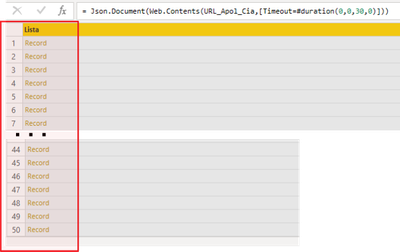
Solved! Go to Solution.
Hi;
Grateful for the help.
I solved the situation using:
- Authentication in API Auth, and;
- Function List.Generate;
The videos and content from the links below helped a lot:
- https://www.youtube.com/watch?v=Xhr864DlfNE;
- https://www.youtube.com/watch?v=yc78DZnGhbQ;
- https://www.youtube.com/watch?v=mXbjoSg9ldo;
- https://www.youtube.com/watch?v=hHkU8tPhVXs&t=492s;
-http://angryanalyticsblog.azurewebsites.net/index.php/2016/05/16/api-strategies-with-power-bi/;
Hi;
Grateful for the help.
I solved the situation using:
- Authentication in API Auth, and;
- Function List.Generate;
The videos and content from the links below helped a lot:
- https://www.youtube.com/watch?v=Xhr864DlfNE;
- https://www.youtube.com/watch?v=yc78DZnGhbQ;
- https://www.youtube.com/watch?v=mXbjoSg9ldo;
- https://www.youtube.com/watch?v=hHkU8tPhVXs&t=492s;
-http://angryanalyticsblog.azurewebsites.net/index.php/2016/05/16/api-strategies-with-power-bi/;
Please see this video for how to do this.
Power BI - Tales From The Front - REST APIs - YouTube
Pat
To learn more about Power BI, follow me on Twitter or subscribe on YouTube.
Thank`s man.
A new Power BI DataViz World Championship is coming this June! Don't miss out on submitting your entry.
Share feedback directly with Fabric product managers, participate in targeted research studies and influence the Fabric roadmap.
| User | Count |
|---|---|
| 5 | |
| 4 | |
| 4 | |
| 3 | |
| 3 |
| User | Count |
|---|---|
| 11 | |
| 10 | |
| 8 | |
| 7 | |
| 5 |