This time we’re going bigger than ever. Fabric, Power BI, SQL, AI and more. We're covering it all. You won't want to miss it.
Learn moreDid you hear? There's a new SQL AI Developer certification (DP-800). Start preparing now and be one of the first to get certified. Register now
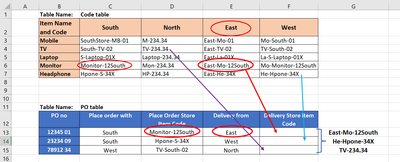
I have one table "Code table". Here Product code (Mobile, TV, Monitor, etc) is mentioned based on different stores (South Store, North Store, Ease, and West store).
I have another table "PO Table". Here one monitor is ordered from South store. But this product will be delivered from East store.
Both tables are in Power Query. In "PO Table", I want to get the item code of the delivery store based on the Store location. Please find the Picture for a better understanding.
For the first example, Conditional cells are marked with a red circle.
This would be great if you can give the solution with normal Power query steps rather than M language. 😀
Solved! Go to Solution.
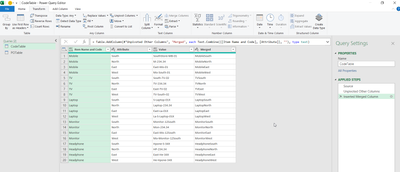
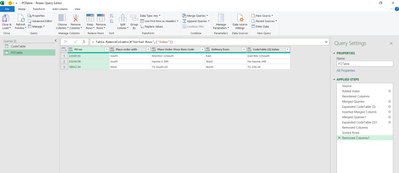
yes, I solved it. Main Part needs to pivot other columns of "Code table".
Then Need to merge and compare with "PO Table". With the below steps, Solved it. Shared with all if it helps other.
yes, I solved it. Main Part needs to pivot other columns of "Code table".
Then Need to merge and compare with "PO Table". With the below steps, Solved it. Shared with all if it helps other.
Check out the April 2026 Power BI update to learn about new features.
Sign up to receive a private message when registration opens and key events begin.
If you have recently started exploring Fabric, we'd love to hear how it's going. Your feedback can help with product improvements.