cancel
Showing results for 
Search instead for 
Did you mean: 

We've captured the moments from FabCon & SQLCon that everyone is talking about, and we are bringing them to the community, live and on-demand. Starts on April 14th. Register now

Reply
tswm00
Frequent Visitor

Expression.Evaluate to examine value of parameter?

Is it possible to use Expression.Evaluate to (dynamically) examine the value of a Power Query Parameter?

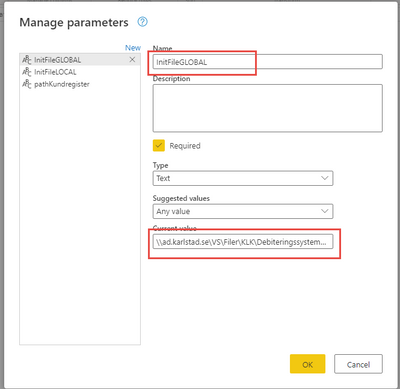
Trying the below results in null despite the parameter "InitFileGLOBAL" has a value.


let
  ParameterName = "InitFileGLOBAL",
  Source = Expression.Evaluate(ParameterName, #shared)
in
  Source
5 REPLIES 5
Vijay_A_Verma
Most Valuable Professional

You have to just say

let
   Source = InitFileGLOBAL
in
  Source

Thanks! I was unclear. I want to examine value dynamically and thus select what parameter to examine based on a string value representing the name of the parameter.

Vijay_A_Verma
Most Valuable Professional

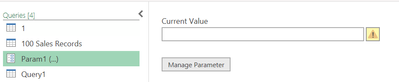
The way you have done is right. Check whether InitFileGLOBAL contains a value or not in Parameter screen. 

The null will come when there is no value in current value.

1.png

Thanks for your response!

I am trying to accomplish this in Power Query Online (Datamart)

When testing the same thing i Power Query for Excel it works as a charm so the question is if this is a permanent limitation in Power Query Online?

Online doesnt like the #share object or any other dynamic values in my queries (that works fine in the Excel version) so perhaps i need to rethink the design fundamentally.

tswm00_0-1654090019907.png


tswm00
Frequent Visitor

Perhaps Expression.Evaluate is not the right way?

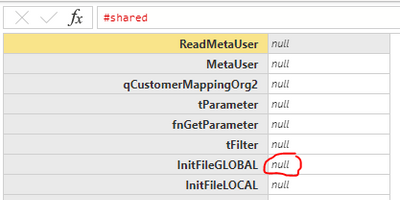
Examining #share results in:

tswm00_0-1654086800246.png


Helpful resources

Announcements
New to Fabric survey Carousel

New to Fabric Survey

If you have recently started exploring Fabric, we'd love to hear how it's going. Your feedback can help with product improvements.

Power BI DataViz World Championships carousel

Power BI DataViz World Championships - June 2026

A new Power BI DataViz World Championship is coming this June! Don't miss out on submitting your entry.

Join our Fabric User Panel

Join our Fabric User Panel

Share feedback directly with Fabric product managers, participate in targeted research studies and influence the Fabric roadmap.

March Power BI Update Carousel

Power BI Community Update - March 2026

Check out the March 2026 Power BI update to learn about new features.