Don't miss your chance to take the Fabric Data Engineer (DP-700) exam on us!
Learn moreNext up in the FabCon + SQLCon recap series: The roadmap for Microsoft SQL and Maximizing Developer experiences in Fabric. All sessions are available on-demand after the live show. Register now
I am trying to export some table - datasets (created with query from a db) to Excel.
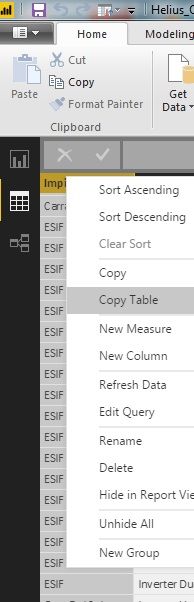
I have seen the option you can see in the image, 'copy table', but apparently it does not work when I try
paste to Excel
thanks
Solved! Go to Solution.
Hi @perpor,
It's the known issue that the Copy Table function doesn't work in latest Power BI desktop version, you can see this thread.
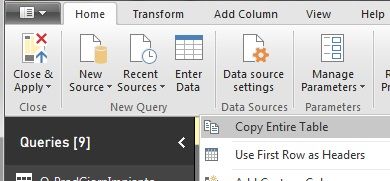
When you use Copy Entire Table in Query Editor, it will copy data which are loaded in the table, it means you need to scroll down to load all table data, then use this feature to copy and paste whole table.
Also you can try to use table visual to show data from that table, then use Export Data feature.
As the table comes from the database, you can get data from the database in Excel directly with the same connection information and credential used in desktop, see: Import Data from Database using Native Database Query (Power Query).
Best Regards,
Qiuyun Yu
Hi @perpor,
It's the known issue that the Copy Table function doesn't work in latest Power BI desktop version, you can see this thread.
When you use Copy Entire Table in Query Editor, it will copy data which are loaded in the table, it means you need to scroll down to load all table data, then use this feature to copy and paste whole table.
Also you can try to use table visual to show data from that table, then use Export Data feature.
As the table comes from the database, you can get data from the database in Excel directly with the same connection information and credential used in desktop, see: Import Data from Database using Native Database Query (Power Query).
Best Regards,
Qiuyun Yu
maybe I have found the solution (I answer to myself..), in query editor there is the option'copy entire table' that works...
Argh..... This option is limited to 1000 rows, the other are not copied !!!!
If you have recently started exploring Fabric, we'd love to hear how it's going. Your feedback can help with product improvements.
A new Power BI DataViz World Championship is coming this June! Don't miss out on submitting your entry.
Share feedback directly with Fabric product managers, participate in targeted research studies and influence the Fabric roadmap.
| User | Count |
|---|---|
| 5 | |
| 4 | |
| 3 | |
| 3 | |
| 2 |
| User | Count |
|---|---|
| 8 | |
| 6 | |
| 6 | |
| 5 | |
| 5 |