cancel
Showing results for 
Search instead for 
Did you mean: 

Try your skills in the Power BI Dataviz World Championship! Round one ends June 26. Join now

Reply
Supercat
Frequent Visitor

Expand table with wrong data

Hi 

   I have met a strange promble with table expand. Please check the picture following.


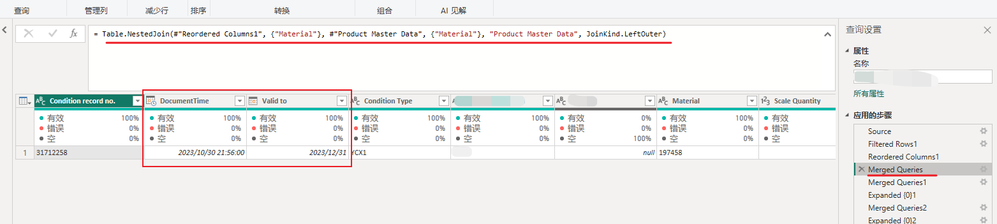
   I have filter one row and merge another table. You can see the data of "DocumentTime" and "Valid To".

Supercat_0-1698723222256.png


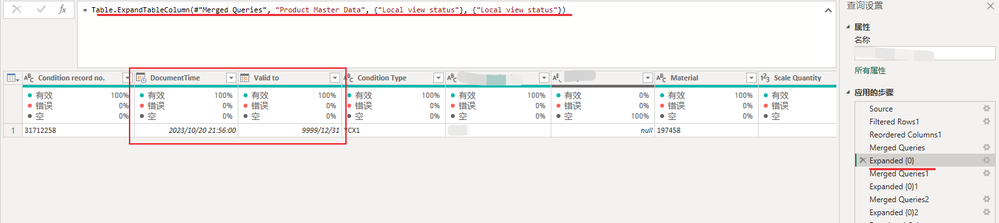
And then I expand the column of the table I just merge. Then the column "DocumentTime" and "Valid To" shows another information which I have already filtered in another table.


Supercat_2-1698723674896.png


I have tried other tables merge and expand, the same result. How can I fix with this problem?


Thank you all.

1 ACCEPTED SOLUTION
wdx223_Daniel
Community Champion
Community Champion

add a new step in your #"Product Master Data"

NewStep=Table.Buffer(YourOriginalLastStepName)

View solution in original post

3 REPLIES 3
wdx223_Daniel
Community Champion
Community Champion

add a new step in your #"Product Master Data"

NewStep=Table.Buffer(YourOriginalLastStepName)

Thank you.

I have added the Buffer to the source table, and then the result is right. My source tables are not loaded to the model. Can you please explain why this happened without buffer?

Table.Buffer will load the data into the memory and lock it.

Helpful resources

Announcements
Fabric Data Days is here Carousel

Fabric Data Days 2026

Don't miss out on Data Days, June 15 through August 7. Learn Fabric, Power BI, SQL, AI and more.

Power BI DataViz World Championships carousel

Power BI DataViz World Championships - June 2026

A new Power BI DataViz World Championship is coming this June! Don't miss out on submitting your entry.