Share feedback directly with Fabric product managers, participate in targeted research studies and influence the Fabric roadmap.
Sign up nowGet Fabric certified for FREE! Don't miss your chance! Learn more
On page https://msdn.microsoft.com/en-us/library/mt260859.aspx the definition of Excel.Workbook has 2 parameters. In the code generated by PowerBI the function has a third parameter. More specifically, the second is always "null'", the third one is "true".
As a test I removed the "null" second parameter and now the tables loaded with the first line promoted as header, exactly as the second parameter is supposed to do.
What happened here? Does PowerBI generate incorrect code or is the definition page wrong or ?
Thanks in advance for your answer
Solved! Go to Solution.
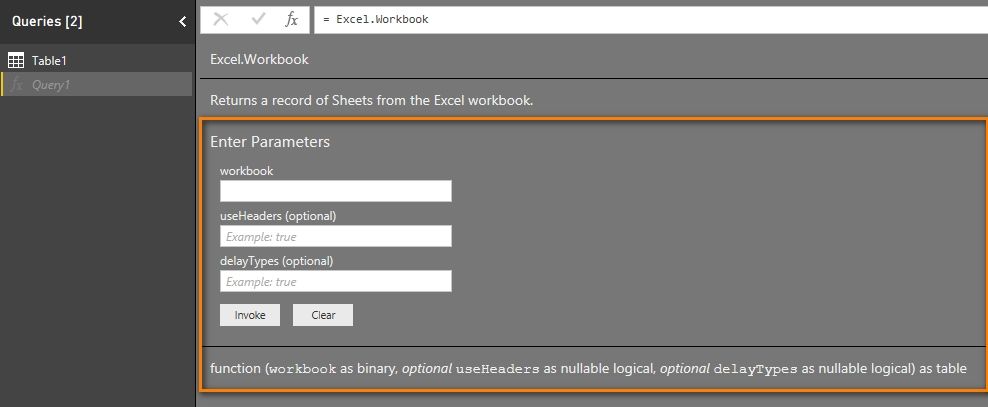
The MSDN documentation is somewhat out-of-date. The best place to find up-to-date documentation is in Power Query or Power BI Desktop itself. Inside the query editor, if you enter the formula
= Excel.Workbook
you will see the most recent documentation for that function.
Best Regards,
Herbert
The MSDN documentation is somewhat out-of-date. The best place to find up-to-date documentation is in Power Query or Power BI Desktop itself. Inside the query editor, if you enter the formula
= Excel.Workbook
you will see the most recent documentation for that function.
Best Regards,
Herbert
Hi @FrankHazel,
I can report this issue internally, will update to you once get feedback.
Best Regards,
Qiuyun Yu
Share feedback directly with Fabric product managers, participate in targeted research studies and influence the Fabric roadmap.
| User | Count |
|---|---|
| 12 | |
| 11 | |
| 11 | |
| 7 | |
| 6 |