cancel
Showing results for 
Search instead for 
Did you mean: 

July 7 - July 17 | Round 2 of the Power BI Dataviz World Championships. Don't miss your chance! Learn more

Reply
Anonymous
Not applicable

Excel Formula to Power Bi

Hi Folks,


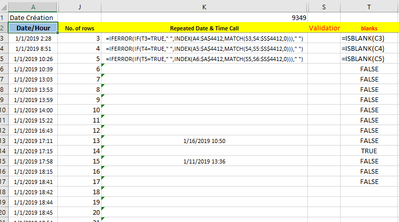
Need your Help on  convert this Excel formula to Dax Power BI fformula.

I allready tried searching but doesn't work.


Validitor = Unique Value

Date/Hour= Date of Call


Allan-Mautante_0-1614417672933.png


1 ACCEPTED SOLUTION
Jimmy801
Community Champion
Community Champion

Hello @Anonymous 


i can show you how to write these formulas in Power Query, but sometimes this is not the best approach, because Power Query is not Excel after all. 

ISBLANK = 
   [ColumnReference]=null
    or
    [Columnreference]="" depending if your column is empty cell or null

IFERROR = 
    surround your function with try ... yourfunction .... otherwise HereComesFunctionWhenFirstPartGivesError

IF(...,...,...)=
   if check then yourCodeIfCheck=True else yourCodeIfCheck=False

INDEX(MATCH)=
   these kind of function is not existing in Power Query but there is a better alternative and is Table.NestedJoin or Table.Join

I also dont know if your relative cell reference in INDEX or MATCH is intended and needed (basically your cell S4 its changed to S5 in the next row--> is that needed?).  And I really think that is needed --> then you can't use Table.NestedJoin but you would need to go for Table.SelectRows instead and you need to add a Index-column as well. 

Here the formula

Table.AddColumn(AddedIndex, "YourFormula", each try if [C]="" then "" else Table.SelectRows(AddedIndex, (sel)=> sel[Index]>[Index] and sel[S]=[S])[A]{0} otherwise "")

Here the complete code

let
    Source = Table.FromRows(Json.Document(Binary.Decompress(Binary.FromText("i45WCsovd1TSUQIiE6VYHTDfCcipAGJTmIAzVMAMJuCCUBELAA==", BinaryEncoding.Base64), Compression.Deflate)), let _t = ((type nullable text) meta [Serialized.Text = true]) in type table [A = _t, C = _t, S = _t]),
    #"Changed Type" = Table.TransformColumnTypes(Source,{{"A", type text}, {"C", type text}, {"S", Int64.Type}}),
    AddedIndex = Table.AddIndexColumn(#"Changed Type", "Index", 0, 1),
    #"Added Custom" = Table.AddColumn(AddedIndex, "YourFormula", each try if [C]="" then "" else Table.SelectRows(AddedIndex, (sel)=> sel[Index]>[Index] and sel[S]=[S])[A]{0} otherwise "")
in
    #"Added Custom"

transforms this

Jimmy801_0-1614440828607.png

into this

Jimmy801_1-1614440844410.png


Copy paste this code to the advanced editor in a new blank query to see how the solution works. 

If this post helps or solves your problem, please mark it as solution (to help other users find useful content and to acknowledge the work of users that helped you)
Kudoes are nice too

Have fun

Jimmy

View solution in original post

1 REPLY 1
Jimmy801
Community Champion
Community Champion

Hello @Anonymous 


i can show you how to write these formulas in Power Query, but sometimes this is not the best approach, because Power Query is not Excel after all. 

ISBLANK = 
   [ColumnReference]=null
    or
    [Columnreference]="" depending if your column is empty cell or null

IFERROR = 
    surround your function with try ... yourfunction .... otherwise HereComesFunctionWhenFirstPartGivesError

IF(...,...,...)=
   if check then yourCodeIfCheck=True else yourCodeIfCheck=False

INDEX(MATCH)=
   these kind of function is not existing in Power Query but there is a better alternative and is Table.NestedJoin or Table.Join

I also dont know if your relative cell reference in INDEX or MATCH is intended and needed (basically your cell S4 its changed to S5 in the next row--> is that needed?).  And I really think that is needed --> then you can't use Table.NestedJoin but you would need to go for Table.SelectRows instead and you need to add a Index-column as well. 

Here the formula

Table.AddColumn(AddedIndex, "YourFormula", each try if [C]="" then "" else Table.SelectRows(AddedIndex, (sel)=> sel[Index]>[Index] and sel[S]=[S])[A]{0} otherwise "")

Here the complete code

let
    Source = Table.FromRows(Json.Document(Binary.Decompress(Binary.FromText("i45WCsovd1TSUQIiE6VYHTDfCcipAGJTmIAzVMAMJuCCUBELAA==", BinaryEncoding.Base64), Compression.Deflate)), let _t = ((type nullable text) meta [Serialized.Text = true]) in type table [A = _t, C = _t, S = _t]),
    #"Changed Type" = Table.TransformColumnTypes(Source,{{"A", type text}, {"C", type text}, {"S", Int64.Type}}),
    AddedIndex = Table.AddIndexColumn(#"Changed Type", "Index", 0, 1),
    #"Added Custom" = Table.AddColumn(AddedIndex, "YourFormula", each try if [C]="" then "" else Table.SelectRows(AddedIndex, (sel)=> sel[Index]>[Index] and sel[S]=[S])[A]{0} otherwise "")
in
    #"Added Custom"

transforms this

Jimmy801_0-1614440828607.png

into this

Jimmy801_1-1614440844410.png


Copy paste this code to the advanced editor in a new blank query to see how the solution works. 

If this post helps or solves your problem, please mark it as solution (to help other users find useful content and to acknowledge the work of users that helped you)
Kudoes are nice too

Have fun

Jimmy
Helpful resources

Announcements
FabCon and SQLCon Barcelona 2026

FabCon & SQLCon – Barcelona 2026

Join us in Barcelona for FabCon and SQLCon, the Fabric, Power BI, SQL, and AI community event. Save €200 with code FABCMTY200.

60 days of Data Days Carousel

Data Days 2026

Join Fabric Data Days 2026: 60 days of free live/on-demand sessions, challenges, study groups, and certification opportunities.

Power BI DataViz World Championships carousel

Power BI DataViz World Championships - June 2026

A new Power BI DataViz World Championship is coming this June! Don't miss out on submitting your entry.
