Don't miss your chance to take the Fabric Data Engineer (DP-600) exam for FREE! Find out how by attending the DP-600 session on April 23rd (pacific time), live or on-demand.
Learn moreNext up in the FabCon + SQLCon recap series: The roadmap for Microsoft SQL and Maximizing Developer experiences in Fabric. All sessions are available on-demand after the live show. Register now
Hello,
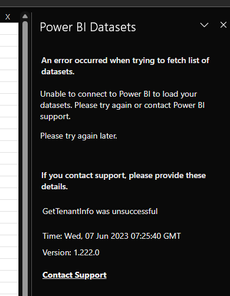
I am trying to connect a DataSet to Excel by my company account. When I open a desktop Excel and choose the Power Bi source, popup shows error with information " GetTenantInfo was unsuccessful ".
I Have tried relog, restart the Excel and whole PC several times without change. I Have similar rights as my colleagues, who are able to add it to Excel. When I add it via second account ( Again the same rights as mine ) and sent the Excel file with created connection to my PC, I am able to refresh the data, but adding a new DataSet stil not working.
Can someone help me with this ?
Hi @JakubG
Are you able to log in Power BI Service with the account that failed to connect to a dataset from Excel? When using this account in Power BI Service, are you able to see the dataset you want to connect to?
Best Regards,
Community Support Team _ Jing
Hi @v-jingzhang
Account works perfect in Power BI workspace and desktop.
Thanks.
Hi @JakubG
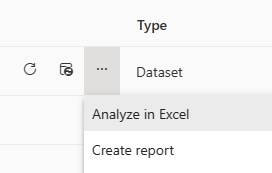
So are you able to use the Analyze in Excel feature from Power BI Service? This can also let you use a Power BI dataset in Excel. This may be a workaround. Create Excel workbooks with refreshable Power BI data - Power BI | Microsoft Learn
Best Regards,
Community Support Team _ Jing
If you have recently started exploring Fabric, we'd love to hear how it's going. Your feedback can help with product improvements.
A new Power BI DataViz World Championship is coming this June! Don't miss out on submitting your entry.
| User | Count |
|---|---|
| 5 | |
| 3 | |
| 3 | |
| 3 | |
| 2 |