cancel
Showing results for 
Search instead for 
Did you mean: 

The Power BI Data Visualization World Championships is back! Get ahead of the game and start preparing now! Learn more

Reply
Sab
Helper V
Helper V

Error converting percentages

Hello


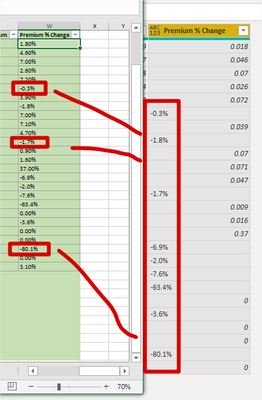
as you see in the screeshot below, when I load these percentage data, the negative ones stay as Text and I don't know why!!! I cannot convert them to number. There is no Chnage Type step in the query and I disabled automatic detection of data types..


Sab_0-1620865734855.png


Thank you!


1 ACCEPTED SOLUTION
Anonymous
Not applicable

Your column is not converted to a number type, it's still type any. As long as you have the header row in your data instead of promoting  them to headers. Ideally you'd format the Excel data as a table, and then no work would even be necessary, except to click the Get Data From Table/Range button.

Once you Promote those headers, you can probably use:

Fixed = Table.TransformColumns(PriorStep,  {{"Premium % Change", Number.FromText}})


--Nate

View solution in original post

3 REPLIES 3
Anonymous
Not applicable

Your column is not converted to a number type, it's still type any. As long as you have the header row in your data instead of promoting  them to headers. Ideally you'd format the Excel data as a table, and then no work would even be necessary, except to click the Get Data From Table/Range button.

Once you Promote those headers, you can probably use:

Fixed = Table.TransformColumns(PriorStep,  {{"Premium % Change", Number.FromText}})


--Nate

Fowmy
Super User
Super User

@Sab 

Try to right-click on the column, Change Type, and select Percentage.

If this doesn't solve your problem, can you share the M code or explain how the column was built? Check source data as well

Did I answer your question? Mark my post as a solution! and hit thumbs up


Subscribe and learn Power BI from these videos

Website LinkedIn PBI User Group

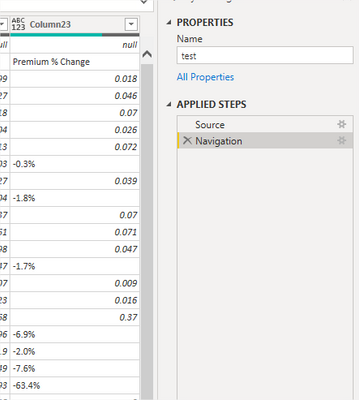
Not many steps at all! It just read the excel, navigate to the sheets and then converts positive percentages correctly, but it does not the negative ones!!!


I tried to change the '-' and the '%' with regular characters but nothing happened!

Sab_0-1620869177040.png


So the correct change type step (which I don't know where is executed!!!), for the first negative value of -0.3% should have been converted to -0.003


Helpful resources

Announcements
Power BI DataViz World Championships

Power BI Dataviz World Championships

The Power BI Data Visualization World Championships is back! Get ahead of the game and start preparing now!

December 2025 Power BI Update Carousel

Power BI Monthly Update - December 2025

Check out the December 2025 Power BI Holiday Recap!

FabCon Atlanta 2026 carousel

FabCon Atlanta 2026

Join us at FabCon Atlanta, March 16-20, for the ultimate Fabric, Power BI, AI and SQL community-led event. Save $200 with code FABCOMM.

Top Solution Authors