
cancel
Showing results for 
Search instead for 
Did you mean: 

Level up your Power BI skills this month - build one visual each week and tell better stories with data! Get started

Reply
roscas
Helper I
Helper I

Empty Table

Hello, I need your help to fix this issue.

How can I correct this error in Power Query,

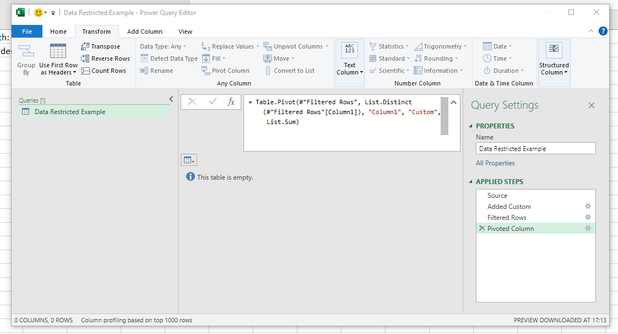
one of the steps is to apply a filter, normally after refreshing the report the table is updated.

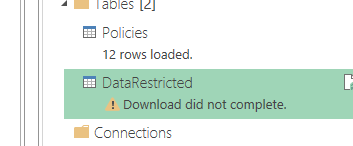
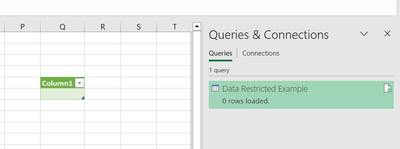
The problem I have now is that after applying the filter, the table is empty, and the query is not updated. "Download did not complete" error. Is there any way to bypass this error and load the table showing zero values (0)?


Thanks


1.png

2.png

5 REPLIES 5
Daryl-Lynch-Bzy
Community Champion
Community Champion

Hi @roscas - ah, I see that you have Pivot Column step.  This step will require rows with data other no columns are returned - no columns no table, so now you error message makes sense.


DarylLynchBzy_0-1673630055750.png

As a work around, you need to include and extra to checks if the table is empty and if so create an empty table as a substitute.  Something like this:

= if Table.IsEmpty( #"Pivoted Column" ) then #table( type table[Column1=text, Column2=text] , {} ) else #"Pivoted Column"


Daryl-Lynch-Bzy
Community Champion
Community Champion

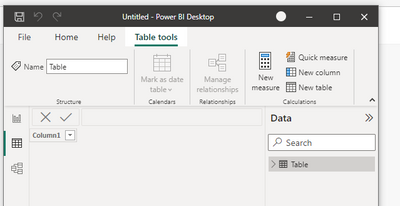
Hi @roscas - I am not sure how to help because Excel and a Power BI Dataset/Dataflows will load empty tables. 


DarylLynchBzy_0-1673628536056.png


DarylLynchBzy_1-1673628593876.png


@Daryl-Lynch-Bzy thanks for your recommendation, the problem I'm having is that if I apply this, a new table will be created. I need it to show zero in the same table, since this table is referenced with other formulas.

Hi @roscas - it is possible to include a row with Blank in this table.  Please refer to the Gorilla Bi Creating Tables - see the example in the #table constructor.

= #table(
     type table[ ProductKey = Int64.Type, Product = Text.Type ],
     {
        { 1, "Apple" },
        { 2, "Prume" }
     } 
) // Creates a table with specified Data Types and Column Names


Hi Daryl

The excel file is not empty, if you see the steps before apply Filter there are 128 rows, after filter is empty

3.jpg


Helpful resources

Announcements
April Power BI Update Carousel

Power BI Monthly Update - April 2026

Check out the April 2026 Power BI update to learn about new features.

Fabric SQL PBI Data Days

Data Days 2026 coming soon!

Sign up to receive a private message when registration opens and key events begin.

New to Fabric survey Carousel

New to Fabric Survey

If you have recently started exploring Fabric, we'd love to hear how it's going. Your feedback can help with product improvements.

Power BI DataViz World Championships carousel

Power BI DataViz World Championships - June 2026

A new Power BI DataViz World Championship is coming this June! Don't miss out on submitting your entry.

Top Solution Authors
Top Kudoed Authors