
Join us at FabCon Atlanta from March 16 - 20, 2026, for the ultimate Fabric, Power BI, AI and SQL community-led event. Save $200 with code FABCOMM.
Register now!The Power BI Data Visualization World Championships is back! Get ahead of the game and start preparing now! Learn more
Dear Everyone,
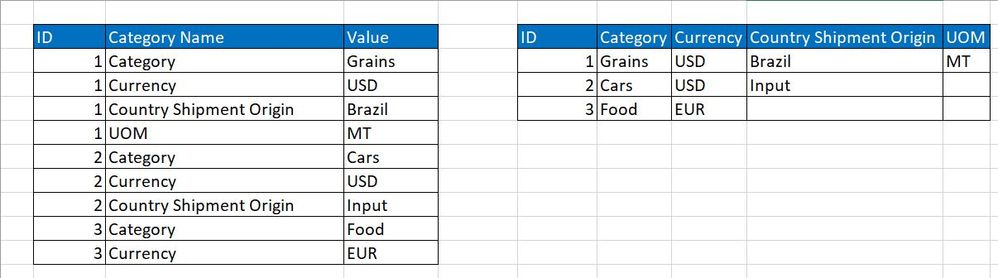
I am not sure if this is feasible, and I am guessing it will be heavy, row by row transformation with a custom M function, but I would like to get some ideas, as how to approach a problem I am currently facing. I will add the example below with mock data.
In short, one ID can have multiple properties with values associated to them. Each ID can have a different number of properties, listed in changing order, but with matching names (!). I would like to reduce the number of rows and expand the number of columns, meaning, one ID is in one row and each property name becomes a header, with a value assigned to it. This feels a bit similar to pivoting, but it is not exactly pivoting and due to the changing number of properties, it is also dynamic.
I would massively appreciate any help, as I am unsure how to approach this or even search on it. Thanks!
Solved! Go to Solution.
Hi @Anonymous ,
Try this m code:
let
Source = Table.FromRows(Json.Document(Binary.Decompress(Binary.FromText("i45WMlTSUXJOLElNzy+qBDLdixIz84qVYnWgMqVFRal5ySCZ0GAXhHB+aV5JUaVCcEZmQW5qXomCf1FmemYeUMapKLEqMweuMNTfF0j6hoAFjFCtck4sKkaIY1pkhNciz7yC0hKwOmNUY93y81MQ4ghjXUODlGJjAQ==", BinaryEncoding.Base64), Compression.Deflate)), let _t = ((type text) meta [Serialized.Text = true]) in type table [ID = _t, #"Category Name" = _t, Values = _t]),
#"Changed Type" = Table.TransformColumnTypes(Source,{{"ID", Int64.Type}, {"Category Name", type text}, {"Values", type text}}),
#"Pivoted Column" = Table.Pivot(#"Changed Type", List.Distinct(#"Changed Type"[#"Category Name"]), "Category Name", "Values")
in
#"Pivoted Column"
@Anonymous , refer pivot can help
Hi @Anonymous ,
Try this m code:
let
Source = Table.FromRows(Json.Document(Binary.Decompress(Binary.FromText("i45WMlTSUXJOLElNzy+qBDLdixIz84qVYnWgMqVFRal5ySCZ0GAXhHB+aV5JUaVCcEZmQW5qXomCf1FmemYeUMapKLEqMweuMNTfF0j6hoAFjFCtck4sKkaIY1pkhNciz7yC0hKwOmNUY93y81MQ4ghjXUODlGJjAQ==", BinaryEncoding.Base64), Compression.Deflate)), let _t = ((type text) meta [Serialized.Text = true]) in type table [ID = _t, #"Category Name" = _t, Values = _t]),
#"Changed Type" = Table.TransformColumnTypes(Source,{{"ID", Int64.Type}, {"Category Name", type text}, {"Values", type text}}),
#"Pivoted Column" = Table.Pivot(#"Changed Type", List.Distinct(#"Changed Type"[#"Category Name"]), "Category Name", "Values")
in
#"Pivoted Column"
Thanks @camargos88 this is the right direction, but the harder part is to make this dynamic, meaning each ID can have a different number of Properties, ordered in a changing way, so the columns should pick them up in the right order. Right now, a single pivot step will lead to the correct structure, but the columns will have mixed values, from other columns.
I will provide an example of this below.
| ID | Property Name | Value |
| 1 | Country | Brazil |
| 1 | Currency USD | |
| 2 | Currency | EUR |
| 2 | Product | Rice |
| 2 | Country | China |
-->
| ID | Currency | Product | Country |
| 1 | Brazil | ||
| 2 | EUR | Rice | China |
Yes, sorry, you are right - I was confused by the actual values in the data, as a column had very different values and I thought those are values from different fields that should not be in 1 column.
I did not expect pivoting to also recognize all the columns correctly, but it looks like it does.
Hi @Anonymous ,
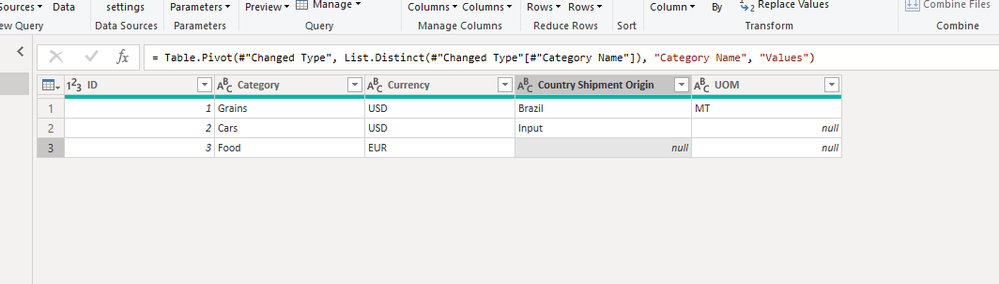
I pivot the "Property" column and returns the following result.
So how do you manage "Currency USD"? You could share your thoughts here.
The Power BI Data Visualization World Championships is back! Get ahead of the game and start preparing now!
| User | Count |
|---|---|
| 17 | |
| 9 | |
| 9 | |
| 7 | |
| 7 |