
cancel
Showing results for 
Search instead for 
Did you mean: 

July 7 - July 17 | Round 2 of the Power BI Dataviz World Championships. Don't miss your chance! Learn more

Reply
Anonymous
Not applicable

Dynamic transform - columnizing row data

Dear Everyone,


I am not sure if this is feasible, and I am guessing it will be heavy, row by row transformation with a custom M function, but I would like to get some ideas, as how to approach a problem I am currently facing. I will add the example below with mock data.


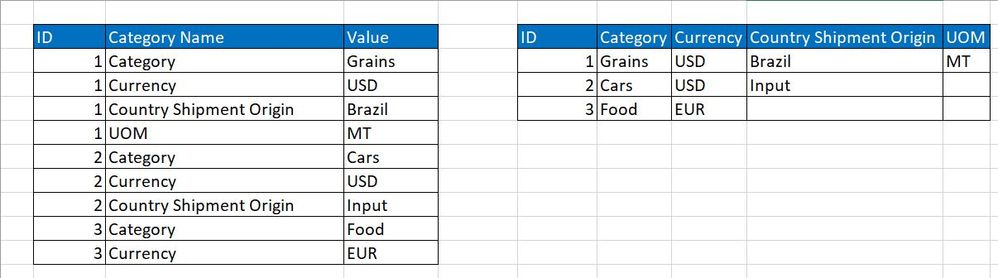
In short, one ID can have multiple properties with values associated to them. Each ID can have a different number of properties, listed in changing order, but with matching names (!). I would like to reduce the number of rows and expand the number of columns, meaning, one ID is in one row and each property name becomes a header, with a value assigned to it. This feels a bit similar to pivoting, but it is not exactly pivoting and due to the changing number of properties, it is also dynamic.


I would massively appreciate any help, as I am unsure how to approach this or even search on it. Thanks!


Transform.JPG

1 ACCEPTED SOLUTION
camargos88
Community Champion
Community Champion

Hi @Anonymous ,


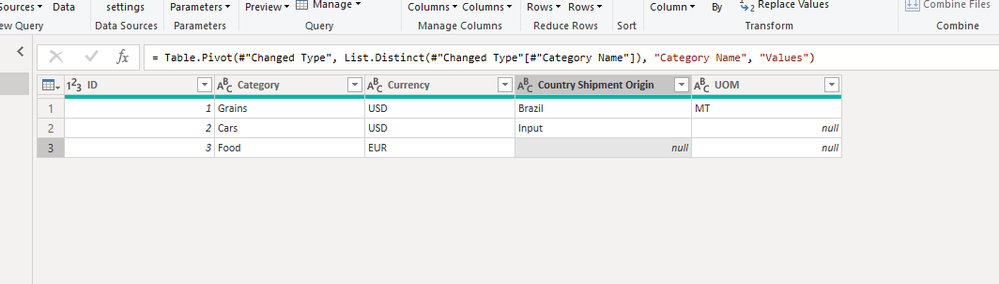
Try this m code:

let
Source = Table.FromRows(Json.Document(Binary.Decompress(Binary.FromText("i45WMlTSUXJOLElNzy+qBDLdixIz84qVYnWgMqVFRal5ySCZ0GAXhHB+aV5JUaVCcEZmQW5qXomCf1FmemYeUMapKLEqMweuMNTfF0j6hoAFjFCtck4sKkaIY1pkhNciz7yC0hKwOmNUY93y81MQ4ghjXUODlGJjAQ==", BinaryEncoding.Base64), Compression.Deflate)), let _t = ((type text) meta [Serialized.Text = true]) in type table [ID = _t, #"Category Name" = _t, Values = _t]),
#"Changed Type" = Table.TransformColumnTypes(Source,{{"ID", Int64.Type}, {"Category Name", type text}, {"Values", type text}}),
#"Pivoted Column" = Table.Pivot(#"Changed Type", List.Distinct(#"Changed Type"[#"Category Name"]), "Category Name", "Values")
in
#"Pivoted Column"


Capture.PNG


Did I answer your question? Mark my post as a solution!

Proud to be a Super User!


View solution in original post

6 REPLIES 6
amitchandak
Super User
Super User

@Anonymous , refer pivot can help

https://radacad.com/pivot-and-unpivot-with-power-bi

Share with Power BI Enthusiasts: Full Power BI Video (20 Hours) YouTube
Microsoft Fabric Series 60+ Videos YouTube
Microsoft Fabric Hindi End to End YouTube
camargos88
Community Champion
Community Champion

Hi @Anonymous ,


Try this m code:

let
Source = Table.FromRows(Json.Document(Binary.Decompress(Binary.FromText("i45WMlTSUXJOLElNzy+qBDLdixIz84qVYnWgMqVFRal5ySCZ0GAXhHB+aV5JUaVCcEZmQW5qXomCf1FmemYeUMapKLEqMweuMNTfF0j6hoAFjFCtck4sKkaIY1pkhNciz7yC0hKwOmNUY93y81MQ4ghjXUODlGJjAQ==", BinaryEncoding.Base64), Compression.Deflate)), let _t = ((type text) meta [Serialized.Text = true]) in type table [ID = _t, #"Category Name" = _t, Values = _t]),
#"Changed Type" = Table.TransformColumnTypes(Source,{{"ID", Int64.Type}, {"Category Name", type text}, {"Values", type text}}),
#"Pivoted Column" = Table.Pivot(#"Changed Type", List.Distinct(#"Changed Type"[#"Category Name"]), "Category Name", "Values")
in
#"Pivoted Column"


Capture.PNG


Did I answer your question? Mark my post as a solution!

Proud to be a Super User!


Anonymous
Not applicable

Thanks @camargos88 this is the right direction, but the harder part is to make this dynamic, meaning each ID can have a different number of Properties, ordered in a changing way, so the columns should pick them up in the right order. Right now, a single pivot step will lead to the correct structure, but the columns will have mixed values, from other columns.


I will provide an example of this below.


IDProperty NameValue
1CountryBrazil
1Currency USD 
2CurrencyEUR
2ProductRice
2CountryChina


-->


IDCurrencyProductCountry
1  Brazil
2EURRiceChina

H @Anonymous ,


I didn't get your point. ID's can have more than 1 same properties, like ID 1 has 2 countries ?

If no, the pivot will handle the correct transformation with the values.


Did I answer your question? Mark my post as a solution!

Proud to be a Super User!


Anonymous
Not applicable

Yes, sorry, you are right - I was confused by the actual values in the data, as a column had very different values and I thought those are values from different fields that should not be in 1 column.

I did not expect pivoting to also recognize all the columns correctly, but it looks like it does.

Hi @Anonymous ,


I pivot the "Property" column and returns the following result.

4-1.PNG

So how do you manage "Currency USD"? You could share your thoughts here.


Community Support Team _ Eads
If this post helps, then please consider Accept it as the solution to help the other members find it.

Helpful resources

Announcements
FabCon and SQLCon Barcelona 2026

FabCon & SQLCon – Barcelona 2026

Join us in Barcelona for FabCon and SQLCon, the Fabric, Power BI, SQL, and AI community event. Save €200 with code FABCMTY200.

60 days of Data Days Carousel

Data Days 2026

Join Fabric Data Days 2026: 60 days of free live/on-demand sessions, challenges, study groups, and certification opportunities.

Power BI DataViz World Championships carousel

Power BI DataViz World Championships - June 2026

A new Power BI DataViz World Championship is coming this June! Don't miss out on submitting your entry.