cancel
Showing results for 
Search instead for 
Did you mean: 

The Power BI Data Visualization World Championships is back! Get ahead of the game and start preparing now! Learn more

Reply
Anonymous
Not applicable

Dynamic data type

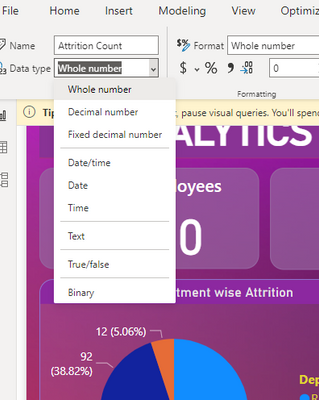
Dear all, i noticed that my Power BI desktop doesnt have dynamic data type. I saw alot of youtube tutorial that used dynamic data type to make their chart more interactive. 

Do anyone know why certain power bi desktop doesn't have dynamic data type ?

dynamic data type.png


1 ACCEPTED SOLUTION
ppm1
Solution Sage
Solution Sage

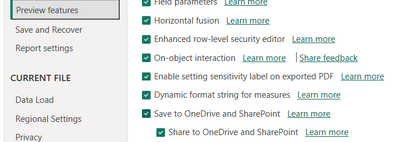
Assuming you have the latest version installed, you need to turn on the feature in Preview Features in File/Options and Settings/Options/Preview Features.

ppm1_0-1685706942058.png


Pat

Microsoft Employee

View solution in original post

2 REPLIES 2
ppm1
Solution Sage
Solution Sage

Assuming you have the latest version installed, you need to turn on the feature in Preview Features in File/Options and Settings/Options/Preview Features.

ppm1_0-1685706942058.png


Pat

Microsoft Employee
Anonymous
Not applicable

I tried turned on all the preview features (as what you show in the picture) and restart the Microsoft power bi application, restart the computer and all uninstall and install the power bi application but unfortunately nothing changed. 

Helpful resources

Announcements
Power BI DataViz World Championships

Power BI Dataviz World Championships

The Power BI Data Visualization World Championships is back! Get ahead of the game and start preparing now!

December 2025 Power BI Update Carousel

Power BI Monthly Update - December 2025

Check out the December 2025 Power BI Holiday Recap!

FabCon Atlanta 2026 carousel

FabCon Atlanta 2026

Join us at FabCon Atlanta, March 16-20, for the ultimate Fabric, Power BI, AI and SQL community-led event. Save $200 with code FABCOMM.