cancel
Showing results for 
Search instead for 
Did you mean: 

July 28 - August 9 | Final Round of the Power BI Dataviz World Championships. This is your chance. Learn more

Reply
Anonymous
Not applicable

Dynamic data type

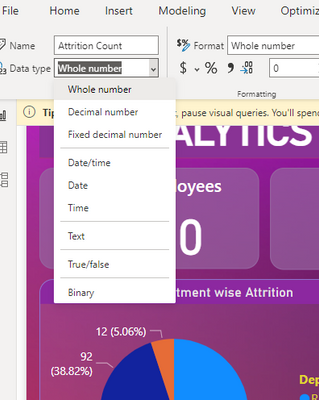
Dear all, i noticed that my Power BI desktop doesnt have dynamic data type. I saw alot of youtube tutorial that used dynamic data type to make their chart more interactive. 

Do anyone know why certain power bi desktop doesn't have dynamic data type ?

dynamic data type.png


1 ACCEPTED SOLUTION
ppm1
Solution Sage
Solution Sage

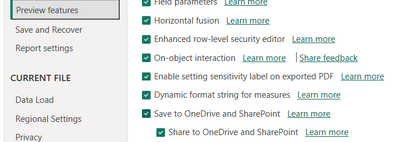
Assuming you have the latest version installed, you need to turn on the feature in Preview Features in File/Options and Settings/Options/Preview Features.

ppm1_0-1685706942058.png


Pat

Microsoft Employee

View solution in original post

2 REPLIES 2
ppm1
Solution Sage
Solution Sage

Assuming you have the latest version installed, you need to turn on the feature in Preview Features in File/Options and Settings/Options/Preview Features.

ppm1_0-1685706942058.png


Pat

Microsoft Employee
Anonymous
Not applicable

I tried turned on all the preview features (as what you show in the picture) and restart the Microsoft power bi application, restart the computer and all uninstall and install the power bi application but unfortunately nothing changed. 

Helpful resources

Announcements
FabCon and SQLCon Barcelona 2026

FabCon & SQLCon – Barcelona 2026

Join us in Barcelona for FabCon and SQLCon, the Fabric, Power BI, SQL, and AI community event. Save €200 with code FABCMTY200.

Power BI DataViz World Championships carousel

Power BI DataViz World Championships - June 2026

A new Power BI DataViz World Championship is coming this June! Don't miss out on submitting your entry.