Don't miss your chance to take the Fabric Data Engineer (DP-700) exam on us!
Learn moreWe've captured the moments from FabCon & SQLCon that everyone is talking about, and we are bringing them to the community, live and on-demand. Starts on April 14th. Register now
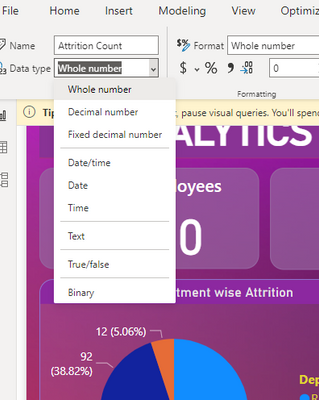
Dear all, i noticed that my Power BI desktop doesnt have dynamic data type. I saw alot of youtube tutorial that used dynamic data type to make their chart more interactive.
Do anyone know why certain power bi desktop doesn't have dynamic data type ?
Solved! Go to Solution.
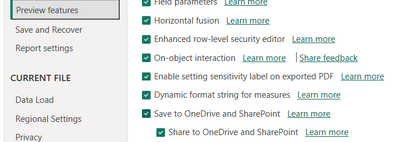
Assuming you have the latest version installed, you need to turn on the feature in Preview Features in File/Options and Settings/Options/Preview Features.
Pat
Assuming you have the latest version installed, you need to turn on the feature in Preview Features in File/Options and Settings/Options/Preview Features.
Pat
I tried turned on all the preview features (as what you show in the picture) and restart the Microsoft power bi application, restart the computer and all uninstall and install the power bi application but unfortunately nothing changed.
If you have recently started exploring Fabric, we'd love to hear how it's going. Your feedback can help with product improvements.
A new Power BI DataViz World Championship is coming this June! Don't miss out on submitting your entry.
Share feedback directly with Fabric product managers, participate in targeted research studies and influence the Fabric roadmap.
| User | Count |
|---|---|
| 5 | |
| 3 | |
| 2 | |
| 2 | |
| 2 |
| User | Count |
|---|---|
| 9 | |
| 8 | |
| 7 | |
| 5 | |
| 5 |