cancel
Showing results for 
Search instead for 
Did you mean: 

Vote for your favorite vizzies from the Power BI Dataviz World Championship submissions. Vote now!

Reply
luanamoreschi
Frequent Visitor

Duration Conversion and Calculation

Hello everyone. I have this database where the calls' duration are in the format 00:00:00 (hh:mm:ss). I.E:

Contact IDTMA 
100003:02:30 
100106:23:20 
100202:47:30 
100303:16:40 
100405:23:20 
100504:50:00 
100603:18:20 
100702:27:30 
100806:36:40 
100904:20:00 
101005:43:20 
101106:37:30 

When I try to convert it to Duration, I get the error:


DataFormat.Error: We couldn't convert to Duration.
Details:
00:12:41


I want to convert it so I can calculate the average for each Rep.
Thanks in advance


1 ACCEPTED SOLUTION
Peter_Beck
Resolver II
Resolver II

You might be getting this error becuase you are already automatically converting the data to a time, and then trying to make a duration from that.


If you have an automatic step that is converting the column to a "time", delete that step and replace it with a step that converts it to duration.


This gives an error:


let
Source = Table.FromRows(Json.Document(Binary.Decompress(Binary.FromText("i45WMjQwMFDSUTIwtjIwsjI2UIqNBQA=", BinaryEncoding.Base64), Compression.Deflate)), let _t = ((type nullable text) meta [Serialized.Text = true]) in type table [Contact_ID = _t, TMA = _t]),
#"Changed Type" = Table.TransformColumnTypes(Source,{{"TMA", type time}}),
#"Changed Type1" = Table.TransformColumnTypes(#"Changed Type",{{"TMA", type duration}})
in
#"Changed Type1"


This works ok:


let
Source = Table.FromRows(Json.Document(Binary.Decompress(Binary.FromText("i45WMjQwMFDSUTIwtjIwsjI2UIqNBQA=", BinaryEncoding.Base64), Compression.Deflate)), let _t = ((type nullable text) meta [Serialized.Text = true]) in type table [Contact_ID = _t, TMA = _t]),
#"Changed Type1" = Table.TransformColumnTypes(#"Source",{{"TMA", type duration}}) // note removed step from previous example
in
#"Changed Type1"


Hope this helps,


Peter


View solution in original post

4 REPLIES 4
Peter_Beck
Resolver II
Resolver II

You might be getting this error becuase you are already automatically converting the data to a time, and then trying to make a duration from that.


If you have an automatic step that is converting the column to a "time", delete that step and replace it with a step that converts it to duration.


This gives an error:


let
Source = Table.FromRows(Json.Document(Binary.Decompress(Binary.FromText("i45WMjQwMFDSUTIwtjIwsjI2UIqNBQA=", BinaryEncoding.Base64), Compression.Deflate)), let _t = ((type nullable text) meta [Serialized.Text = true]) in type table [Contact_ID = _t, TMA = _t]),
#"Changed Type" = Table.TransformColumnTypes(Source,{{"TMA", type time}}),
#"Changed Type1" = Table.TransformColumnTypes(#"Changed Type",{{"TMA", type duration}})
in
#"Changed Type1"


This works ok:


let
Source = Table.FromRows(Json.Document(Binary.Decompress(Binary.FromText("i45WMjQwMFDSUTIwtjIwsjI2UIqNBQA=", BinaryEncoding.Base64), Compression.Deflate)), let _t = ((type nullable text) meta [Serialized.Text = true]) in type table [Contact_ID = _t, TMA = _t]),
#"Changed Type1" = Table.TransformColumnTypes(#"Source",{{"TMA", type duration}}) // note removed step from previous example
in
#"Changed Type1"


Hope this helps,


Peter


Thank you!

It worked. But I wanted to convert to duration in minutes, is it possible?

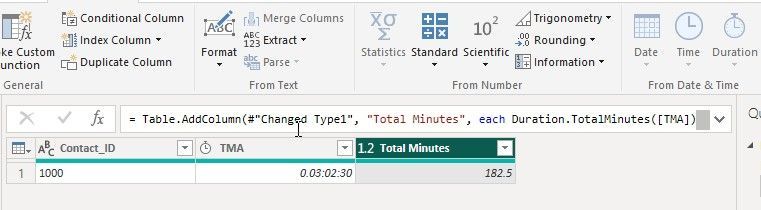
Do you mean convert 3 hrs 2 min 30 sec (the example above) to 182.5 minutes?


If so, you can use the functon Duration.TotalMinutes:


https://learn.microsoft.com/en-us/powerquery-m/duration-totalminutes


Alternatively, select the column, and on the Add Column tab, select Duration... and then Total Minutes (it is on the upper right side of the tab - see the screen-shot below). This will create a new column with the total minutes for the column you selected.


ScreenHunter_117 Mar. 14 20.58.jpg

Hope this helps,


Peter

Hope this helps,


Peter

wdx223_Daniel
Community Champion
Community Champion

NewStep=Table.TransformColumns(PreviousStepName,{"TMA",each Duration.From(Number.From(_))})

Helpful resources

Announcements
Power BI DataViz World Championships

Power BI Dataviz World Championships

The Power BI Data Visualization World Championships is back! It's time to submit your entry.

Sticker Challenge 2026 Carousel

Join our Community Sticker Challenge 2026

If you love stickers, then you will definitely want to check out our Community Sticker Challenge!

January Power BI Update Carousel

Power BI Monthly Update - January 2026

Check out the January 2026 Power BI update to learn about new features.

FabCon Atlanta 2026 carousel

FabCon Atlanta 2026

Join us at FabCon Atlanta, March 16-20, for the ultimate Fabric, Power BI, AI and SQL community-led event. Save $200 with code FABCOMM.