Join us at FabCon Atlanta from March 16 - 20, 2026, for the ultimate Fabric, Power BI, AI and SQL community-led event. Save $200 with code FABCOMM.
Register now!Vote for your favorite vizzies from the Power BI Dataviz World Championship submissions. Vote now!
Hi!
I have a two tables:
First table contains info about actual sales per country and date.
Second table contains info about EXPECTED sales per country and date.
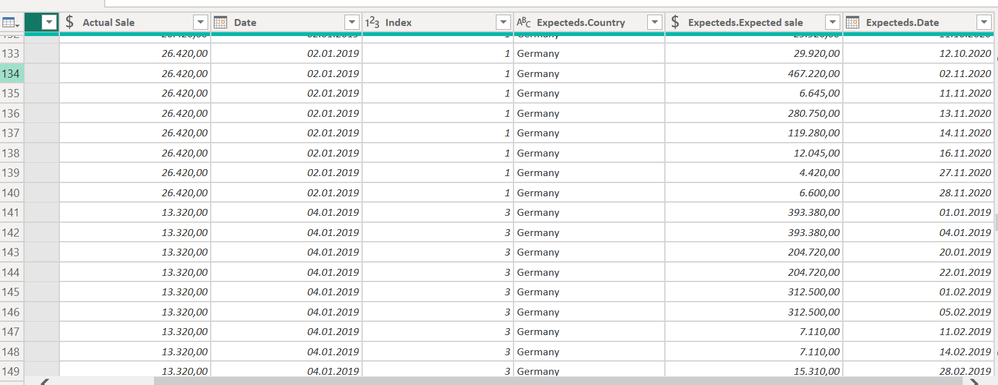
Some of the countries are not present in both tables, that is why I perfomed an outer join. BUT after performing this join, for the first table I get duplicated values as the dates are different for the both tables (not all the dates in 2nd table are present in 1st table and the opposite).Issue
How can I fill the duplicated values with 0s like here:
Solved: Re: Keep only first value rest put 0 - Microsoft Fabric Community
I already tried this solution but I am not able to implement it.
Please provide sample data that covers your issue or question completely, in a usable format (not as a screenshot).
Do not include sensitive information or anything not related to the issue or question.
If you are unsure how to upload data please refer to https://community.fabric.microsoft.com/t5/Community-Blog/How-to-provide-sample-data-in-the-Power-BI-...
Please show the expected outcome based on the sample data you provided.
Want faster answers? https://community.fabric.microsoft.com/t5/Desktop/How-to-Get-Your-Question-Answered-Quickly/m-p/1447...
If you love stickers, then you will definitely want to check out our Community Sticker Challenge!
Check out the January 2026 Power BI update to learn about new features.
| User | Count |
|---|---|
| 7 | |
| 5 | |
| 4 | |
| 3 | |
| 3 |
| User | Count |
|---|---|
| 13 | |
| 11 | |
| 11 | |
| 8 | |
| 6 |