Get Fabric or SQL Certified for Free.
Get certified for free when you join Fabric Data Days 2026 and dive into Fabric, Power BI, SQL, AI, and other essential data skills.
Join now- Power BI forums
- Get Help with Power BI
- Desktop
- Service
- Report Server
- Power Query
- Mobile Apps
- Developer
- DAX Commands and Tips
- Custom Visuals Development Discussion
- Health and Life Sciences
- Power BI Spanish forums
- Translated Spanish Desktop
- Training and Consulting
- Instructor Led Training
- Dashboard in a Day for Women, by Women
- Galleries
- Data Stories Gallery
- Themes Gallery
- Contests Gallery
- QuickViz Gallery
- Quick Measures Gallery
- Visual Calculations Gallery
- Fabric Apps Gallery
- Notebook Gallery
- Translytical Task Flow Gallery
- TMDL Gallery
- R Script Showcase
- Webinars and Video Gallery
- Ideas
- Custom Visuals Ideas (read-only)
- Issues
- Issues
- Events
- Upcoming Events
July 7 - July 17 | Round 2 of the Power BI Dataviz World Championships. Don't miss your chance! Learn more
- Power BI forums
- Forums
- Get Help with Power BI
- Power Query
- Re: Distinct Count in Query Editor... Is Group by ...
- Subscribe to RSS Feed
- Mark Topic as New
- Mark Topic as Read
- Float this Topic for Current User
- Bookmark
- Subscribe
- Printer Friendly Page


- Mark as New
- Bookmark
- Subscribe
- Mute
- Subscribe to RSS Feed
- Permalink
- Report Inappropriate Content
Distinct Count in Query Editor... Is Group by the only solution
I have multiple columns that I need to do a distinct count within query editor. It seems that Group By is the only option... Do I need to preform a group by for every column, delete the extra columns created, and rename them when I'm done? Is this best practice for distinct column value counts in query editor?


- Mark as New
- Bookmark
- Subscribe
- Mute
- Subscribe to RSS Feed
- Permalink
- Report Inappropriate Content
If you want a distinct count of various columns you could:
[
Column1Count = List.Count(List.Distinct(Table[Column1])),
Column2Count = List.Count(List.Distinct(Table[Column2])),
Column3Count = List.Count(List.Distinct(Table[Column3])),
...
]
- Mark as New
- Bookmark
- Subscribe
- Mute
- Subscribe to RSS Feed
- Permalink
- Report Inappropriate Content
Thanks Artemus,
I may have mispoke on what I was trying to accomplish.
Column 1 contains many different values. I want to see the frequecy of every value within that column in another column. I could do that with a group by Count, and add All Rows, but my problem is that there are many columns in that table that I also need the value's frequency.
I am dreading the thought of doing a group by 10+ times, and then cleaning. Especially since my data is 300k+ rows.
- Mark as New
- Bookmark
- Subscribe
- Mute
- Subscribe to RSS Feed
- Permalink
- Report Inappropriate Content
What is the format of the table you want to have at the end? E.g.
| ColumnName | Term | Count |
| Column1 | Value1 | 4 |
| Column1 | Value2 | 6 |
| Column2 | Value1 | 1 |
- Mark as New
- Bookmark
- Subscribe
- Mute
- Subscribe to RSS Feed
- Permalink
- Report Inappropriate Content
| Fruit | Vegetable | FruitCount | VegetableCount |
| Apple | Carrot | 1 | 2 |
| Orange | Carrot | 3 | 2 |
| Peach | Cucumber | 2 | 2 |
| Peach | Tomato | 2 | 1 |
| Orange | Onion | 3 | 1 |
| Orange | Cucumber | 3 | 2 |
- Mark as New
- Bookmark
- Subscribe
- Mute
- Subscribe to RSS Feed
- Permalink
- Report Inappropriate Content
Ok, you do realize that your table isn't normalized though? E.g. In your example above, you have Orange 3 times, and for all 3 times FruitCount is 3. This can cause issues when you aggergate it on the visualization layer.
It is possible to do this, but it may not be what you want.
- Mark as New
- Bookmark
- Subscribe
- Mute
- Subscribe to RSS Feed
- Permalink
- Report Inappropriate Content
I realize this table is very simple, but I have many columns that need to be counted.
I used a Text.Combine to group the columns that need to be counted together, since there are so many.

- Mark as New
- Bookmark
- Subscribe
- Mute
- Subscribe to RSS Feed
- Permalink
- Report Inappropriate Content
Hi @thegusman
You could create calculated columns in Data model view,
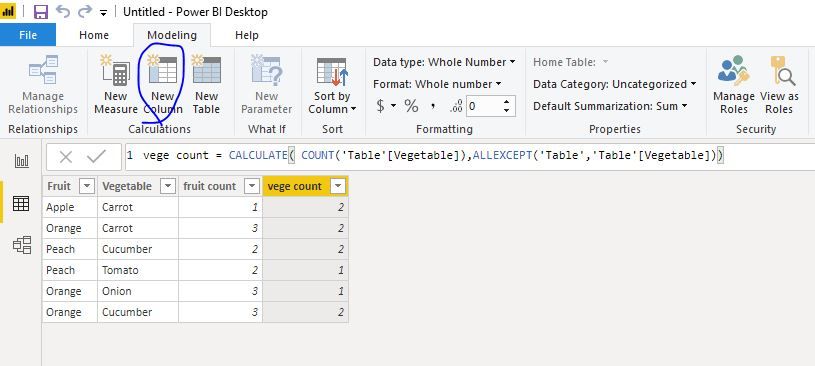
fruit count = CALCULATE( COUNT('Table'[Fruit]),ALLEXCEPT('Table','Table'[Fruit]))

vege count = CALCULATE( COUNT('Table'[Vegetable]),ALLEXCEPT('Table','Table'[Vegetable]))
or create measures which can change with slicers
fruit count m = CALCULATE( COUNT('Table'[Fruit]),FILTER(ALLSELECTED('Table'),'Table'[Fruit]=MAX('Table'[Fruit])))

vege count m = CALCULATE( COUNT('Table'[Vegetable]),FILTER(ALLSELECTED('Table'),'Table'[Vegetable]=MAX('Table'[Vegetable])))
Best Regards
Maggie
Community Support Team _ Maggie Li
If this post helps, then please consider Accept it as the solution to help the other members find it more quickly.
- Mark as New
- Bookmark
- Subscribe
- Mute
- Subscribe to RSS Feed
- Permalink
- Report Inappropriate Content
Hi @thegusman ,
same as above in the @artemus post, but agnostic to column names:
let
    Source = Table.FromRows(Json.Document(Binary.Decompress(Binary.FromText("Vc3LDQAhCEXRXli7APxSi6H/NsanYjILSe4J6pykLEaJhNcY5AmiCJE1LAQhehYv7arHL2VUw8hB5W2VIBTvcwE3zp8tqKPsR+O9VMn9Aw==", BinaryEncoding.Base64), Compression.Deflate)), let _t = ((type text) meta [Serialized.Text = true]) in type table [Year = _t, Sales = _t, Costs = _t]),
    DistinctCount = List.Accumulate(Table.ColumnNames(Source), [], (s,a)=> Record.AddField(s, a, List.Count(List.Distinct(Table.Column(Source, a)))))
in
    DistinctCount
Kind regards,
JB

Helpful resources

FabCon & SQLCon – Barcelona 2026
Join us in Barcelona for FabCon and SQLCon, the Fabric, Power BI, SQL, and AI community event. Save €200 with code FABCMTY200.

Fabric Community Sticker Challenge - Barcelona 2026
If you love stickers, then you will definitely want to check out our community sticker challenge, Barcelona edition!

Power BI Monthly Update - July 2026
Check out the July 2026 Power BI update to learn about new features.

Power BI DataViz World Championships - June 2026
A new Power BI DataViz World Championship is coming this June! Don't miss out on submitting your entry.


