cancel
Showing results for 
Search instead for 
Did you mean: 

The Power BI Data Visualization World Championships is back! Get ahead of the game and start preparing now! Learn more

Reply
Umair_Aslam
Helper I
Helper I

Disable Slicer.

Hi everyone!


I am trying to disable the slicer filter but I can't able to do that. is everyone know How to disable the slicer filter?

Through this no one can use the filter.

1 ACCEPTED SOLUTION

Hi @Umair_Aslam 


Do you mean the slicer should still be displayed on the report page but report users cannot use it to filter? If so, you can add a shape on top layer of the slicer and make it cover the slicer completely. Then make the shape border to 0 and make color to transparent. In this way, users can see the slicer but they cannot use it. 


If your purpose is to make a slicer not filter some visuals in the report, you can select the slicer, go to Format >  Edit interactions, make it not filter other visuals. Change how visuals interact in a report - Power BI | Microsoft Learn


Best Regards,
Community Support Team _ Jing
If this post helps, please Accept it as Solution to help other members find it. Highly appreciate your Kudos!

View solution in original post

3 REPLIES 3
v-jingzhang
Community Support
Community Support

Hi @Umair_Aslam 


You can hide or lock the filters in Filter Pane. 

Solved: How to hide filter pane? - Microsoft Power BI Community

Power BI Visualization Tip: Hide or Lock the Filter for Users - RADACAD


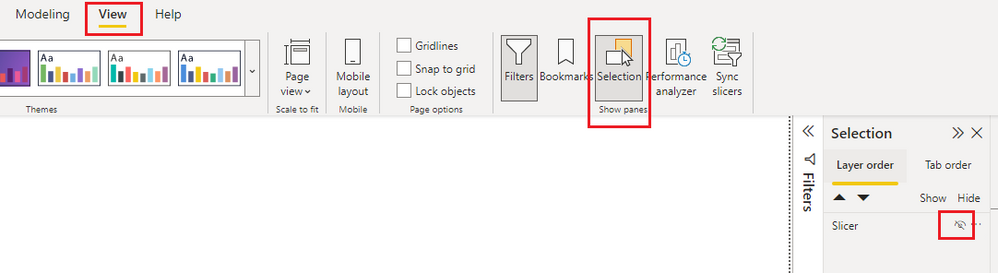
For slicers, you can also hide them like below. 

vjingzhang_0-1671069075041.png

Hope this helps. 


Best Regards,
Community Support Team _ Jing
If this post helps, please Accept it as Solution to help other members find it. Highly appreciate your Kudos!

Hi @v-jingzhang ,

Thanks for your response,

I want to do a slicer filter disable or block.

Hi @Umair_Aslam 


Do you mean the slicer should still be displayed on the report page but report users cannot use it to filter? If so, you can add a shape on top layer of the slicer and make it cover the slicer completely. Then make the shape border to 0 and make color to transparent. In this way, users can see the slicer but they cannot use it. 


If your purpose is to make a slicer not filter some visuals in the report, you can select the slicer, go to Format >  Edit interactions, make it not filter other visuals. Change how visuals interact in a report - Power BI | Microsoft Learn


Best Regards,
Community Support Team _ Jing
If this post helps, please Accept it as Solution to help other members find it. Highly appreciate your Kudos!

Helpful resources

Announcements
Power BI DataViz World Championships

Power BI Dataviz World Championships

The Power BI Data Visualization World Championships is back! Get ahead of the game and start preparing now!

December 2025 Power BI Update Carousel

Power BI Monthly Update - December 2025

Check out the December 2025 Power BI Holiday Recap!

FabCon Atlanta 2026 carousel

FabCon Atlanta 2026

Join us at FabCon Atlanta, March 16-20, for the ultimate Fabric, Power BI, AI and SQL community-led event. Save $200 with code FABCOMM.

Top Solution Authors