cancel
Showing results for 
Search instead for 
Did you mean: 

July 7 - July 17 | Round 2 of the Power BI Dataviz World Championships. Don't miss your chance! Learn more

Reply
Umair_Aslam
Helper I
Helper I

Disable Slicer.

Hi everyone!


I am trying to disable the slicer filter but I can't able to do that. is everyone know How to disable the slicer filter?

Through this no one can use the filter.

1 ACCEPTED SOLUTION

Hi @Umair_Aslam 


Do you mean the slicer should still be displayed on the report page but report users cannot use it to filter? If so, you can add a shape on top layer of the slicer and make it cover the slicer completely. Then make the shape border to 0 and make color to transparent. In this way, users can see the slicer but they cannot use it. 


If your purpose is to make a slicer not filter some visuals in the report, you can select the slicer, go to Format >  Edit interactions, make it not filter other visuals. Change how visuals interact in a report - Power BI | Microsoft Learn


Best Regards,
Community Support Team _ Jing
If this post helps, please Accept it as Solution to help other members find it. Highly appreciate your Kudos!

View solution in original post

3 REPLIES 3
v-jingzhang
Community Support
Community Support

Hi @Umair_Aslam 


You can hide or lock the filters in Filter Pane. 

Solved: How to hide filter pane? - Microsoft Power BI Community

Power BI Visualization Tip: Hide or Lock the Filter for Users - RADACAD


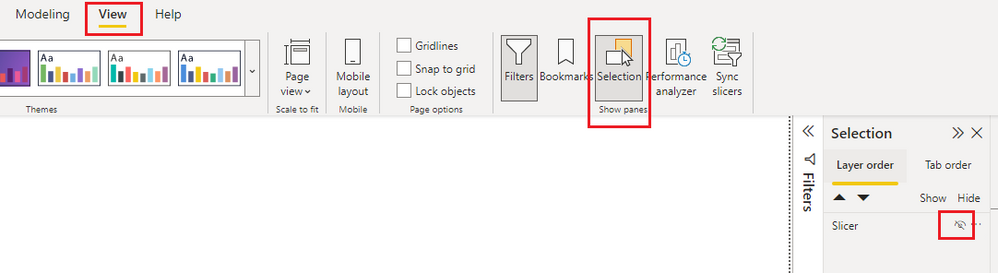
For slicers, you can also hide them like below. 

vjingzhang_0-1671069075041.png

Hope this helps. 


Best Regards,
Community Support Team _ Jing
If this post helps, please Accept it as Solution to help other members find it. Highly appreciate your Kudos!

Hi @v-jingzhang ,

Thanks for your response,

I want to do a slicer filter disable or block.

Hi @Umair_Aslam 


Do you mean the slicer should still be displayed on the report page but report users cannot use it to filter? If so, you can add a shape on top layer of the slicer and make it cover the slicer completely. Then make the shape border to 0 and make color to transparent. In this way, users can see the slicer but they cannot use it. 


If your purpose is to make a slicer not filter some visuals in the report, you can select the slicer, go to Format >  Edit interactions, make it not filter other visuals. Change how visuals interact in a report - Power BI | Microsoft Learn


Best Regards,
Community Support Team _ Jing
If this post helps, please Accept it as Solution to help other members find it. Highly appreciate your Kudos!

Helpful resources

Announcements
FabCon and SQLCon Barcelona 2026

FabCon & SQLCon – Barcelona 2026

Join us in Barcelona for FabCon and SQLCon, the Fabric, Power BI, SQL, and AI community event. Save €200 with code FABCMTY200.

60 days of Data Days Carousel

Data Days 2026

Join Fabric Data Days 2026: 60 days of free live/on-demand sessions, challenges, study groups, and certification opportunities.

Power BI DataViz World Championships carousel

Power BI DataViz World Championships - June 2026

A new Power BI DataViz World Championship is coming this June! Don't miss out on submitting your entry.