cancel
Showing results for 
Search instead for 
Did you mean: 

July 7 - July 17 | Round 2 of the Power BI Dataviz World Championships. Don't miss your chance! Learn more

Reply
Anonymous
Not applicable

DirectQuery: Decode text from Base64

Hello,

I have an existing PowerBI report which utilizes DirectQuery to read from a PostgreSQL database. I recently added a new Postgres table that has a column of base64 encoded text. I need to decode it from Base64 and display it on my PowerBI report. I tried to add a new column and use the function Binary.FromText to decode it, as mentioned in this post:Is there a way to decode a base64 text field?. It didn't work for me because I am using DirectQuery.


let
    Source = PostgreSQL.Database("xx-xxxx-xxxx-xx.xxx.xxxx.xxx:xxxx", "xxxxxx"),
    dcsd_s_postbibfeedbackoutput = Source{[Schema="dcsd_s",Item="postbibfeedbackoutput"]}[Data],
    #"Added Custom" = Table.AddColumn(dcsd_s_postbibfeedbackoutput, "decodedRecord", each Lines.FromBinary(Binary.FromText([originalRecord],BinaryEncoding.Base64), null, null, 1252){0})
in
    #"Added Custom"



pelinoa_0-1712081517864.png


I don't think I can switch to Import mode (instead of DirectQuery) because of two reasons:

1) the report needs to be updated ASAP when new data is available.

2) the amount of data that I'm loading to this report is huge.


I also thought about decoding the string in Postgres first, and then reading it from PowerBI. But I was told that the string might get distorted when PowerBI reads it from Postgres. 


Is there any way for me to decode these base64 text strings in PowerBI while using DirectQuery?


Thank you for your time.

2 ACCEPTED SOLUTIONS
AnalyticPulse
Solution Sage
Solution Sage

direct query mode relies on querying the data source in realtime, and transformations like Base64 decoding happen within Power bi's internal engine, you can preprocess the data in etl to to decode then import it in powerbi. or you can go for source level decoding ie decode at database level

View solution in original post

AlexisOlson
Super User
Super User

I think @AnalyticPulse is right. Decoding isn't likely compatible with DirectQuery since it breaks query folding. The best option would be to decode it in the database before connecting.


Alternatively, it's likely possible to decode using DAX but you'd have to write your own custom logic to do that.

View solution in original post

4 REPLIES 4
Anonymous
Not applicable

Hi @Anonymous 

Thanks for the solution @AlexisOlson  and @AnalyticPulse  provided, and i want to offer some more information for you to refer to. 

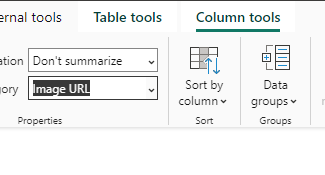
Based on the picture you have offered, do you want use the base 64 to display picture? If you want to implement, you can change the base 64 to image url in data category in Power BI Desktop, you can refer to the following picture.

vxinruzhumsft_0-1712546342589.png

And you can refer to the following article about more.

Embedding Images in Power BI using Base64 – Some Random Thoughts (sqljason.com)


Best Regards!

Yolo Zhu

If this post helps, then please consider Accept it as the solution to help the other members find it more quickly.


Anonymous
Not applicable

No, this is not a picture. It is a marc record that was encoded to base-64, and should be decoded for the user to properly view it. Thank you.

AlexisOlson
Super User
Super User

I think @AnalyticPulse is right. Decoding isn't likely compatible with DirectQuery since it breaks query folding. The best option would be to decode it in the database before connecting.


Alternatively, it's likely possible to decode using DAX but you'd have to write your own custom logic to do that.

AnalyticPulse
Solution Sage
Solution Sage

direct query mode relies on querying the data source in realtime, and transformations like Base64 decoding happen within Power bi's internal engine, you can preprocess the data in etl to to decode then import it in powerbi. or you can go for source level decoding ie decode at database level

Helpful resources

Announcements
FabCon and SQLCon Barcelona 2026

FabCon & SQLCon – Barcelona 2026

Join us in Barcelona for FabCon and SQLCon, the Fabric, Power BI, SQL, and AI community event. Save €200 with code FABCMTY200.

60 days of Data Days Carousel

Data Days 2026

Join Data Days 2026: 60 days of free live/on-demand sessions, challenges, study groups, and certification opportunities.

Power BI DataViz World Championships carousel

Power BI DataViz World Championships - June 2026

A new Power BI DataViz World Championship is coming this June! Don't miss out on submitting your entry.

Top Solution Authors