cancel
Showing results for 
Search instead for 
Did you mean: 

July 7 - July 17 | Round 2 of the Power BI Dataviz World Championships. Don't miss your chance! Learn more

Reply
bselby
Frequent Visitor

Direct Query - SAP HANA Database

Good afternoon,


I have a question about the Direct Query mode of the SAP HANA Database connection.


Creating and using the connection in the first instance works perfectly - I can connect to Calculation Views stored on our HANA databases, design dashboards and publish them.


My issue is that once that initial connection is made, it cannot be changed or edited. This is a massive burden when trying to replicate the same dashboard across multiple databases, because the layout has to be built from scratch again in a new dashboard with a new connection.


As an example, we have a sales dashboard looking at a Calc. View for our Australian database. We'd like the same dashboard for our New Zealand database. I'd expect to be able to create a copy of the dashboard file and change the connection to look at the New Zealand Calc. View, especially because all the fields are the same. Unfortunately, I can't find a way to do this.


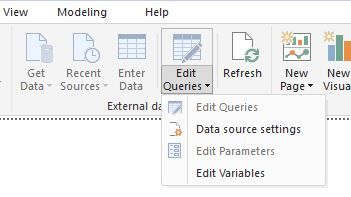
Does anybody have a solution? Data Source Settings only allows me to change the connection credentials.


HANA Direct Query Power BI.JPG


1 ACCEPTED SOLUTION
Anonymous
Not applicable

@bselby,

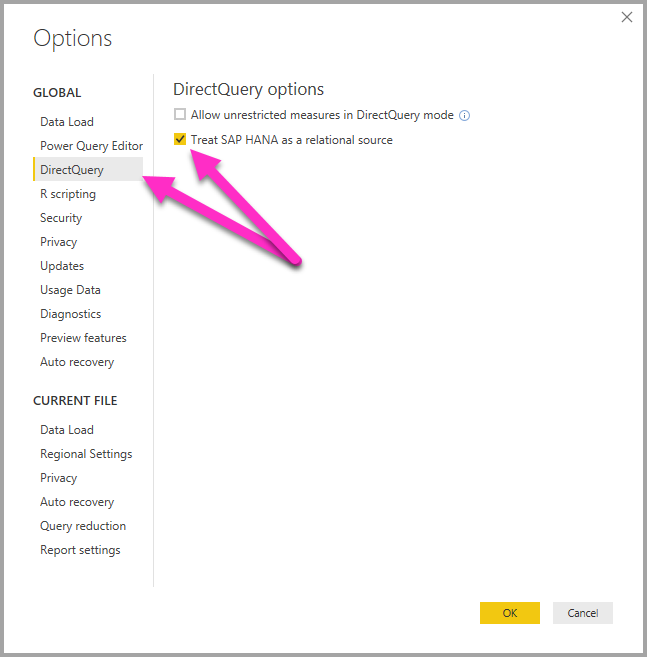
Please go to File > Options and settings ->Options > DirectQuery, then select the option "Treat SAP HANA as a relational source". After you create Power BI report with this option, you can make a copy of PBIX file and change connection to views.
directquery-sap-hana_01a.png


Regards,
Lydia

View solution in original post

2 REPLIES 2
Anonymous
Not applicable

@bselby,

Please go to File > Options and settings ->Options > DirectQuery, then select the option "Treat SAP HANA as a relational source". After you create Power BI report with this option, you can make a copy of PBIX file and change connection to views.
directquery-sap-hana_01a.png


Regards,
Lydia

Thank you for your help Lydia, I wasn't aware of that setting.

Helpful resources

Announcements
FabCon and SQLCon Barcelona 2026

FabCon & SQLCon – Barcelona 2026

Join us in Barcelona for FabCon and SQLCon, the Fabric, Power BI, SQL, and AI community event. Save €200 with code FABCMTY200.

60 days of Data Days Carousel

Data Days 2026

Join Data Days 2026: 60 days of free live/on-demand sessions, challenges, study groups, and certification opportunities.

Power BI DataViz World Championships carousel

Power BI DataViz World Championships - June 2026

A new Power BI DataViz World Championship is coming this June! Don't miss out on submitting your entry.