cancel
Showing results for 
Search instead for 
Did you mean: 

The Power BI Data Visualization World Championships is back! Get ahead of the game and start preparing now! Learn more

Reply
bselby
Frequent Visitor

Direct Query - SAP HANA Database

Good afternoon,


I have a question about the Direct Query mode of the SAP HANA Database connection.


Creating and using the connection in the first instance works perfectly - I can connect to Calculation Views stored on our HANA databases, design dashboards and publish them.


My issue is that once that initial connection is made, it cannot be changed or edited. This is a massive burden when trying to replicate the same dashboard across multiple databases, because the layout has to be built from scratch again in a new dashboard with a new connection.


As an example, we have a sales dashboard looking at a Calc. View for our Australian database. We'd like the same dashboard for our New Zealand database. I'd expect to be able to create a copy of the dashboard file and change the connection to look at the New Zealand Calc. View, especially because all the fields are the same. Unfortunately, I can't find a way to do this.


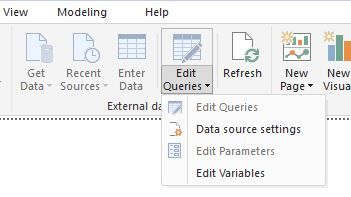
Does anybody have a solution? Data Source Settings only allows me to change the connection credentials.


HANA Direct Query Power BI.JPG


1 ACCEPTED SOLUTION
Anonymous
Not applicable

@bselby,

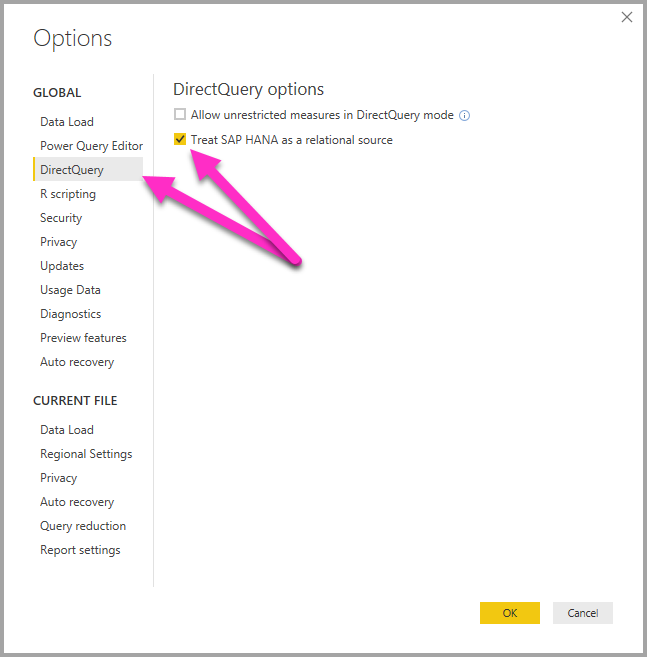
Please go to File > Options and settings ->Options > DirectQuery, then select the option "Treat SAP HANA as a relational source". After you create Power BI report with this option, you can make a copy of PBIX file and change connection to views.
directquery-sap-hana_01a.png


Regards,
Lydia

View solution in original post

2 REPLIES 2
Anonymous
Not applicable

@bselby,

Please go to File > Options and settings ->Options > DirectQuery, then select the option "Treat SAP HANA as a relational source". After you create Power BI report with this option, you can make a copy of PBIX file and change connection to views.
directquery-sap-hana_01a.png


Regards,
Lydia

Thank you for your help Lydia, I wasn't aware of that setting.

Helpful resources

Announcements
Power BI DataViz World Championships

Power BI Dataviz World Championships

The Power BI Data Visualization World Championships is back! Get ahead of the game and start preparing now!

December 2025 Power BI Update Carousel

Power BI Monthly Update - December 2025

Check out the December 2025 Power BI Holiday Recap!

FabCon Atlanta 2026 carousel

FabCon Atlanta 2026

Join us at FabCon Atlanta, March 16-20, for the ultimate Fabric, Power BI, AI and SQL community-led event. Save $200 with code FABCOMM.