This is best Fabric, Power BI, SQL and AI community event. How do we know? The last event sold out! Save €200 with code FABCMTY200.
Register nowThe Fabric community is upgrading! Read all of the details including the timeline and what you can expect. Learn more
Any idea how to delete these datasets? I can not find any options anywhere. Thereagain I am a newbie....
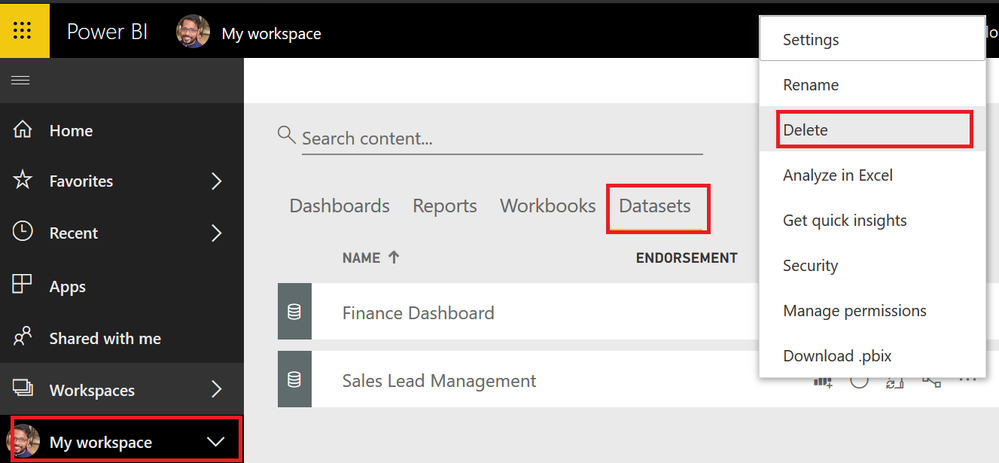
Click My Workspace > DataSets > Click on the elipses on the dataset you want to delete
Rgds,
Vivek
If this post helps, then please consider Accept it as the solution to help the other members find it more quickly.
Thanks for the response, though they're not listed in the main pane of the datasets, only at the side. Weird (though I am a newbie 😄 )
Hover your mouse over the dataset that you want to delete. Ellipses (...) should appear to the right of the dataset name. Click the ellipses and select "Remove" from the fly-out menu.
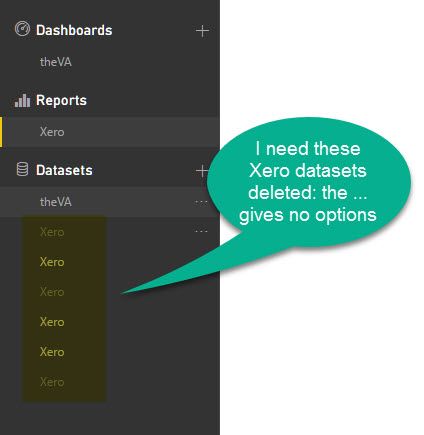
How do I delete a dataset when the ... gives no optionts to do so?
Do you get any options at all?
Hi @Greg_Deckler ,
I'm trying to remove datasets which I now longer have access to, though I don't have the option to do so (see below) and they don't appear in the dataset view.
Any thoughts upon how I could delete them please? It's not mission critical, they're just in the way!
Thanks in advance.
Join us in Barcelona for FabCon and SQLCon, the Fabric, Power BI, SQL, and AI community event. Save €200 with code FABCMTY200.