Don't miss your chance to take the Fabric Data Engineer (DP-600) exam for FREE! Find out how by attending the DP-600 session on April 23rd (pacific time), live or on-demand.
Learn moreNext up in the FabCon + SQLCon recap series: The roadmap for Microsoft SQL and Maximizing Developer experiences in Fabric. All sessions are available on-demand after the live show. Register now
Any idea how to delete these datasets? I can not find any options anywhere. Thereagain I am a newbie....
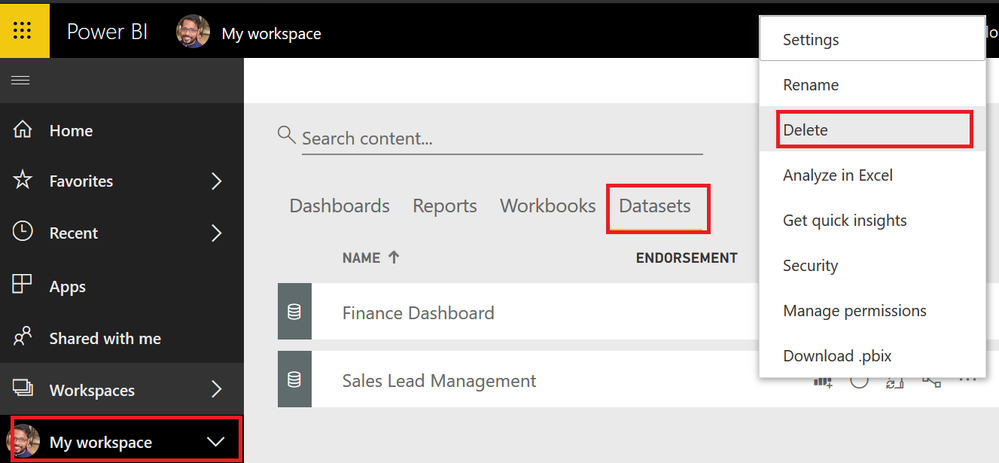
Click My Workspace > DataSets > Click on the elipses on the dataset you want to delete
Rgds,
Vivek
If this post helps, then please consider Accept it as the solution to help the other members find it more quickly.
Thanks for the response, though they're not listed in the main pane of the datasets, only at the side. Weird (though I am a newbie 😄 )
Hover your mouse over the dataset that you want to delete. Ellipses (...) should appear to the right of the dataset name. Click the ellipses and select "Remove" from the fly-out menu.
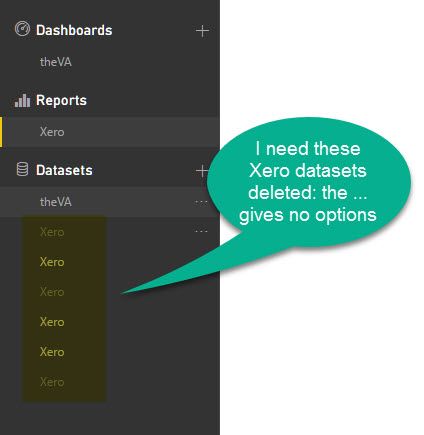
How do I delete a dataset when the ... gives no optionts to do so?
Do you get any options at all?
Hi @Greg_Deckler ,
I'm trying to remove datasets which I now longer have access to, though I don't have the option to do so (see below) and they don't appear in the dataset view.
Any thoughts upon how I could delete them please? It's not mission critical, they're just in the way!
Thanks in advance.
If you have recently started exploring Fabric, we'd love to hear how it's going. Your feedback can help with product improvements.
A new Power BI DataViz World Championship is coming this June! Don't miss out on submitting your entry.
Share feedback directly with Fabric product managers, participate in targeted research studies and influence the Fabric roadmap.
| User | Count |
|---|---|
| 6 | |
| 3 | |
| 3 | |
| 3 | |
| 2 |