Get Fabric or SQL Certified for Free.
Get certified for free when you join Fabric Data Days 2026 and dive into Fabric, Power BI, SQL, AI, and other essential data skills.
Join now- Power BI forums
- Get Help with Power BI
- Desktop
- Service
- Report Server
- Power Query
- Mobile Apps
- Developer
- DAX Commands and Tips
- Custom Visuals Development Discussion
- Health and Life Sciences
- Power BI Spanish forums
- Translated Spanish Desktop
- Training and Consulting
- Instructor Led Training
- Dashboard in a Day for Women, by Women
- Galleries
- Data Stories Gallery
- Themes Gallery
- Contests Gallery
- QuickViz Gallery
- Quick Measures Gallery
- Visual Calculations Gallery
- Notebook Gallery
- Translytical Task Flow Gallery
- TMDL Gallery
- R Script Showcase
- Webinars and Video Gallery
- Ideas
- Custom Visuals Ideas (read-only)
- Issues
- Issues
- Events
- Upcoming Events
Data Days is here! Join us now for 60+ days of learning, challenges, and connection. Learn more
- Power BI forums
- Forums
- Get Help with Power BI
- Power Query
- Re: Debugging bulk type change
- Subscribe to RSS Feed
- Mark Topic as New
- Mark Topic as Read
- Float this Topic for Current User
- Bookmark
- Subscribe
- Printer Friendly Page


- Mark as New
- Bookmark
- Subscribe
- Mute
- Subscribe to RSS Feed
- Permalink
- Report Inappropriate Content
Debugging bulk type change
My data source looks like this

I want to perform a bulk change of data type for all columns with the following condition
try Number.FromText(columns) otherwise 0
I tried like this
let
    src=Table.FromRows(Json.Document(Binary.Decompress(Binary.FromText("LczBDQAhCETRXjjPJgIqUIux/zYW0Rtv8sNa5ODpBOIGGUYbOYWdASyzLODecxHM0FfEK6IcOq6tlxWu52mH8y20cVrNS1/eH+39Aw==", BinaryEncoding.Base64), Compression.Deflate)), let _t = ((type nullable text) meta [Serialized.Text = true]) in type table [jan = _t, feb = _t]),
    ct = Table.TransformColumnTypes(src,{{"jan", type text}, {"feb", type text}}),
    cols = Table.ColumnNames(ct),
    def = List.Transform(cols, each{_, (x)=> try Number.FromText(x) otherwise 0, type number } ),
    Custom1 = Table.TransformColumnTypes(ct,def)
in
    Custom1
But it did not work. I am getting the following error

@AlexisOlson @ImkeF @wdx223_Daniel @Anonymous @CNENFRNL
Thank you in advance.
========================
Did I answer your question? Mark my post as a solution!
Proud to be a Super User
My Custom Visualization Projects
• Plotting Live Sound: Live Sound
• Beautiful News: Women in Parliament, Energy Mix, Shrinking Armies
• Visual Capitalist: Working Hrs
• Others: Easing Graph, Animated Calendar
MayViz Submissions
• Week 1: View
• Week 2: View
• Week 3: View
• Week 4: View
========================
Solved! Go to Solution.


- Mark as New
- Bookmark
- Subscribe
- Mute
- Subscribe to RSS Feed
- Permalink
- Report Inappropriate Content
Use Table.TransformColumns instead of Table.TransformColumnTypes in your last line.
Here's how you can do the unpivoted version.
let
    src=Table.FromRows(Json.Document(Binary.Decompress(Binary.FromText("LczBDQAhCETRXjjPJgIqUIux/zYW0Rtv8sNa5ODpBOIGGUYbOYWdASyzLODecxHM0FfEK6IcOq6tlxWu52mH8y20cVrNS1/eH+39Aw==", BinaryEncoding.Base64), Compression.Deflate)), let _t = ((type nullable text) meta [Serialized.Text = true]) in type table [jan = _t, feb = _t]),
    ct = Table.TransformColumnTypes(src,{{"jan", type text}, {"feb", type text}}),
    #"Unpivoted Columns" = Table.UnpivotOtherColumns(ct, {}, "Attribute", "Value"),
    #"Replaced Value" = Table.ReplaceValue(#"Unpivoted Columns", each [Value], each try Number.FromText([Value]) otherwise 0, Replacer.ReplaceValue, {"Value"}),
    #"Changed Type" = Table.TransformColumnTypes(#"Replaced Value", {{"Value", Int64.Type}})
in
    #"Changed Type"
- Mark as New
- Bookmark
- Subscribe
- Mute
- Subscribe to RSS Feed
- Permalink
- Report Inappropriate Content
try this code in a new step
NewStep=Table.TransformColumns(PreviousStepName,{},each try Number.From(_) otherwise 0)
- Mark as New
- Bookmark
- Subscribe
- Mute
- Subscribe to RSS Feed
- Permalink
- Report Inappropriate Content
Use Table.TransformColumns instead of Table.TransformColumnTypes in your last line.
Here's how you can do the unpivoted version.
let
    src=Table.FromRows(Json.Document(Binary.Decompress(Binary.FromText("LczBDQAhCETRXjjPJgIqUIux/zYW0Rtv8sNa5ODpBOIGGUYbOYWdASyzLODecxHM0FfEK6IcOq6tlxWu52mH8y20cVrNS1/eH+39Aw==", BinaryEncoding.Base64), Compression.Deflate)), let _t = ((type nullable text) meta [Serialized.Text = true]) in type table [jan = _t, feb = _t]),
    ct = Table.TransformColumnTypes(src,{{"jan", type text}, {"feb", type text}}),
    #"Unpivoted Columns" = Table.UnpivotOtherColumns(ct, {}, "Attribute", "Value"),
    #"Replaced Value" = Table.ReplaceValue(#"Unpivoted Columns", each [Value], each try Number.FromText([Value]) otherwise 0, Replacer.ReplaceValue, {"Value"}),
    #"Changed Type" = Table.TransformColumnTypes(#"Replaced Value", {{"Value", Int64.Type}})
in
#"Changed Type"- Mark as New
- Bookmark
- Subscribe
- Mute
- Subscribe to RSS Feed
- Permalink
- Report Inappropriate Content
Thanks @AlexisOlson @wdx223_Daniel
========================
Did I answer your question? Mark my post as a solution!
Proud to be a Super User
My Custom Visualization Projects
• Plotting Live Sound: Live Sound
• Beautiful News: Women in Parliament, Energy Mix, Shrinking Armies
• Visual Capitalist: Working Hrs
• Others: Easing Graph, Animated Calendar
MayViz Submissions
• Week 1: View
• Week 2: View
• Week 3: View
• Week 4: View
========================

- Mark as New
- Bookmark
- Subscribe
- Mute
- Subscribe to RSS Feed
- Permalink
- Report Inappropriate Content
- Mark as New
- Bookmark
- Subscribe
- Mute
- Subscribe to RSS Feed
- Permalink
- Report Inappropriate Content
@AntrikshSharma because the data is horrible and it may look like this. I need the data engineering to be done accurately.
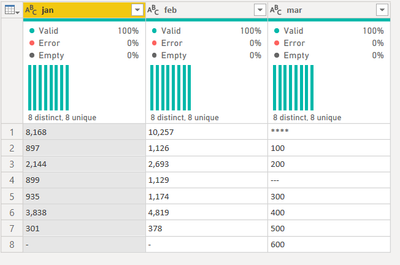
I guess I can do this but the question at this point will be how do I use to replace the content of the value column conditionally
try Number.From([Value]) otherwise 0 in this column
let
    src=Table.FromRows(Json.Document(Binary.Decompress(Binary.FromText("NY3LDcAgDEN34VgZiRA+ySyI/ddoTCkScvzswFrJIMMSkhTUPmN44qSNSJxWIHWcvBxaIa2Frxiu1MvN/bapOedDXftHJ3f0dhWm/LPBhO328yJsTWb9sszX4g76/QI=", BinaryEncoding.Base64), Compression.Deflate)), let _t = ((type nullable text) meta [Serialized.Text = true]) in type table [jan = _t, feb = _t, mar = _t]),
    #"Added Index" = Table.AddIndexColumn(src, "Index", 1, 1, Int64.Type),
    #"Unpivoted Other Columns" = Table.UnpivotOtherColumns(#"Added Index", {"Index"}, "Attribute", "Value")
in
    #"Unpivoted Other Columns"

I know I can create a conditional column but I am just curious how to use try statement in Table.Replace
========================
Did I answer your question? Mark my post as a solution!
Proud to be a Super User
My Custom Visualization Projects
• Plotting Live Sound: Live Sound
• Beautiful News: Women in Parliament, Energy Mix, Shrinking Armies
• Visual Capitalist: Working Hrs
• Others: Easing Graph, Animated Calendar
MayViz Submissions
• Week 1: View
• Week 2: View
• Week 3: View
• Week 4: View
========================

Helpful resources

Fabric Data Days 2026
Don't miss out on Data Days, June 15 through August 7. Learn Fabric, Power BI, SQL, AI and more.

Power BI Monthly Update - May 2026
Check out the May 2026 Power BI update to learn about new features.

Power BI DataViz World Championships - June 2026
A new Power BI DataViz World Championship is coming this June! Don't miss out on submitting your entry.

| User | Count |
|---|---|
| 4 | |
| 4 | |
| 3 | |
| 2 | |
| 1 |


| User | Count |
|---|---|
| 11 | |
| 11 | |
| 5 | |
| 4 | |
| 4 |


