
Don't miss your chance to take the Fabric Data Engineer (DP-600) exam for FREE! Find out how by attending the DP-600 session on April 23rd (pacific time), live or on-demand.
Learn moreJoin the FabCon + SQLCon recap series. Up next: Power BI, Real-Time Intelligence, IQ and AI, and Data Factory take center stage. All sessions are available on-demand after the live show. Register now
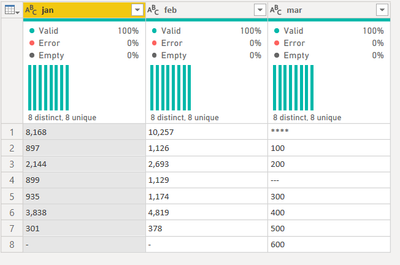
My data source looks like this
I want to perform a bulk change of data type for all columns with the following condition
try Number.FromText(columns) otherwise 0
I tried like this
let
src=Table.FromRows(Json.Document(Binary.Decompress(Binary.FromText("LczBDQAhCETRXjjPJgIqUIux/zYW0Rtv8sNa5ODpBOIGGUYbOYWdASyzLODecxHM0FfEK6IcOq6tlxWu52mH8y20cVrNS1/eH+39Aw==", BinaryEncoding.Base64), Compression.Deflate)), let _t = ((type nullable text) meta [Serialized.Text = true]) in type table [jan = _t, feb = _t]),
ct = Table.TransformColumnTypes(src,{{"jan", type text}, {"feb", type text}}),
cols = Table.ColumnNames(ct),
def = List.Transform(cols, each{_, (x)=> try Number.FromText(x) otherwise 0, type number } ),
Custom1 = Table.TransformColumnTypes(ct,def)
in
Custom1
But it did not work. I am getting the following error
@AlexisOlson @ImkeF @wdx223_Daniel @Anonymous @CNENFRNL
Thank you in advance.
Solved! Go to Solution.
Use Table.TransformColumns instead of Table.TransformColumnTypes in your last line.
Here's how you can do the unpivoted version.
let
src=Table.FromRows(Json.Document(Binary.Decompress(Binary.FromText("LczBDQAhCETRXjjPJgIqUIux/zYW0Rtv8sNa5ODpBOIGGUYbOYWdASyzLODecxHM0FfEK6IcOq6tlxWu52mH8y20cVrNS1/eH+39Aw==", BinaryEncoding.Base64), Compression.Deflate)), let _t = ((type nullable text) meta [Serialized.Text = true]) in type table [jan = _t, feb = _t]),
ct = Table.TransformColumnTypes(src,{{"jan", type text}, {"feb", type text}}),
#"Unpivoted Columns" = Table.UnpivotOtherColumns(ct, {}, "Attribute", "Value"),
#"Replaced Value" = Table.ReplaceValue(#"Unpivoted Columns", each [Value], each try Number.FromText([Value]) otherwise 0, Replacer.ReplaceValue, {"Value"}),
#"Changed Type" = Table.TransformColumnTypes(#"Replaced Value", {{"Value", Int64.Type}})
in
#"Changed Type"
try this code in a new step
NewStep=Table.TransformColumns(PreviousStepName,{},each try Number.From(_) otherwise 0)
Use Table.TransformColumns instead of Table.TransformColumnTypes in your last line.
Here's how you can do the unpivoted version.
let
src=Table.FromRows(Json.Document(Binary.Decompress(Binary.FromText("LczBDQAhCETRXjjPJgIqUIux/zYW0Rtv8sNa5ODpBOIGGUYbOYWdASyzLODecxHM0FfEK6IcOq6tlxWu52mH8y20cVrNS1/eH+39Aw==", BinaryEncoding.Base64), Compression.Deflate)), let _t = ((type nullable text) meta [Serialized.Text = true]) in type table [jan = _t, feb = _t]),
ct = Table.TransformColumnTypes(src,{{"jan", type text}, {"feb", type text}}),
#"Unpivoted Columns" = Table.UnpivotOtherColumns(ct, {}, "Attribute", "Value"),
#"Replaced Value" = Table.ReplaceValue(#"Unpivoted Columns", each [Value], each try Number.FromText([Value]) otherwise 0, Replacer.ReplaceValue, {"Value"}),
#"Changed Type" = Table.TransformColumnTypes(#"Replaced Value", {{"Value", Int64.Type}})
in
#"Changed Type"
Thanks @AlexisOlson @wdx223_Daniel
@AntrikshSharma because the data is horrible and it may look like this. I need the data engineering to be done accurately.
I guess I can do this but the question at this point will be how do I use to replace the content of the value column conditionally
try Number.From([Value]) otherwise 0 in this column
let
src=Table.FromRows(Json.Document(Binary.Decompress(Binary.FromText("NY3LDcAgDEN34VgZiRA+ySyI/ddoTCkScvzswFrJIMMSkhTUPmN44qSNSJxWIHWcvBxaIa2Frxiu1MvN/bapOedDXftHJ3f0dhWm/LPBhO328yJsTWb9sszX4g76/QI=", BinaryEncoding.Base64), Compression.Deflate)), let _t = ((type nullable text) meta [Serialized.Text = true]) in type table [jan = _t, feb = _t, mar = _t]),
#"Added Index" = Table.AddIndexColumn(src, "Index", 1, 1, Int64.Type),
#"Unpivoted Other Columns" = Table.UnpivotOtherColumns(#"Added Index", {"Index"}, "Attribute", "Value")
in
#"Unpivoted Other Columns"
I know I can create a conditional column but I am just curious how to use try statement in Table.Replace
Check out the April 2026 Power BI update to learn about new features.
If you have recently started exploring Fabric, we'd love to hear how it's going. Your feedback can help with product improvements.
A new Power BI DataViz World Championship is coming this June! Don't miss out on submitting your entry.
| User | Count |
|---|---|
| 5 | |
| 3 | |
| 3 | |
| 3 | |
| 2 |
| User | Count |
|---|---|
| 7 | |
| 5 | |
| 5 | |
| 5 | |
| 4 |